Open topic with navigation
Channel Configuration Pane
The following configuration settings are available in this pane.
Note: The specific features and functionality available in BenchVue will vary depending on the instrument and model number. Some of the parameters and functionality described here might not be available for your particular instrument. The bench application will show only those parameters, and parameter ranges, available for your particular instrument. Although the specific configuration properties vary by the DAQ model number, the primary elements of the bench application will be the same. In this case, the U2356A model is used as an example in the following description.
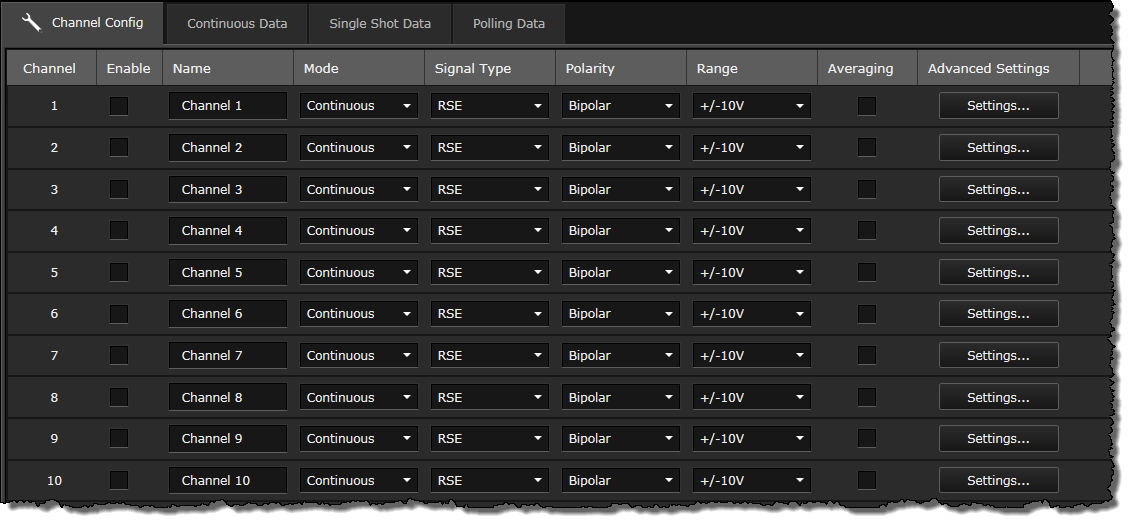
Channel Setup
Use the Channel Config tab to configure the following channel settings.
- Enable - Select the desired channels to enable for your AI acquisition.
- Name - Edit the channel name.
- Mode - Select the desired AI signal acquisition mode (continuous, single shot, or polling). Refer to Acquisition Mode Data Display for details.
- Signal Type - Select the desired single-ended or differential signal type (DIFF: Differential, NRSE: Non Referenced Single-Ended, or RSE: Referenced Single-Ended).
- Polarity - Select the bipolar or unipolar polarity option.
- Range - Select the desired range.
- Averaging - Select to enable averaging for the value of each data block during the AI acquisition.
- Advanced Settings - Click Settings to configure scaling parameters for the acquired signals in order to achieve a better resolution and to linearize the graph display. By default, scaling parameters for the voltage measurement are displayed. Select the checkbox of each parameter to set the values accordingly. If you set the U2802A thermocouple input device for Signal Conditioning in the Device Properties pane, additional thermocouple measurement configuration will be available. Refer to General and Acquisition Setup Panes for details.
Note: The U2802A device option is only applicable for the U2355A and U2356A models.
The following buttons below the table allows you to perform quick channel configuration.
- Enable All - Select and enable all channels.
- Disable All - Deselect and disable all selected channels.
- Duplicate Channel Settings - Configure the channel settings and apply them to all selected channels.
- Duplicate Scaling Settings - Configure the scaling parameters and apply them to all selected channels.