The BenchVue application uses Keysight Connection Expert, which is part of the Keysight IO Libraries Suite, to automatically configure your instrument IO and populate the BenchVue Instrument Panel. Connection Expert displays the status of your instruments as determined by the Keysight Instrument Discovery Service, which loads whenever your computer is running with IO Libraries Suite installed. Most instruments are automatically discovered by the Instrument Discovery Service and you will see those instruments in the BenchVue Instrument Panel. In some cases, however, you may need to launch Connection Expert to manually add an instrument to your configuration.
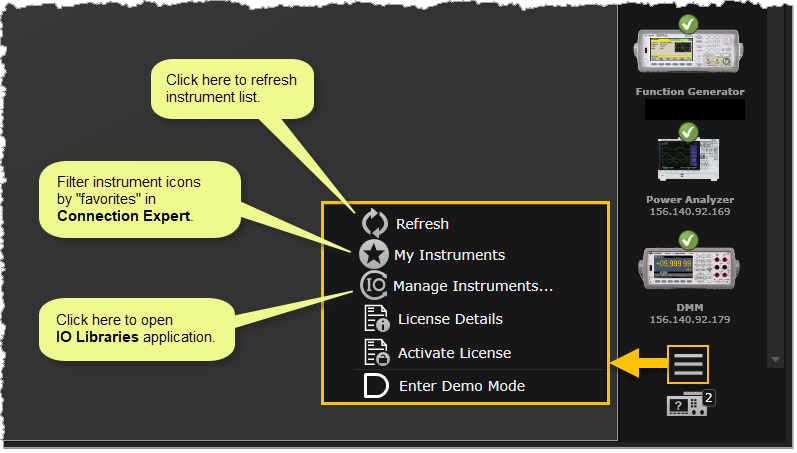
If an instrument you are expecting to see is not shown in the BenchVue Instrument Panel, launch Connection Expert to manually add that instrument to your configuration – usually for serial (RS-232) instruments and LAN instruments that are not on your local subnet or are older LAN-based instruments. Note that if one of your instruments was discovered at an earlier time but communication can no longer be established with that instrument, it will not be shown in Connection Expert. In most cases, this means that the instrument has been disconnected or turned off. If you are experiencing connection issues with an instrument, be sure to verify that the instrument is turned on and is properly connected to the selected interface. Then try refreshing the instrument list in BenchVue by clicking the Refresh button at the bottom right corner of the Instrument Panel.
For more information on troubleshooting connectivity issues, see "Troubleshoot Instrument Connections" in the main BenchVue Help.
If you are filtering the list of instruments in BenchVue using "favorites", make sure that the instrument you are looking for is selected as a "favorite" in Connection Expert.
Click the Favorite Instruments button to toggle the list of "favorite" instruments on or off. Favorites are those instruments that you plan to use frequently and you have marked them with a gold star  in Connection Expert. From BenchVue, a blue star
  indicates that the instrument list is currently being filtered based on the selected "favorites"; a gray star
  indicates that all discovered instruments are currently shown in the instrument list.
When an instrument is added to the Instruments view as a "favorite" in Connection Expert:
Note: For more information on using Connection Expert, see the Connection Expert Help.
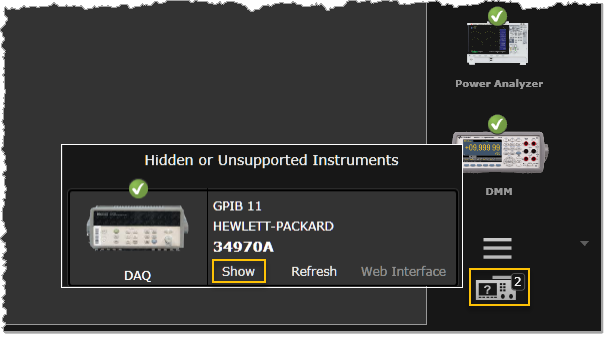
Make sure that the instrument that you are looking for is not set to Hide.
To view the current status of Hidden or Unsupported instruments, click  at the bottom right corner of the Instrument Panel. To enable a Hidden instrument, click the icon and select the Show button.