To evaluate a BenchVue application for a free 30-day trial period, go to the BenchVue Apps tab, click once on the desired application, and then click on the "Start Trial" button – the trial period represents the number of calendar days remaining. After the trial period expires, you will be required to purchase a software license for that application.
As described below, Keysight's flexible licensing options allow you to select the license type and license term that best fit your specific test needs, project schedules, and budget requirements.
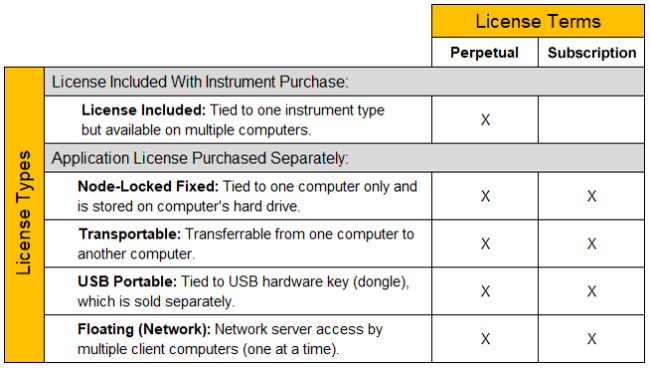
Select from the following license types depending on whether you want to install the software license on a single computer, be able to transfer the license between computers, or make licenses available to multiple users over a network server.
Select from the following licensing terms of use depending on whether you want to have unlimited (perpetual) access to the license or limited (subscription) access to the license as a more economical option.
Note: The time-bound aspects of the Perpetual license (license does not expire) and the subscription license (license expires after limited time) start at the time you add the software order to your Keysight Software Manager profile (see details below).
To obtain a software license for a BenchVue application, follow the procedure below. If you want to purchase a software license for network-based "floating" licensing, see Network License Administration Guide.
Once you have redeemed your software license, you will receive an e-mail from Keysight with a software license file (*.lic) attached. If you are unable to install your software license file using the standard procedure outlined above (not common), you can manually install the license file on your computer. For more information, see Manually Installing a Software License to install the license file and activate the software license on your computer.
Note: The time-bound aspects of the Perpetual license (license does not expire) and the Subscription Basedlicense (license expires after limited time) start at the time you add the software order to your KSM profile.
If you have purchased a transportable license, you can transfer that license from one computer to another computer. Use the Keysight Software Manager (KSM) to save the existing transportable license for later re-assignment to a different computer. To save the license, follow the procedure below.