Connecting to an Instrument
When you use Interactive IO, the first thing you have to do is connect to an instrument by selecting Connect ... from the toolbar or the Connect menu.
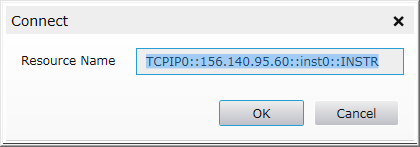
The Connect screen for a LAN instrument (Windows is shown; Linux functionality is the same):
Connection Strings (Resource Names)
A connection string consists of interface name and number, address, and, optionally INSTR. In the examples below, items in brackets are optional.
GPIB[board]::primary address[::secondary address][::INSTR]
ASRL[board]::[INSTR]
TCPIP[board]::host address[::LAN device name]::[INSTR]

If you are connecting to a serial instrument, start Keysight Connection Expert, make sure the port is there, change the settings as needed, close Connection Expert and re-start Interactive IO.
Other examples of these connection strings (Resource Names):
GPIB0::22
|
|
TCPIP0::jetscrm3::gpib0,22::INSTR |
Keysight E5810A LAN/GPIB Gateway |
TCPIP::portal6::hpib,10 |
E2050 LAN/HP-IB Gateway |
USB0::2391::1031::0000000123::0::INSTR
|
As you can see, the USB connection string is quite long. However, you can use Connection Expert to assign aliases to make working with these instruments simpler.