Power level accuracy is the difference between the power level indicated by the device under test (PDUT), and the true power delivered by the DUT (PgZ0).
PLAdB = PgZ0- PDUT
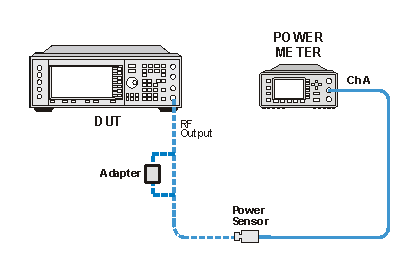
Direct absolute power measurements are made with a power meter down to –45 dBm. The measurement at –45 dBm is used as a reference for all lower power level measurements.
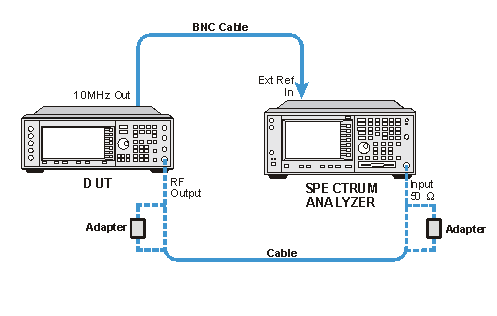
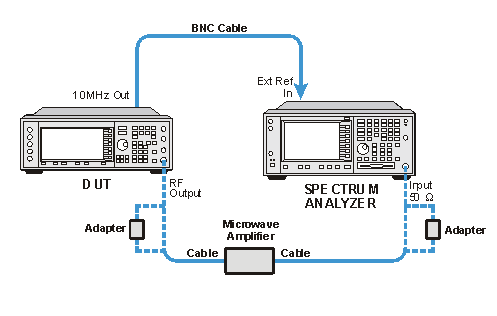
A PSA is used for all low power measurements. The PSA is setup to read the –45 dBm power level and the marker is set to Marker Delta mode with the delta of 0. The DUT is stepped down in amplitude in 5 dB steps and the delta Marker is read. For power levels < –45 dBm, the PSA internal amplifier (Option 1DS) is turned on for frequencies < 2850 MHz. For frequencies ≥ 2850 MHz, an external amplifier is used. The actual absolute power level PgZ0 is the sum of the –45 dBm power meter measurement and the Delta Marker reading. The number of averages is increased as the signal level is decreased. This is to ensure at least a 25 dB signal to noise floor ratio at all signal levels.
|
|
For frequencies >2850 MHz, a YIG Filter cal is used to minimize any error contributed by the PSA YIG filter. This YIG filter calibration must be run prior to running this performance test. However, because the data is stored, it only needs to be run once for PSA used in the test. This calibration is found in the Utilities Test Plan. |
|
Instrument |
Critical Specifications for This Test |
Recommended Model1 |
|---|---|---|
|
Power Meter |
None |
N1914A2 |
|
Power Sensor |
None |
E9304A |
|
Microwave Amplifier |
None |
83006A (0.01 to 26.5 GHz) 83050A (2 to 50 GHz) |
|
Spectrum Analyzer |
None |
E444xA3 Opt 1DS, 1234 |
|
Connections and Setup Procedures
|
|
All test equipment requires a 30 minute warm-up
period to ensure accurate performance. Power level measurements are made at extremely low power levels. Results may be affected by unrelated low level signals picked up by the PSA. These could be the result of RF leakage within the device under test or external signals that are at the same tested frequencies. To protect against errors at low power levels, take the following precautions:
At low power levels, residual spurs from adjacent instruments can cause the DUT to fail the test. Therefore, the instruments must be adequately separated from one another. Do not place one device on top of another. If the test fails at very low power levels, offset all frequencies by +25 Hz or –25 Hz and manually verify. This will shift the test frequency away from possible residual responses. |
Connect all test equipment as shown.
Connect GPIB cables to all GPIB-controlled test equipment.
While performing this test, follow all instructions on the controller display.
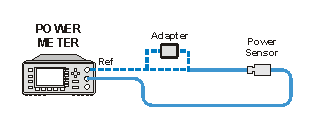
Power Sensor Calibration
Power Meter Measurements (Maximum Power to −45 dBm)
Power Level Accuracy (−50 to −127 dBm, frequency < 2850 MHz) Performance Test Setup
Power level accuracy (-50 dBm to -127 dBm, Frequency ≥ 2850 MHz) Performance Test Setup
In Case of Difficulty
Sometimes noise from nearby test equipment can affect low-level measurements. Errors may be caused even if the power meter is stacked on top of the spectrum analyzer.
Inspect all RF cables. If semi-rigid cables are used, check for cracks in the shielding or at the connectors. RF leakage to/from the cables generally cause problems at higher frequencies (>2 GHz) and low power levels (<-100 dBm).
Verify that the spectrum analyzer does not have a residual spur at the frequency being measured. Sometimes a spur will limit how low in power the spectrum analyzer can measure.
Make sure that all test equipment is using the same power outlet. Ground loops can cause problems at low power levels. This type of problem will most likely show up at lower frequencies.
Make sure all covers on the DUT are secure and that all screws are in place.
Verify the amplifier being used meets its gain specifications.
Make sure all connections in the measurement system are torqued properly. Loose or damaged connections result in RF leakage and errors result at low power levels.
Make sure all test equipment (including the amplifier) has been turned on at least 30 minutes.