Single-Sideband Phase Noise (Manual Performance Test)

ESG AP and DP Only

This manual test verifies that the signal generator's single-sideband phase noise meets specifications.

During this test, a phase noise system is used to measure the single-sideband phase noise of the signal generator. A Keysight 8665B or PSG signal generator (reference source) is used to produce reference frequencies for 500 MHz, 1 GHz, 2 GHz, 3 GHz, and 4 GHz. The phase noise is measured at 20 kHz offsets and compared to specifications.

Required Test Equipment

Instrument

Critical Specifications for This Test

Recommended Model1

Phase Noise System

Input: APC 3.5 (m)

E5502B Option 001

Reference Source

Output: Type-N (f),
APC 3.5 (m), 2.4 mm (m)

8665B with Option 004 or
E82xxA/C/D Options UNJ, UNX, or UNR, or UNY, and 1EA

Cable

APC 3.5 (m) to (m)

8120-4921

Cable

Type-N (m) to (m)

11500C

Cable

BNC (m) to (m)

8120-1840
or 10503A

Adapter

BNC Tee (m) (f) (f)

E9625A

Adapter

2.4 mm (f) to APC 3.5 (m)

11901D

Adapter

APC 3.5 (f) to (f)

1250-1749

  1. Refer to the main equipment list for alternate models.

Connections and Setup Procedures

  • All test equipment requires a 30 minute warm-up period to ensure accurate performance.
  • In the following test setup, direct cable and adapter connections are designated as solid lines. Changeable cable and adapter connections are designated as dashed lines.
  • Connect all test equipment as shown.
  • Connect GPIB cables to all GPIB-controlled test equipment.
  • While performing this test, follow all instructions on the controller display.
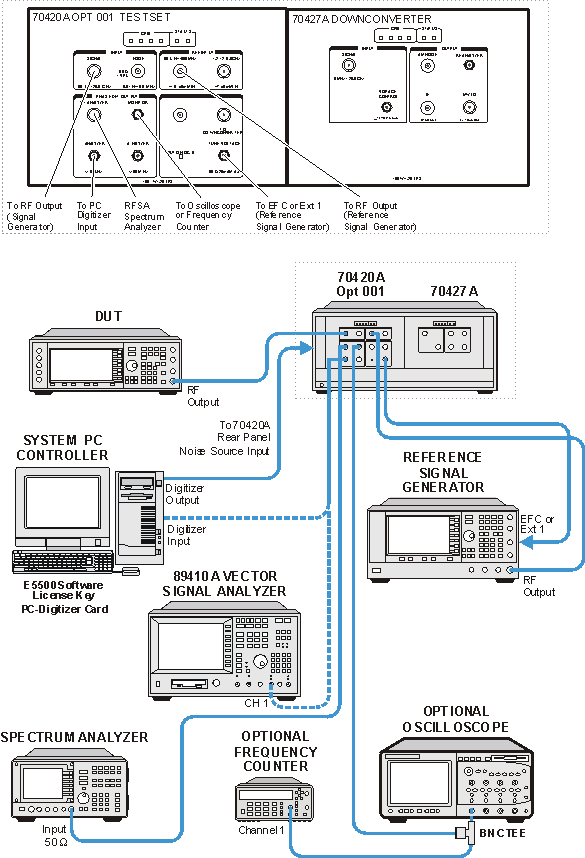
 

Connections and Setup Procedures for a
500 MHz Single-Sideband Phase Noise Measurement


Setup with a carrier frequency of 500 MHz

  1. Connect all test equipment as shown.

  2. Connect GPIB cables to all GPIB-controlled test equipment.

  3. Preset all test equipment and the signal generator.

  4. Connect the 8665B/E82XXX RF output to the 70420A 50 kHz to 1600 MHz reference input.

  5. Connect the 70420A Tune Voltage Output to the 8665B FM input or the E82XXX Ext 1 input.


Table 1: ESG-B Carrier Test Frequencies and Power

Frequency (MHz)

DUT Power (dBm)

Reference Power (dBm)

500

14

12

1000

14

12

2000

10

5

3000

10

5

4000

10

5

  1. In the E5502B Option 001 Phase Noise System user interface, change the following parameters:

    1. Select the View pull down menu.

    2. Select Display Preferences and clear the Spurs box.

    3. Select OK to close Display Preferences.

    4. From the Define pull down menu, select Measurement, and set the following:

Parameter

Setting


Type and Range Tab

Measurement Type

Absolute phase noise

Start Offset Frequency

1 Hz

Stop Offset Frequency

1 Hz

FFT Averages

4

FFT Quality

Normal

Swept Quality

Normal


Sources Tab

Carrier Source Connected

Test Set

Carrier Source Frequency

See Table 1.

Carrier Source Power

See Table 1.

Detector Input Frequency

See Table 1.

Reference Source Power

See Table 1.

VCO Tune Constant

10,000 Hz/Volt

VCO Tune Range

5 volts

VCO Input Resistance

50 ohms for PSG, 600 ohms for 8665B


Cal Tab

Measure Phase Detector Constant

Checkmark

Measure VCO Tune Constant

Checkmark

Verify calculated phase lock loop suppression

Blank

Phase Lock Loop Suppression

Use theoretical value.


Block Diagram Tab

Carrier Source

Manual

Down Converter

None

Reference Source

E82XXA/C/D with Option UNJ or UNR or UNX or 8665B with Option 004

Phase Detector Mode

Automatic

Test Set Tune Voltage Destination

Reference Source

VCO Tune Mode

DCFM


Test Set Tab

Input Attenuation

0 dB

LNA Low Pass Filter

Auto

LNA Gain

Auto

PLL Integrator Attenuation

0 dB


Downconverter Tab

Input Attenuation

Auto

IF Gain

Auto

Microwave/Millimeter Band

Microwave (0 to 26.5 GHz)

Reference Chain Reference

10 MHz

External Tune Enable

Blank


Graph Tab

Title

User specific

Graph Type

Single-sideband phase noise (dBc/Hz)

X Scale minimum

1 Hz

X Scale maximum

1E+6

Y Scale maximum

0

Y Scale minimum

–170

Normalize Trace Data

1 Hz bandwidth


Making the Measurement


  1. Set the signal generator frequency to the first carrier frequency and power in Table 1.

  2. Set the RF Output to on.

  3. Perform a phase noise measurement.

  4. From the Measure pull down menu, select New Measurement.

  5. Place a marker at 20 kHz offset.

  6. Compare the marker amplitude value to the following specifications:


Offset from Carrier (dBc/Hz)

Carrier Frequency

20 kHz

500 MHz

<–134

1 GHz

<–130

2 GHz

<–123

3 GHz

<–120

4 GHz

<–118


  1. Print out a phase noise plot.

  2. Set the signal generator frequency to the next carrier frequency and power in Table 1.

  3. In the E5502B Option 001 Phase Noise System user interface make the following changes:


Sources Tab

Carrier Source Frequency

See Table 1.

Carrier Source Power

See Table 1.

Detector Input Frequency

See Table 1.

Reference Source Power

See Table 1.


If the next frequency is greater than 1 GHz, connect the Reference Source RF Output to the 70420A 1.2 GHz to 26.5 GHz RF Input.

  1. Repeat steps 2 through 9 for the remaining frequencies in Table 1.