
-
All test equipment requires a 30 minute warm-up period to ensure accurate performance.
-
In the following test setup, cables are designated as solid lines and direct connections are designated as dashed lines.
Phase Modulation Frequency Response verifies the ΦM (phase-modulation) deviation flatness while varying the modulation rate. A reference value is taken at a 1 kHz rate.
A measurement receiver is used to measure the FM deviation. The FM deviation is then divided by the modulation rate to determine the ΦM deviation.
Phase Modulation Frequency Response is checked at CW frequencies from 500 MHz to 1.0 GHz. If the UUT meets the specification in this frequency range, accuracy in all other frequency ranges will be assured.
This test supports two equipment setups:
In the Agilent Recommended Variant setup, a PSA-series spectrum analyzer (E444xA) with Option 233 (measuring receiver personality) is used to demodulate the signal and measure the deviation.
In the Normal Variant setup, an 8902A measuring receiver is used to demodulate the signal and measure the deviation.
|
Test Equipment |
Agilent Recommended Variant Models |
Normal Variant Models |
Alternate Model(s) |
|
Spectrum Analyzer |
E444xA1 Opt 233 |
|
|
|
Measuring Receiver |
|
8902A Opt 002 |
|
|
Function Generator |
33250A |
33250A |
33120A Opt 001 |
|
Digital Voltmeter |
3458A Opt 002 |
3458A Opt 002 |
|
1. Depending on your frequency range needs, choose either an E4440A, E4446A, E4447A, or E4448A
|
|
|
Connect all test equipment as shown.
Connect GPIB cables to all GPIB-controlled test equipment.
While performing this performance test, follow all instructions on the controller display.
Setup for External Phase Modulation Frequency Response
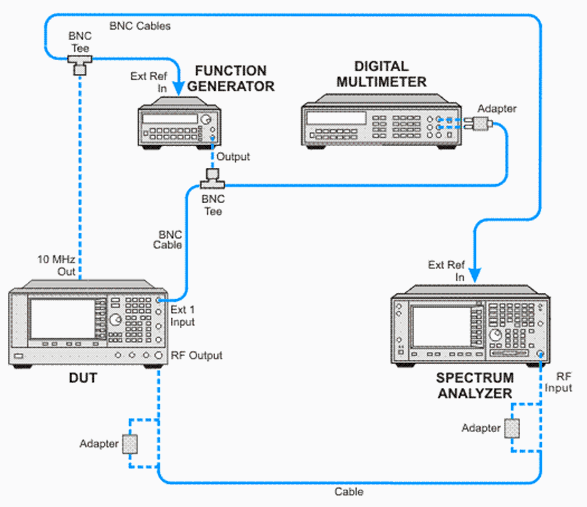
Setup for Measuring Receiver Calibration
/MRCal.GIF)
Setup for External Phase Modulation Frequency Response
/PSG_FuncGen_DVM_MR.GIF)
If this performance test fails, perform the following steps in order:
Check the equipment setup (see above). If the setup is incorrect, make the necessary corrections and rerun the performance test.
Refer to the troubleshooting section of the service guide. If you do not have a printed copy of the service guide (Option OBW), one is available either on the CD-ROM that came with your signal generator shipment or on the Keysight website.
If necessary, obtain service from Keysight Technologies. Refer to Contacting Keysight Technologies.
