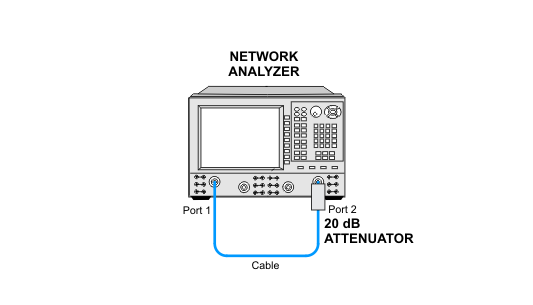
|
For Type-N Connector PNA Models
E8356A, E8357A, E8358A
E8801A, E8802A, E8803A
N3381A, N3382A, N3383A
|
|
Test Equipment
|
Recommended Model
|
Alternate Model
|
|
Power meter1
|
N1914A
|
E4419A/B
EPM-442A
N1912A
|
|
Power sensor
|
N8482A
|
8482A
|
|
Power sensor
(for > 3 GHz to 9 GHz models)
(not required when testing 3 GHz models)
|
N8481A
|
8481A
|
|
Calibration kit
(only a short is used)
|
85032F
|
none
|
|
Power sensor cable
(Qty 2)
(1 required when testing 3 GHz models)
|
11730A
|
equivalent
|
|
RF cable Type-N (m) to Type-N (m)
(for N338xA only)
|
N6314A
|
8120-8862
|
|
Adapter Type-N (f) to Type-N (f)
(for N338xA only)
|
1250-0777
|
equivalent
|
|
10 dB fixed attenuator
(only required for models without the optional internal step attenuator)
|
8491A Opt. 010
|
8491B Opt. 010
|
|
20 dB fixed attenuator
(for N338xA only)
|
8491A Opt. 020
|
8491B Opt. 020
|
|
1. When testing PNAs that have a frequency range up to 3 GHz, the E4418A/B power meter can be used; therefore the E4412A power sensor and power sensor cable will not be required.
|
|
For 3.5 mm Connector PNA Models
E8362A, E8362B, E8362C
|
|
Test Equipment
|
Recommended Model
|
Alternate Model
|
|
Power meter
|
N1914A
|
E4419A/B
EPM-442A
N1912A
|
|
Power sensor
|
N8482A
|
8482A
|
|
Power sensor
|
N8485A
|
E9300A H25
8485A
|
|
Gain Compression Test Set
|
U3070A-K01
|
Z5623A-K01
|
|
Power sensor cable
(Qty 2)
|
11730A
|
equivalent
|
|
Cable RF 3.5 mm (f) to 3.5 mm (f)
(Qty. 2)
|
85131-60013
|
85131-60010
(not for 4-port)
|
|
Adapter 3.5 mm (m) to 2.4 mm (f)
|
11901D
|
equivalent
|
|
Adapter 3.5 mm (m) to 2.4 mm (f)
(NMD type)
|
85130-60010
|
none
|
|
Adapter 3.5 mm (m) to Type-N (f)
|
1250-1750
|
equivalent
|
|
Adapter 3.5 mm (f) to Type-N (m)
(for power sensor calibration)
|
1250-1744
|
08485-60005
|
|
For 2.4 mm Connector PNA Models
E8363A, E8363B
E8364A, E8364B
|
|
Test Equipment
|
Recommended Model
|
Alternate Model
|
|
Power meter
|
N1914A
|
E4419A/B
EPM-442A
N1912A
|
|
Power sensor
|
N8482A
|
8482A
|
|
Power sensor
|
N8487A
|
8487A
|
|
Gain Compression Test Set
|
U3070A-K01
|
Z5623A-K01
|
|
Cable RF 2.4 mm (f) to 2.4 mm (f)
(qty. 2)
|
85133-60016
(more flexible)
|
85133-60002
(less flexible)
|
|
Power sensor cable
(Qty 2)
|
11730A
|
equivalent
|
|
Adapter 2.4 mm (m) to Type-N (f)
|
11903C
|
equivalent
|
|
Adapter 2.4 mm (f) to Type-N (m)
(for power sensor calibration)
|
11903D
|
08487-60001
|
|
For 1.85 mm Connector PNA Models
E8361A, E8361C
|
|
Test Equipment
|
Recommended Model
|
Alternate Model
|
|
Power meter
|
N1914A
|
E4419A/B
EPM-442A
N1912A
|
|
Power sensor
|
N8482A
|
8482A
|
|
Power sensor
|
N8487A
|
8487A
|
|
Power sensor
|
N8488A
|
V8486A with the V281A waveguide adapter1
(includes Option H67)2
|
|
Short 1.85 mm (f)
(may come from 85058B cal kit)
|
85058-60105
|
none
|
|
10 dB fixed attenuator 1.85 mm
(qty. 2 if Opt. 014, otherwise qty 1)
(not required for models with Opt. UNL)
|
8490G Opt. 010
|
Anritsu 41V-10
|
|
Power sensor cable
(qty. 2)
|
11730A
|
equivalent
|
|
Bypass cable
(for Option 014 only)
|
E8361-60005
|
none
|
|
Adapter 2.4 mm (f) to Type-N (f)
|
11903B
|
equivalent
|
|
Adapter 2.4 mm (f) to Type-N (m)
(for power sensor calibration)
|
11903D
|
08487-60001
|
- Combination of the V8486A power sensor and V281A adapter must be calibrated as a single unit—do not separate. For more information, click here.
 When the V281A adapter is mounted on the V8486A power sensor, it is
necessary to make sure the 1.85 mm connector on the adapter is on the
opposite side from the type-N connector on the power sensor. The
power sensor/adapter combination must be connected prior to calibrating
the power sensor. The combination must be left connected for the
duration of the calibration period. Check Option H67 when configuring the station and import the correct calibration data associated with Option H67. Also refer to Service Note E8361A/C-01. When the V281A adapter is mounted on the V8486A power sensor, it is
necessary to make sure the 1.85 mm connector on the adapter is on the
opposite side from the type-N connector on the power sensor. The
power sensor/adapter combination must be connected prior to calibrating
the power sensor. The combination must be left connected for the
duration of the calibration period. Check Option H67 when configuring the station and import the correct calibration data associated with Option H67. Also refer to Service Note E8361A/C-01.
- Option H67 is an ANSI Z540-1 calibration for the V8486A power sensor with a V281A connector adapter (connected together).
|