Unable to Find Package (Hardware Extensions)
Symptom
An error may occur while building macros that target .NET6+, when referencing hardware-specific input extensions. The error will look similar to:
error NU1101: Unable to find package Keysight.SA.Vsa.HardwareExtensions.Xyz.
Where "Xyz" is a hardware-specific name for a hardware extension installed separately from the main 89600 VSA software.
The root cause is no .NET6+ client library package exists for this type of hardware.
Possible Solutions
-
To set or get input extension properties, modify the code to use the InputExtension methods GetParameter, SetParameter and ParameterNames instead of using the strongly-typed properties. Then remove the package reference and any type references and recompile the client code.
-
If .NET6+ client libraries are supported, be sure they exist and are accessible through the source mappings for the .NET project. This may require modifying a nuget.config file to enable searching additional paths for nuget packages.
-
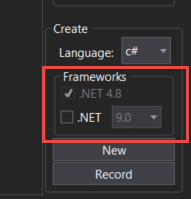
If only .NET 4.8 client support is required, re-record the macro with only ".NET 4.8" enabled: