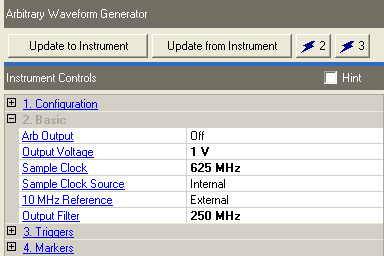
Choices: On | Off
Default: Off
Double-click or use the drop-down menu to turn the Arb On or Off.
Range:
0.34 V to 1.0 V
Default: External I/Q: 0.5 V; Wideband I/Q: 1.0 V
Enter a value to set the output voltage from the QArb. This value can be changed to optimize the signal broadband noise verses distortion caused in the I/Q modulation chain. Systems configured with the N603xA or N824xA Arbs support the following peak to peak voltage:
|
|
Range |
Reset Value |
|
External I/Q |
|
0.5 V |
|
Option 015 |
|
1.0 V |
|
Arb Only |
|
1.0 V |
Range: 156.25 MHz to 1.25GHz
Default: 625 MHz
Set the Arbitrary waveform generator sample clock frequency. The sample clock reset value is system configuration specific.
|
|
Arb Only |
External I/Q |
Wideband I/Q |
|
Reset |
1.25 GHz |
625 MHz |
625 MHz |
|
Minimum |
625 MHz |
156.25 MHz |
156.25 MHz |
|
Maximum |
1.25 GHz |
1.25 GHz |
1.25 GHz |
The internal clock only supports the following frequencies: 156.25 MHz, 312.5 MHz, 625 MHz, 1.25 GHz
Choices: Internal | External
Default: Internal
Double-click or use the drop-down menu to select the sample clock source. External may be used when multiple Arbs need to be synchronized.
Do not select External for Sample Clock Source without a valid external clock present. Selecting External clock without one present causes the Arb to reset and all current waveforms will be lost.
Choices: Internal | External
Default: External
Double-click or use the drop-down menu to select the Arb 10 MHz reference.
N6030A: 10 MHz REF IN
N8241A: AUX 10 MHz REF IN
Choices: Through | 250 MHz | 500 MHz
Default: 500 MHz
Double-click or use the drop-down menu to select the Output Filter.
This parameter is available for any system configured with an external Arb. It is disabled for any system configured with the internal baseband generator.