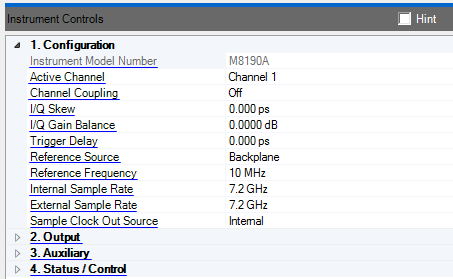
Displays the connected arbitrary waveform generator's model number. In simulated mode, however, you can select the Arb model, which determines the maximum sample rate available. The displayed Arb properties vary according to the Arb model connected or selected.
Double-click or use the drop-down menu to select the channel being used by the application.
Channel 1 - Download and play a signal to channel 1 of the M8190A Arb.
Channel 2 - Download and play a signal to channel 2 of the M8190A Arb.
Both - Download and play identical signals to channel 1 and channel 2 of the M8190A Arb.
This property is only available when the software has been configured in "Arb Only" mode.
Double-click or use the drop-down menu to enable or disable channel coupling. When enabled, several properties of channel 1 and channel 2 are coupled including: clock source, sample rate, output mode, interpolated mode and others.
Enter a value to skew the channel 1 waveform relative to the channel 2 waveform with sub sample period resolution. Adjusting the I/Q skew can minimize electrical length differences between the cables and help reduce images. With good cables the adjustment is typically less than 100 ps, and probably closer to 20 ps. See Optimize the Signal Before Corrections.
The I/Q skew is implemented using the channel Course and Fine Delay properties. The initial Course and Fine Delay of each channel is set to 150 ps for zero I/Q Skew. This initial delay provides room do fine I/Q Skew adjustments and still allow for time alignment between multiple M8190A Arbs.
Range: -15 dB to 15 dB
Adjust the gain balance between channel 1 and channel 2. An unbalanced gain results in images. Typically a gain balance adjustment of less than 0.1 dB is all that is needed.
The I/Q gain balance is implemented varying channel 1 and channel 2 output amplitudes.
Range: 0 ns to 9.0 ns
Enter a value to delay the signal start relative to a trigger. Use to align the output signal start of multiple M8190A Arbs.
The trigger delay is implemented using the channel Course and Fine Delay properties. The I/Q Skew and Trigger Delay properties are coupled.
Double-click or use the drop-down menu to select the M8190A reference source.
Internal - Use the internal 100 MHz reference.
External - Use the reference signal provide to the REF CLK IN connector on the M8190A front panel. Be sure to set the reference frequency when external is used.
Backplane - Use the 100 MHz reference provided by the AXIe backplane.
Range: 1 MHz to 200 MHz
Enter the frequency of the reference signal applied to the REF CLK IN connector. Use abbreviations for faster entry (example: 10m = 10.0 MHz).
Range:
14 Bit Direct Mode: 125 MHz to 8 GHz
12 Bit Direct Mode: 125 MHz to 12 GHz
Interpolated Mode: 1.0 GHz to 7.2 GHz
Set the internal sample clock rate. Use abbreviations for faster entry (example: 1g = 1.0 GHz).
Range:
14 Bit Direct Mode: 125 MHz to 8 GHz
12 Bit Direct Mode: 125 MHz to 12 GHz
Interpolated Mode: 1.0 GHz to 7.2 GHz
Set the external sample clock rate. Use abbreviations for faster entry (example: 1g = 1.0 GHz).
Double-click or use the drop-down menu to select the clock source routed to the SAMPLE CLK OUT connector on the M8190A front panel.
Internal - Route the internal sample clock to the SAMPLE CLK OUT connector.
External - Route the sample clock signal from the SAMPLE CLK IN connector to the SAMPLE CLK OUT connector.
The software sets this to Internal when configured in "Arb Only" Mode.