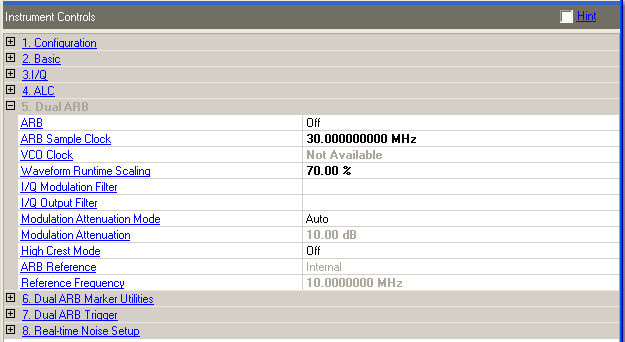
Choice: On | Off
Default: Off
Double-click or use the drop-down menu to control the ARB state.
Turning the Arb on also turns on the I/Q and ensures that the Arb output is connected to the I/Q modulator.
This parameter is overwritten by the application during a download or play.
Range: for specified range values, see the signal generator's data sheet
Enter a value to set the signal generator’s sample clock frequency. Use abbreviations for faster entry (example: 1m = 1.000000 MHz).
This parameter is overwritten by the application during a download or play.
Choice: Internal | External
Default: Internal
Double-click or use the drop-down menu to select the signal generator’s VCO Clock. The software does not control the instrument providing the external sample clock.
Internal − the signal generator uses its internal VCO Clock.
External − the signal generator uses an external VCO Clock.
The external VCO Clock is only available if the signal generator is an ESG or PSG model with option HEC for external clock support. See the signal generator’s user’s guide for information on VCO Clock.
This parameter is overwritten by the application during a download or play.
Range: 1%−100%
Default: 70%
Use this parameter after downloading and synchronizing with the signal generator.
Set or change the Waveform Runtime Scaling to reduce the overshoot associated with the digital-to-analog convertor (DAC) interpolation filter. Enter a scaling value for the signal generator to apply to the waveform while it is playing. Use scaling to get the best dynamic range without overflowing the I and Q digital to analog converters. At 100 percent, some overshoot may occur; therefore the default setting is 85 percent.
This parameter is available for all systems configured with an internal Arb.
Choice: Auto | 2.1 MHz | 40 MHz | Through
Default: Auto
Use this parameter after downloading and synchronizing with the signal generator.
Double-click or use the drop-down menu to select a filter for I/Q signals modulated onto the RF carrier. The bandwidth of the baseband signal should dictate the minimum reconstruction filter bandwidth you choose. Depending on the oversampling ratio and where the image frequencies appear, you may want to select a wider bandwidth.
Auto − automatically selects a digital modulation filter.
2.1 MHz − applies a 2.1 MHz baseband filter to the I/Q signals.
40 MHz − applies a 40 MHz baseband filter to the I/Q signals.
Through − bypasses filtering.
This parameter is not available with all instrument model numbers and may be grayed out.
This parameter is overwritten by the application during a download or play.
Choice: Auto | 40 MHz | Through
Default: Auto
Use this parameter after downloading and synchronizing with the signal generator.
Double-click or use the drop-down menu to select a filter or through path for routing I and Q signals to the rear panel I/Q outputs.
Auto − automatically selects an I/Q output filter.
40 MHz − applies a 40 MHz baseband filter.
Through − bypasses filtering.
This parameter is not available with all instrument model numbers and may be grayed out.
Choice: Auto | Manual
Default: Auto
Use this parameter after downloading and synchronizing with the signal generator.
Double-click or use the drop-down menu to select the mode of the internal I/Q modulator.
Manual − manually set the attenuation level of the I/Q modulator using the Modulation Attenuation cell.
Auto − the attenuation level automatically sets to a value for best performance based on the digital modulation settings.
This parameter is not available with all instrument model numbers and may be grayed out.
Range: 0.00−40.00 dB
Default: 10.00 dB
Set Modulation Attenuation Mode to Manual to enable this parameter.
Set the attenuation of the I/Q signals being modulated through the signal generator RF path. Adjusting the attenuation may reduce signal distortion and improve the overall dynamic range.
When ALC is enabled, the RF output amplitude will not change while the attenuator value is changed until the ALC range is exceeded.
Choice: On | Off
Default: Off
Use this parameter after downloading and synchronizing with the signal generator.
Double-click or use the drop-down menu to enable or disable the signal generator’s high crest mode.
On − enables the high crest mode for externally applied signals with high crest factors. High Crest mode allows the signal generator to process high-crest-factor arbitrary I/Q waveforms with less distortion. For crest factors higher than 4 dB, you should reduce I/Q Modulation Atten levels by 1 dB for each dB above that level. High crest mode reduces the maximum output level and degrades power level accuracy.
Off − disables the high crest mode.
This parameter is not available with all instrument model numbers and may be grayed out.
Choice: Internal | External
Default: Internal
Use this parameter after downloading and synchronizing with the signal generator.
Double-click or use the drop-down menu to select the signal generator’s ARB reference source.
Internal − the signal generator uses its internally generated 10 MHz signal as the reference source.
External − the signal generator uses an external signal as the reference frequency for the baseband I/Q signal. Connect to the rear-panel BASEBAND GEN REF IN connector. See the signal generator’s user’s guide for information on external references.
This parameter is not available with all instrument model numbers and may be grayed out.
This parameter is overwritten by the application during a download or play.
Range: 0.2500000–100.0000000
MHz
Default: 10.0000000 MHz
Set ARB Reference to External to enable this parameter.
Use this parameter after downloading and synchronizing with the signal generator.
Enter the frequency value of the external reference when using an externally supplied reference signal. See the signal generator’s user’s guide for information on external references.
This parameter is not available with all instrument model numbers and may be grayed out.