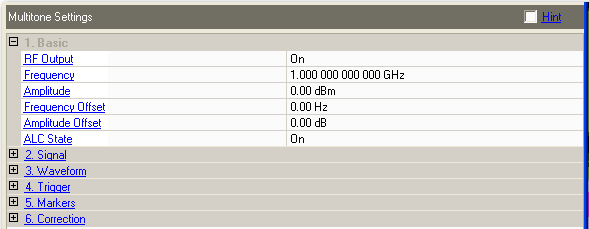
These parameters require a Download or Play to update their settings.
Choices: On | Off
Default: On
Double-click or use the drop-down menu to turn the RF output on or off.
Range: 250 kHz to 44 GHz
Default: System dependent
|
Arb Only |
250 MHz |
|
Internal Arb |
1 GHz |
|
External Arb |
1 GHz |
|
Wideband Arb |
10 GHz |
Enter a value to set the signal generator output frequency. Use abbreviations for faster entry (1k = 1 kHz).
Range: -144 dBm to +25 dBm
Default: 0 dBm
Enter a value to set the signal generator output amplitude.
This parameter cannot be set for systems configured to use the M9330A/N6030A/N8241A Wideband Arb as a signal generator. The N7621 application generates the highest amplitude possible for the current multitone signal and updates the value displayed after a Download. The output amplitude cannot exceed 2.5 dBm and will usually be less than -5 dBm, depending on the multitone signal parameters.
Range: -200 GHz to 200 GHz
Default: 0 Hz
Enter the signal generator frequency offset. Used during the correction
operation to account for a frequency offset introduced
The signal generator used to create the frequency shift must have its 10 MHz reference connected to the 10 MHz reference of the other instruments.
Range: -200 dB to 200 dB
Default: 0 dB
Enter the signal generator amplitude offset. Used during the correction operation to account for a power offset introduced by an amplifier or cable loss in the signal path between the signal generator and the spectrum analyzer.
Choices: On | Off
Default: On
Double-click or use the drop-down menu to turn ALC (Automatic Level Control) on or off. The best performance is usually achieved with the ALC On. Turn the ALC off when the tone spacing is 1 kHz or less.
When the ALC State is disabled, the application sets the signal generator Power Search Reference to Modulation and executes a power search during Play to ensure correct output power. A power search is also done during the correction measurement.