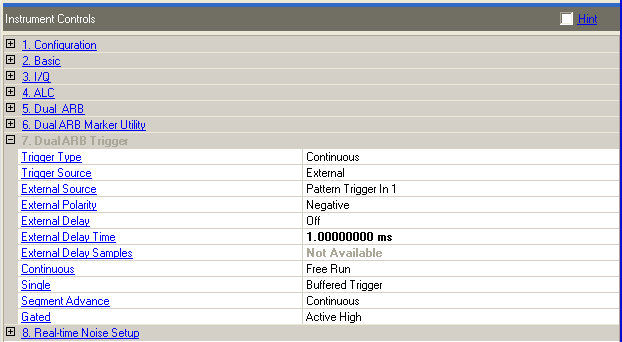
Choice: Continuous | Single | Gated | Segment
Advance
Default: Continuous
Double-click or use the drop-down menu to select the trigger type.
Continuous – selects the continuous triggering mode, which enables the signal generator to repeat the modulating signal indefinitely until you turn off the modulation format, change triggers or select another waveform.
Single – sets up a waveform to play once after receiving a trigger. See Retrigger Mode to configure the waveform's response to triggers.
Gated – sets the signal generator to the gated trigger mode, which causes the waveform (modulating signal) to repeatedly start and stop in response to an externally applied trigger signal. To use the gated trigger mode, you must also select External Trigger Source.
Segment Advance – controls the way the signal generator plays segments within a sequence. This includes determining whether a segment plays once or continuously, and when the sequence advances to the next segment. See also Segment Advance Mode.
This parameter is overwritten by the application during a download or play.
Choice: Trigger Key | External | Bus
Default: External
Double-click or use the drop-down menu to select the trigger source. This parameter adjusts the trigger source applied to the PATT TRIG IN or AUX I/O connectors.
Trigger Key – selects the front panel hardkey as the trigger source. After making this selection, press the Trigger hardkey to trigger a waveform.
Bus – enables the sending of a SCPI command (*TRG) through the GPIB, LAN or AUXILIARY IO (RS-232) input connector to trigger a waveform.
External – causes a waveform to trigger from an externally supplied trigger signal.
This parameter is overwritten by the application during a download or play.
Choice: Pattern Trigger In 1 | Pattern Trigger
In 2
Default: Pattern Trigger In 1
Double-click or use the drop-down menu to select the external trigger input. This parameter selects the rear-panel input for the external trigger signal. External must be selected as the trigger source.
Pattern Trigger In 1 – selects the PATTERN TRIG IN rear-panel BNC connector
Pattern Trigger In 2 – selects the AUXILIARY I/O rear panel connector
|
Signal generator model |
Auxillary I/O connector pin number |
|
N162A/N5182A-651, -652, -654 |
External trigger input is pin number 6 on the "AUXILLARY I/O” connector on the rear panel of the instrument |
|
E4438C-001, -002, -601, -602 |
External trigger input is pin number 17 on the AUXILLARY I/O” connector on the rear panel of the instrument. |
|
E8267C/D-001 002, 601, 602 |
External trigger input is pin number 17 on the AUXILLARY I/O” connector on the rear panel of the instrument. |
This parameter is overwritten by the application during a download or play.
Choice: Positive | Negative
Default: Negative
Double-click or use the drop-down menu to select the external trigger polarity. This parameter toggles the polarity of the TTL signal at the rear panel TRIGGER OUT connector.
This parameter is overwritten by the application during a download or play.
Choice: Off | Time | Samples
Default: Off
Double-click or use the drop-down menu to enable the external trigger delay. The selection is active only after selecting External as the trigger source.
Off - disable the trigger delay.
Time - specify the trigger delay in seconds.
Samples - specify the trigger delay in sample points.
This parameter is overwritten by the application during a download or play.
|
Range: |
ESG/PSG: 10 ns to 40 s |
|
MXG: 8 ns to 32 s |
|
|
Default: |
1 ms |
Enter a delay time from when the external trigger is received until it is applied to the waveform. This cell sets the amount of time to delay the signal generator's response to an external trigger, in 10 ns steps. The delay is a path (time) delay between the time the signal generator receives the trigger and when it responds to the trigger.
Using a time delay for the ESG/PSG external trigger will introduce jitter in the trigger signal. Use External Delay Samples to eliminate the jitter.
This parameter is overwritten by the application during a download or play.
Range: 0 to 100000000
Enter a delay in samples from when the external trigger is received until it is applied to the waveform. At a 100 MHz sample clock rate one sample is equal to 10 ns. Trigger delay in samples is not available for the MXG.
This parameter is not available with all instrument model numbers and may be grayed out.
This parameter is overwritten by the application during a download or play.
Choice: Free Run | Trigger & Run | Reset
& Run
Default: Free Run
Double-click or use the drop-down menu to select the continuous mode. This parameter selects the waveform's response to triggers when Continuous is the trigger mode (continuous waveform transmission.)
Free Run – plays continuously and does not respond to triggers.
Trigger & Run – waits for and starts on the first trigger; ignores subsequent triggers.
Reset & Run – waits for and starts on the first trigger; resets and plays on a subsequent trigger.
This parameter is overwritten by the application during a download or play.
Choice: Buffered Trigger | No Retrigger
| Restart on Trigger
Default: Buffered Trigger
Double-click or use the drop-down menu to select the Single mode. This parameter configures the waveform's response to triggers while using the single trigger mode. The response selections determine whether the waveform accepts a trigger during playback, and if it does, how it responds to that trigger.
No Retrigger – causes the waveform to ignore the triggers during playback.
Buffered Trigger – causes a waveform to accept a trigger during payback and to restart after the current play finishes.
Restart on Trigger – causes a waveform to accept a trigger during playback and to restart immediately after receiving a trigger.
This parameter is overwritten by the application during a download or play.
Choice: Single | Continuous
Default: Continuous
Double-click or use the drop-down menu to select the segment advance mode. This parameter configures how play moves from segment to segment within a waveform sequence.
Single – causes the next segment in the sequence to be played once. Any currently playing segment is completed before moving to the next segment.
Continuous – causes the next segment in the sequence to be played continuously. Any currently playing segment is completed before moving to the next segment.
This parameter is overwritten by the application during a download or play.
Choice: Active High | Active Low
Default: Active High
Double-click or use the drop-down menu to select the gated trigger acive mode. Sets the signal generator to the gated trigger mode, which causes the waveform (modulating signal) to repeatedly start and stop in response to an externally applied trigger signal. To use the gated trigger mode, you must also select External.
Active High – current sequence runs while the gate signal is high and pauses when it is low.
Active Low – current sequence runs while the gate signal is low and pauses when it is high.
Sets the trigger active state for the gated trigger mode.
Gate Active = High
Trigger Signal State = High
Waveform file stops playing.
Gate Active = High
Trigger Signal State = Low
Waveform file plays.
Gate Active = Low
Trigger Signal State = High
Waveform file plays.
Gate Active = Low
Trigger Signal State = Low
Waveform file stops playing.
This parameter is overwritten by the application during a download or play.