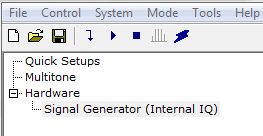
tree view
displays the Signal Generator Settings table in the node view of the main
window. Click the plus
tree view
displays the Signal Generator Settings table in the node view of the main
window. Click the plus  box or
  arrow to expand each set of parameters.
Clicking Signal Generator in the tree view
displays the Signal Generator Settings table in the node view of the main
window. Click the plus
box or arrow to expand each set of parameters.
The Signal Generator Settings table provides direct control of the signal generator parameters, similar to pushing the front panel buttons on the instrument. The values are sent to and from the signal generator using the Update to Instrument and Update from Instrument buttons. If Real Time Update is enabled, changes to the signal generator properties are sent immediately to the hardware.
The available signal generator settings are dependent on the system configuration. The supported signal generators share many of the same parameters, however, each signal generator also has a few unique parameters.
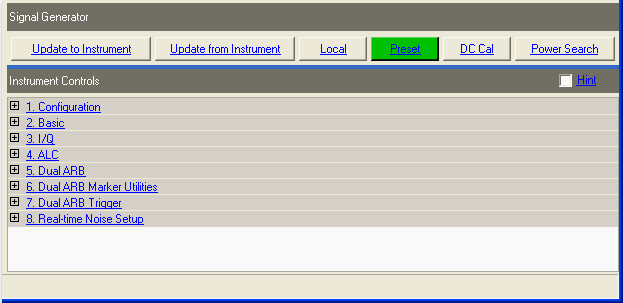

Press this button to send the software parameters to the connected instrument.
A power search is executed at the end of Update to Instrument when the RF power is on, the ALC is off, and the power search mode is set to manual or auto.

Press this button to retrieve the parameters from the connected instrument.

Press this button to deactivate remote operation and return the signal generator to local (front panel) control.

Press this button to set the signal generator to a known state, either factory-defined or user-defined.
Refer to the signal generator's user's guide for information on setting a user-defined state.

Press this button to execute an I/Q DC Calibration to minimize errors associated with offset voltages.
DC Cal minimizes I/Q offset errors for a single frequency only, and must be repeated if the signal generator's settings change.
Download a waveform to set the correct parameters for the target instrument, and make this button available.

Press this button to execute a manual power search calibration.
This is an internal calibration routine that improves output power accuracy when ALC is off.
Download a waveform to set the correct parameters for the target instrument, and set ALC to Off to make this button available.