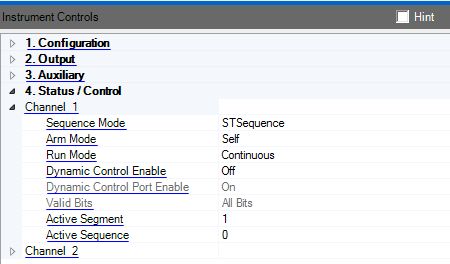
Accesses the properties for this channel. The properties for channel 1 and channel 2 are identical.
Double-click or use the drop-down menu to select the channel sequence mode.
Arbitrary - Play the specified arbitrary waveform segment.
STSequence - Play the specified sequence of waveform segments.
STScenario - Play the specified sequence of sequences.
Double-click or use the drop-down menu to select the channel arm mode.
Armed - Set the channel arm mode to Armed.
Self - Set the channel arm mode to Self.
Double-click or use the drop-down menu to select the channel run mode.
Continuous - Set the channel run mode to Continuous.
Triggered - Set the channel run mode to Triggered.
Gated - Set the channel run mode to Gated.
Double-click or use the drop-down menu to enable or disable dynamic control.
Double-click or use the drop-down menu to enable or disable the dynamic control port on the M8190A front panel.
Double-click or use the drop-down menu to select the valid bits on the dynamic control input port.
Lower Bits - Use the 13 lower bits from the dynamic control port for segment or sequence selection.
All Bits - Use 19 bits from the dynamic control port for segment or sequence selection.
Range: 1 to 524287
Select the segment to play for this channel.
Range: 0 to 524286
Select the sequence to play for this channel.