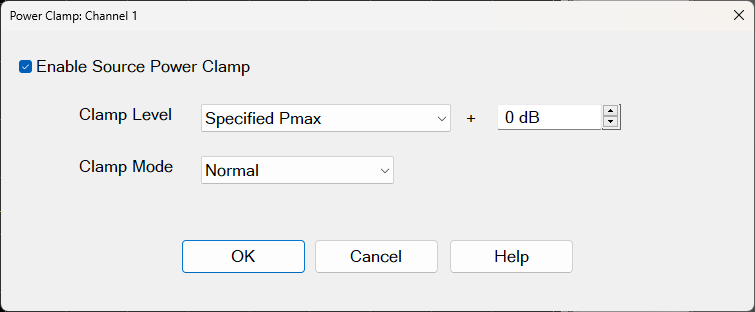
This dialog provides basic control of power clamp for a specific channel. If you are using a split screen for two or more channels, the dialog opens for the active channel until it is closed.
Enable Source Power Clamp Enables or disables the power clamp configuration for the specified channel.
Clamp Level Choose either Specified or Typical maximum leveled power (Pmax). These values are automatically applied, according to your VNA model's published Technical Specifications.
+ (dB) Applies a power offset to all the frequency ranges listed for your model's maximum leveled power. Range is -20 dB to 20 dB. You can use this offset while viewing your trace to achieve the desired effect.
Clamp Mode Choose from one of the following sweep optimization levels:
Normal No optimization is applied.
Fast Applies an algorithm to increase the sweep speed.
Very Fast Applies an algorithm to further increase the sweep speed.
OK Applies your new configuration, power-clamp state, and closes the dialog.
Cancel Cancels any configuration or power-clamp state changes you may have made and closes the dialog. No changes are applied.