:FUNCtion:PARameters:DIFF:PALign
Command Syntax
:FUNCtionN:PARameters:DIFF:PALign {ON | OFF | 1 | 0}
Where N identifies one of up to 64 possible operators {1:64} that can be defined as part of a math function. The operators are numbered in the order that they were originally added to the function.
Query Syntax
:FUNCtion{1:64}:PARameters:DIFF:PALign?
Query Response
{1 | 0}
Description

For the Differentiate operator (:FUNCtion:FOPerator), this
command specifies whether
or not the Low Pass and Align Phase option is enabled.
The Differentiate algorithm is applied in two different ways depending on the Low Pass and Align Phase option setting.
Low Pass and Align Phase Enabled
Imagine the following four sample points in your waveform.
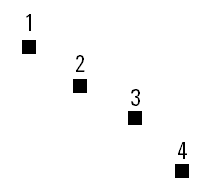
When the Low Pass and Align Phase feature is enabled, the slope between points 3 and 1 is calculated and divided by two. This result is then plotted at point 2. Then the slope between points 2 and 4 is calculated, divided by two, and the result is plotted at point 3 (and so on). The algorithm is defined this way to preserve the phase relationship between the input and the function.
Low Pass and Align Phase NOT Enabled
Imagine the following four sample points in your waveform.
When the Low Pass and Align Phase feature is disabled, the slope between points 2 and 1 is calculated and the result is then plotted at point 1. Then the slope between points 2 and 3 is calculated and the result is plotted at point 2 (and so on).
turns on and off the waveform alignment between the operator's input and output waveforms. Turning off this setting allows you to view any delay introduced by the DUT. By default, this setting is on and the waveforms are aligned.