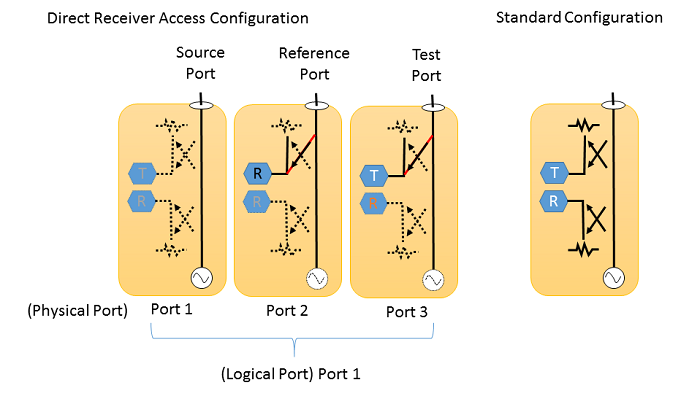
You can make a Direct Receiver Access (DRA) Configuration when you use three ports of E5080B in order to make a better dynamic range and high power measurements. A sets of three physical ports are assigned as Source, Reference and Test ports, then they can be worked as one logical port.
Note: When the macro button is not available, execute “C:\\Program Files\Keysight\Network Analyzer\Service\PortConfiguration.exe”
Port Configuration dialog box help |
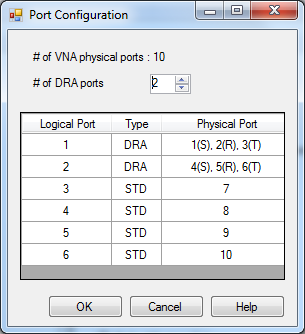
# of VNA physical ports: the number of the detected physical port in your system # of DRA ports: The number of DRA ports you require. Set at 0 to return to the standard mode for all ports. This should be greater than or equal to (# of DRA ports) * 3. The table shows the logical port assignment. The DRA ports are assigned from the physical port 1. Hence, the STD ports come after DRA ports. In the case above, the physical ports from 1 to 3 are assigned source (S), reference (R), and test (T), respectively, then make them logical port 1. Note: DRA is displayed at status bar. DRA mode survives a Preset or Shutdown. Note::A is displayed at status bar. DRA mode survives a Preset or Shutdown. |