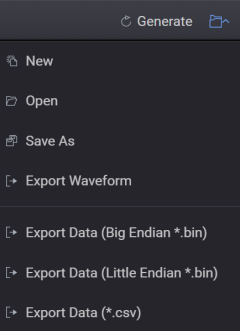
Advanced Waveform Utility
Export Data (Big Endian / Little Endian)
Resets your current AWU application configuration to default settings.
|
SCPI Command |
[:SOURce]:RADio:AWU:PRESet |
|
SCPI Example |
RADio:AWU:PRES |
|
State Saved |
No |
|
Initial S/W Revision |
A.19.03 |
Opens a file management window where you can open a previously saved AWU configuration file (*.pwsg).
|
SCPI Command |
[:SOURce]:RADio:AWU:MEMory:STATe:RECall <string> |
|
SCPI Example |
RADio:AWU:MEMory:STATe:RECall "AWU.pwsg" |
|
State Saved |
No |
|
Initial S/W Revision |
A.19.03 |
Opens a file management window where you can save your current AWU configuration as a file (*.pwsg) for future use.
|
SCPI Command |
[:SOURce]:RADio:AWU:MEMory:STATe:SAVE <string> |
|
SCPI Example |
RADio:AWU:MEMory:STATe:SAVE "AWU.pwsg" |
|
State Saved |
No |
|
Initial S/W Revision |
A.19.03 |
|
SCPI Command |
[:SOURce]:RADio:AWU:WAVeform:EXPort <string> |
|
SCPI Example |
|
|
State Saved |
Yes |
| Initial S/W Revision |
A.19.03 |
Exports waveform data to a Big Endian (*.bin) or Little Endian (*.bin) format.
|
SCPI Command |
[:SOURce]:RADio:AWU:WAVeform:DATA:EXPort <filename>, BIG|LITTle |
|
SCPI Example |
:RADio:AWU:WAVeform:DATA:EXPort 'c:/nr_b.bin', BIG |
|
State Saved |
Yes |
| Initial S/W Revision |
A.19.03 |
Exports waveform data to a CSV (*.csv) format.
If you try to export waveform data from the waveform type Keysight Signal Studio (.wfm) to a CSV file, you get an error "Keysight Signal Studio .wfm cannot be exported into *.csv file".
|
SCPI Command |
[:SOURce]:RADio:AWU:WAVeform:DATA:EXPort:CSV <filename> |
|
SCPI Example |
:RADio:AWU:WAVeform:DATA:EXPort:CSV "c:\temp\ts.csv" |
|
State Saved |
Yes |
| Initial S/W Revision |
A.19.03 |