button displayed with this field to edit this setting in the GPS L5 Satellite Mask dialog box as shown below.
GNSS
The Carrier tab allows you to view and configure the following settings for the GNSS carrier.
Start GPS Time (Date and Time)
Klobuchar Ionosphere Parameters
Initial Direction (Azimuth Angle in Degrees)
The parameters in the GNSS Settings tab are further grouped into the following five tabs.
General settings
GPS Settings
Galileo Settings
Beidou Settings
Advanced Settings
Satellite power reference is the absolute power of one satellite signal with 0dB relative power. When real-time application is turned on, the amplitude on the front panel will be set to satellite power reference. When satellite power reference is changed, the amplitude on the front panel will also be updated.
|
SCPI Command |
[:SOURce]:RADio:GNSS:WAVeform:CCARrier:POWer:REFerence <value> [:SOURce]:RADio:GNSS:WAVeform:CCARrier:POWer:REFerence? |
|
SCPI Example |
RADio:GNSS:WAVeform:CCAR:POW:REF -120 RADio:GNSS:WAVeform:CCAR:POW:REF? |
|
Preset |
-130 |
|
State Saved |
Yes |
|
Range |
-144 to 0 |
|
Initial S/W Revision |
A.16.00 |
Enter the attenuation value of the external attenuator if connected to instrument's RF port. Then the external attenuation will be compensated, which means the amplitude of the instrument output will be set to the sum of satellite power reference and external attenuation.
|
SCPI Command |
[:SOURce]:RADio:GNSS:WAVeform:CCARrier:ATTenuation <value> [:SOURce]:RADio:GNSS:WAVeform:CCARrier:ATTenuation? |
|
SCPI Example |
RAD:GNSS:WAV:CCAR:ATT -10 RAD:GNSS:WAV:CCAR:ATT? |
|
Preset |
0 |
|
State Saved |
Yes |
|
Range |
0 to 100 |
|
Initial S/W Revision |
A.16.00 |
Sets whether or not the GPS L1 C/A signal is to be played.
|
SCPI Command |
[:SOURce]:RADio:GNSS:WAVeform:CCARrier:GPS:L1CA ON|OFF|1|0 [:SOURce]:RADio:GNSS:WAVeform:CCARrier:GPS:L1CA? |
|
SCPI Example |
RADio:GNSS:WAVeform:CCAR:GPS:L1CA OFF RADio:GNSS:WAVeform:CCAR:GPS:L1CA? |
|
Preset |
ON |
|
State Saved |
Yes |
|
Range |
OFF|ON |
|
Initial S/W Revision |
A.16.00 |
Sets whether or not the GPS L5 I signal is to be played.
|
SCPI Command |
[:SOURce]:RADio:GNSS:WAVeform:CCARrier:GPS:L5I ON|OFF|1|0 [:SOURce]:RADio:GNSS:WAVeform:CCARrier:GPS:L5I? |
|
SCPI Example |
RADio:GNSS:WAVeform:CCAR:GPS:L5I OFF RADio:GNSS:WAVeform:CCAR:GPS:L5I? |
|
Preset |
ON |
|
State Saved |
Yes |
|
Range |
OFF|ON |
|
Initial S/W Revision |
A.16.00 |
Sets whether or not the GPS L5 Q signal is to be played.
|
SCPI Command |
[:SOURce]:RADio:GNSS:WAVeform:CCARrier:GPS:L5Q ON|OFF|1|0 [:SOURce]:RADio:GNSS:WAVeform:CCARrier:GPS:L5Q? |
|
SCPI Example |
RADio:GNSS:WAVeform:CCAR:GPS:L5Q OFF RADio:GNSS:WAVeform:CCAR:GPS:L5Q? |
|
Preset |
ON |
|
State Saved |
Yes |
|
Range |
OFF|ON |
|
Initial S/W Revision |
A.16.00 |
Sets the GPS L1 C/A power boosting compared to reference power.
|
SCPI Command |
[:SOURce]:RADio:GNSS:WAVeform:CCARrier:GPS:L1PBoosting <value> [:SOURce]:RADio:GNSS:WAVeform:CCARrier:GPS:L1PBoosting? |
|
SCPI Example |
RADio:GNSS:WAVeform:CCAR:GPS:L1PB -3 RADio:GNSS:WAVeform:CCAR:GPS: L1PB? |
|
Preset |
-1.5 |
|
State Saved |
Yes |
|
Range |
-40 to 0 |
|
Initial S/W Revision |
A.16.00 |
Sets the GPS L5 power boosting compared to the GPS L1 power.
|
SCPI Command |
[:SOURce]:RADio:GNSS:WAVeform:CCARrier:GPS:L5PBoosting <value> [:SOURce]:RADio:GNSS:WAVeform:CCARrier:GPS:L5PBoosting? |
|
SCPI Example |
RADio:GNSS:WAVeform:CCAR:GPS:L5PB -3 RADio:GNSS:WAVeform:CCAR:GPS:L5PB? |
|
Preset |
0 |
|
State Saved |
Yes |
|
Range |
-40 to 0 |
|
Initial S/W Revision |
A.16.00 |
Sets whether the Galileo E1 Open Service signal is to be played.
|
SCPI Command |
[:SOURce]:RADio:GNSS:WAVeform:CCARrier:GALileo:E1 ON|OFF|1|0 [:SOURce]:RADio:GNSS:WAVeform:CCARrier:GALileo:E1? |
|
SCPI Example |
RADio:GNSS:WAVeform:CCAR:GALileo:E1 OFF RADio:GNSS:WAVeform:CCAR:GALileo:E1? |
|
Preset |
ON |
|
State Saved |
Yes |
|
Range |
OFF|ON |
|
Initial S/W Revision |
A.16.00 |
Sets whether the Galileo E5 (including E5a and E5b) signal is to be played.
|
SCPI Command |
[:SOURce]:RADio:GNSS:WAVeform:CCARrier:GALileo:E5 ON|OFF|1|0 [:SOURce]:RADio:GNSS:WAVeform:CCARrier:GALileo:E5? |
|
SCPI Example |
RADio:GNSS:WAVeform:CCAR:GALileo:E5 OFF RADio:GNSS:WAVeform:CCAR:GALileo:E5? |
|
Preset |
ON |
|
State Saved |
Yes |
|
Range |
OFF|ON |
|
Initial S/W Revision |
A.16.00 |
Sets the Galileo E1 power boosting compared to reference power. This is only visible when E1 OS is On.
|
SCPI Command |
[:SOURce]:RADio:GNSS:WAVeform:CCARrier:GALileo:E1PBoosting <value> [:SOURce]:RADio:GNSS:WAVeform:CCARrier:GALileo:E1PBoosting? |
|
SCPI Example |
RADio:GNSS:WAVeform:CCAR:GAL:E1PB -3 RADio:GNSS:WAVeform:CCAR:GAL:E1PB? |
|
Preset |
-2 |
|
State Saved |
Yes |
|
Range |
-40 to 0 |
|
Initial S/W Revision |
A.16.00 |
Sets the Galileo E5 power boosting compared to reference power. This is only visible when E1 (E5a + E5b) is on.
|
SCPI Command |
[:SOURce]:RADio:GNSS:WAVeform:CCARrier:GALileo:E5PBoosting <value> [:SOURce]:RADio:GNSS:WAVeform:CCARrier:GALileo:E5PBoosting? |
|
SCPI Example |
RADio:GNSS:WAVeform:CCAR:GAL:E5PB -3 RADio:GNSS:WAVeform:CCAR:GAL:E5PB? |
|
Preset |
0 |
|
State Saved |
Yes |
|
Range |
-40 to 0 |
|
Initial S/W Revision |
A.16.00 |
Sets whether the BeiDou B1I signal is to be played.
|
SCPI Command |
[:SOURce]:RADio:GNSS:WAVeform:CCARrier:BEIDou:B1I 0|1|OFF|ON [:SOURce]:RADio:GNSS:WAVeform:CCARrier:BEIDou:B1I ON |
|
SCPI Example |
RADio:GNSS:WAVeform:CCAR:BEID:B1I OFF RADio:GNSS:WAVeform:CCAR:BEID:B1I? |
|
Preset |
ON |
|
State Saved |
Yes |
|
Range |
OFF|ON |
|
Initial S/W Revision |
A.18.00 |
Sets whether the BeiDou B1C signal is to be played.
|
SCPI Command |
[:SOURce]:RADio:GNSS:WAVeform:CCARrier:BEIDou:B1C 0|1|OFF|ON [:SOURce]:RADio:GNSS:WAVeform:CCARrier:BEIDou:B1C ON |
|
SCPI Example |
RADio:GNSS:WAVeform:CCAR:BEID:B1C OFF RADio:GNSS:WAVeform:CCAR:BEID:B1C? |
|
Preset |
ON |
|
State Saved |
Yes |
|
Range |
OFF|ON |
|
Initial S/W Revision |
A.18.00 |
Sets whether the BeiDou B2a signal is to be played.
|
SCPI Command |
[:SOURce]:RADio:GNSS:WAVeform:CCARrier:BEIDou:B2A 0|1|OFF|ON [:SOURce]:RADio:GNSS:WAVeform:CCARrier:BEIDou:B2A ON |
|
SCPI Example |
RADio:GNSS:WAVeform:CCAR:BEID:B2A OFF RADio:GNSS:WAVeform:CCAR:BEID:B2A? |
|
Preset |
ON |
|
State Saved |
Yes |
|
Range |
OFF|ON |
|
Initial S/W Revision |
A.18.00 |
Sets the BeiDou B1I power boosting compared to reference power. This setting is visible only when B1I is set to ON.
|
SCPI Command |
[:SOURce]:RADio:GNSS:WAVeform:CCARrier:BEIDou:B1I:PBOosting <value> [:SOURce]:RADio:GNSS:WAVeform:CCARrier:BEIDou:B1I:PBOosting? |
|
SCPI Example |
RADio:GNSS:WAVeform:CCAR:BEID:B1I:PBO -3 RADio:GNSS:WAVeform:CCAR: BEID:B1I:PBO? |
|
Preset |
-4 |
|
State Saved |
Yes |
|
Range |
-40 to 0 |
|
Initial S/W Revision |
A.18.00 |
Sets the BeiDou B1C power boosting compared to reference power. This setting is visible only when B1C is set to ON.
|
SCPI Command |
[:SOURce]:RADio:GNSS:WAVeform:CCARrier:BEIDou:B1C:PBOosting <value> [:SOURce]:RADio:GNSS:WAVeform:CCARrier:BEIDou:B1C:PBOosting? |
|
SCPI Example |
RADio:GNSS:WAVeform:CCAR:BEID:B1C:PBO -3 RADio:GNSS:WAVeform:CCAR: BEID:B1C:PBO? |
|
Preset |
-3 |
|
State Saved |
Yes |
|
Range |
-40 to 0 |
|
Initial S/W Revision |
A.18.00 |
Sets the BeiDou B2a power boosting compared to reference power.
|
SCPI Command |
[:SOURce]:RADio:GNSS:WAVeform:CCARrier:BEIDou:B2A:PBOosting <value> [:SOURce]:RADio:GNSS:WAVeform:CCARrier:BEIDou:B2A:PBOosting? |
|
SCPI Example |
RADio:GNSS:WAVeform:CCAR:BEID:B2A:PBO -3 RADio:GNSS:WAVeform:CCAR: BEID:B2A:PBO? |
|
Preset |
0 |
|
State Saved |
Yes |
|
Range |
-40 to 0 |
|
Initial S/W Revision |
A.18.00 |
Sets whether the QZSS L1 C/A signal is to be played.
|
SCPI Command |
[:SOURce]:RADio:GNSS:WAVeform:CCARrier:QZSS:L1CA ON|OFF|1|0 [:SOURce]:RADio:GNSS:WAVeform:CCARrier:QZSS:L1CA? |
|
SCPI Example |
RADio:GNSS:WAVeform:CCAR:QZSS:L1CA OFF RADio:GNSS:WAVeform:CCAR:QZSS:L1CA? |
|
Preset |
ON |
|
State Saved |
Yes |
|
Range |
OFF|ON |
|
Initial S/W Revision |
A.19.00 |
Sets whether the QZSS L5 I signal is to be played.
|
SCPI Command |
[:SOURce]:RADio:GNSS:WAVeform:CCARrier:QZSS:L5I ON|OFF|1|0 [:SOURce]:RADio:GNSS:WAVeform:CCARrier:QZSS:L5I? |
|
SCPI Example |
RADio:GNSS:WAVeform:CCAR:QZSS:L5I OFF RADio:GNSS:WAVeform:CCAR:QZSS:L5I? |
|
Preset |
ON |
|
State Saved |
Yes |
|
Range |
OFF|ON |
|
Initial S/W Revision |
A.19.00 |
Sets whether the QZSS L5 Q signal is to be played.
|
SCPI Command |
[:SOURce]:RADio:GNSS:WAVeform:CCARrier:QZSS:L5Q ON|OFF|1|0 [:SOURce]:RADio:GNSS:WAVeform:CCARrier:QZSS:L5Q? |
|
SCPI Example |
RADio:GNSS:WAVeform:CCAR:QZSS:L5Q OFF RADio:GNSS:WAVeform:CCAR:QZSS:L5Q? |
|
Preset |
ON |
|
State Saved |
Yes |
|
Range |
OFF|ON |
|
Initial S/W Revision |
A.19.00 |
Sets the QZSS L1 C/A power boosting compared to reference power.
|
SCPI Command |
[:SOURce]:RADio:GNSS:WAVeform:CCARrier:QZSS:L1PBoosting <value> [:SOURce]:RADio:GNSS:WAVeform:CCARrier:QZSS:L1PBoosting? |
|
SCPI Example |
RADio:GNSS:WAVeform:CCAR:QZSS:L1PB -3 RADio:GNSS:WAVeform:CCAR:QZSS:L1PB? |
|
Preset |
-1.5 |
|
State Saved |
Yes |
|
Range |
-40 to 0 |
|
Initial S/W Revision |
A.19.00 |
Sets the QZSS L5 power boosting compared to QZSS L1 power.
|
SCPI Command |
[:SOURce]:RADio:GNSS:WAVeform:CCARrier:QZSS:L5PBoosting <value> [:SOURce]:RADio:GNSS:WAVeform:CCARrier:QZSS:L5PBoosting? |
|
SCPI Example |
RADio:GNSS:WAVeform:CCAR:QZSS:L5PB -3 RADio:GNSS:WAVeform:CCAR:QZSS:L5PB? |
|
Preset |
0 |
|
State Saved |
Yes |
|
Range |
-40 to 0 |
|
Initial S/W Revision |
A.19.00 |
Sets whether the GLONASS L1 C/A signal is to be played.
|
SCPI Command |
[:SOURce]:RADio:GNSS:WAVeform:CCARrier:GLONass:L1CA ON|OFF|1|0 [:SOURce]:RADio:GNSS:WAVeform:CCARrier:GLONass:L1CA? |
|
SCPI Example |
RADio:GNSS:WAVeform:CCAR:GLONass:L1CA OFF RADio:GNSS:WAVeform:CCAR:GLONass:L1CA? |
|
Preset |
ON |
|
State Saved |
Yes |
|
Range |
OFF|ON |
|
Initial S/W Revision |
A.19.00 |
Sets the GLONASS L1 C/A power boosting compared to reference power.
|
SCPI Command |
[:SOURce]:RADio:GNSS:WAVeform:CCARrier:GLONass:L1PBoosting <value> [:SOURce]:RADio:GNSS:WAVeform:CCARrier:GLONass:L1PBoosting? |
|
SCPI Example |
RADio:GNSS:WAVeform:CCAR:GLONass:L1PB -3 RADio:GNSS:WAVeform:CCAR:GLONass: L1PB? |
|
Preset |
0 |
|
State Saved |
Yes |
|
Range |
-40 to 0 |
|
Initial S/W Revision |
A.19.00 |
Sets whether the NavIC L5 SPS signal is to be played.
|
SCPI Command |
[:SOURce]:RADio:GNSS:WAVeform:CCARrier:NAVic:L5 ON|OFF|1|0 [:SOURce]:RADio:GNSS:WAVeform:CCARrier:NAVic:L5? |
|
SCPI Example |
RADio:GNSS:WAVeform:CCAR:NAVic:L5 OFF RADio:GNSS:WAVeform:CCAR:NAVic:L5? |
|
Preset |
ON |
|
State Saved |
Yes |
|
Range |
OFF|ON |
|
Initial S/W Revision |
A.19.00 |
Sets the NavIC L5 SPS power boosting compared to reference power.
|
SCPI Command |
[:SOURce]:RADio:GNSS:WAVeform:CCARrier:NAVic:L5PBoosting <value> [:SOURce]:RADio:GNSS:WAVeform:CCARrier:NAVic:L5PBoosting? |
|
SCPI Example |
RADio:GNSS:WAVeform:CCAR:NAVic:L5PB -3 RADio:GNSS:WAVeform:CCAR:NAVic: L5PB? |
|
Preset |
0 |
|
State Saved |
Yes |
|
Range |
-40 to 0 |
|
Initial S/W Revision |
A.19.00 |
Sets the offset value, in meters, that applies to L5 pseudorange offset. This offset will also be applied to the QZSS L5 signal.
This setting is for debugging and advanced use cases only.
|
SCPI Command |
[:SOURce]:RADio:GNSS:WAVeform:CCARrier:GPS:L5PR:OFFSet <value> [:SOURce]:RADio:GNSS:WAVeform:CCARrier:GPS:L5PR:OFFSet? |
|
SCPI Example |
RAD:GNSS:WAV:CCAR:GPS:L5PR:OFFS -3 RAD:GNSS:WAV:CCAR:GPS:L5PR:OFFS? |
|
Preset |
0 |
|
State Saved |
Yes |
|
Range |
-50 to 50 |
|
Initial S/W Revision |
A.16.00 |
Sets which GPS satellites are transmitting the L5 signal. You can click the button displayed with this field to edit this setting in the GPS L5 Satellite Mask dialog box as shown below.
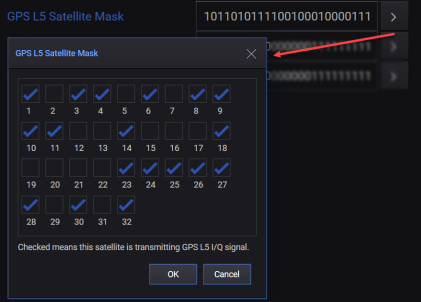
'1' or 'checked' means that the satellite is transmitting L5 signal.
'0' or 'unchecked' means that the satellite is not transmitting L5 signal.
|
SCPI Command |
[:SOURce]:RADio:GNSS:WAVeform:CCARrier:GPS:L5:SATellite:MASK <value> [:SOURce]:RADio:GNSS:WAVeform:CCARrier:GPS:L5:SATellite:MASK? |
|
SCPI Example |
RAD:GNSS:WAV:CCAR:GPS:L5:SAT:MASK '10110101111001000100001111110101' RAD:GNSS:WAV:CCAR:GPS:L5:SAT:MASK? |
|
Preset |
10110101111001000100001111110101 |
|
State Saved |
Yes |
|
Range |
|
|
Initial S/W Revision |
A.18.00 |
Sets which BeiDou satellites are transmitting the B1C signal. You can click the button displayed with this field to edit this setting in the BeiDou B1C Satellite Mask dialog box as shown below.
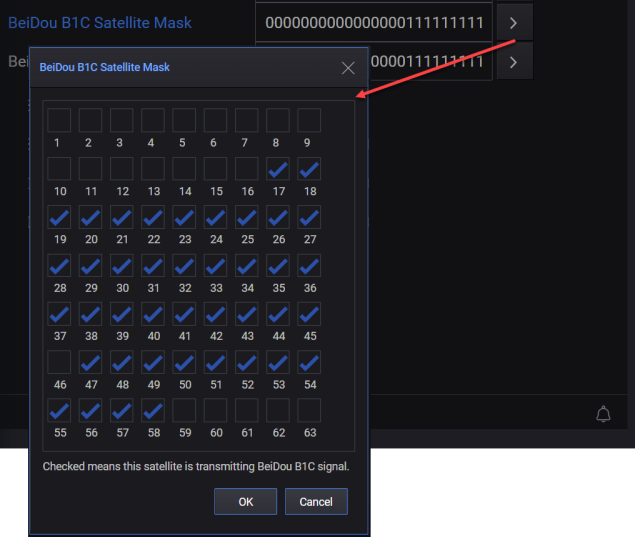
'1' or 'checked' means that the satellite is transmitting B1C signal.
'0' or 'unchecked' means that the satellite is not transmitting B1C signal.
|
SCPI Command |
[:SOURce]:RADio:GNSS:WAVeform:CCARrier:BEIDou:B1C:SATellite:MASK <value> [:SOURce]:RADio:GNSS:WAVeform:CCARrier:BEIDou:B1C:SATellite:MASK? |
|
SCPI Example |
RAD:GNSS:WAV:CCAR:BEID:B1C:SAT:MASK '000000000000000011111111111111111111111111111011111111111100000' RAD:GNSS:WAV:CCAR:BEID:B1C:SAT:MASK? |
|
Preset |
000000000000000011111111111111111111111111111011111111111100000 |
|
State Saved |
Yes |
|
Range |
|
|
Initial S/W Revision |
A.18.00 |
Sets which BeiDou satellites are transmitting the B2a signal. You can click the button displayed with this field to edit this setting in the BeiDou B2a Satellite Mask dialog box as shown below.
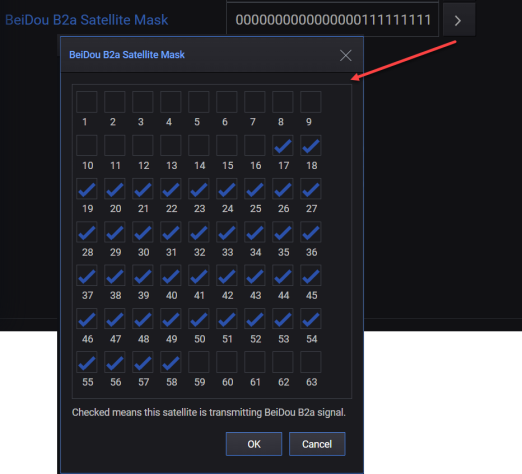
'1' or 'checked' means that the satellite is transmitting B2a signal.
'0' or 'unchecked' means that the satellite is not transmitting B2a signal.
|
SCPI Command |
[:SOURce]:RADio:GNSS:WAVeform:CCARrier:BEIDou:B2A:SATellite:MASK <value> [:SOURce]:RADio:GNSS:WAVeform:CCARrier:BEIDou:B2A:SATellite:MASK? |
|
SCPI Example |
RAD:GNSS:WAV:CCAR:BEID:B2A:SAT:MASK '000000000000000011111111111111111111111111111011111111111100000' RAD:GNSS:WAV:CCAR:BEID:B2A:SAT:MASK? |
|
Preset |
000000000000000011111111111111111111111111111111111111111100000 |
|
State Saved |
Yes |
|
Range |
|
|
Initial S/W Revision |
A.18.00 |
Sets multipath for each satellite. You can click the  button displayed with this setting to access the Multipath dialog that allows you to:
add/delete path(s),
select the constellation, frequency band, and satellite for which you want to set multipath settings.
configure the multipath settings (Delay Offset, Power Offset, and Doppler Shift) for each path that you add.
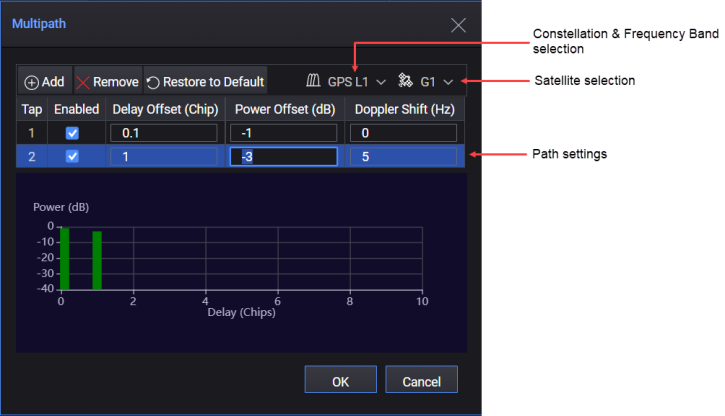
Mutipath Dialog
The settings that you configure in the Multipath dialog are displayed as a string in the GUI. You can also set this string using the SCPI command. This string can be interpreted as follows:
Values in the string are separated by ‘,’.
The first and second section of the string defines the satellite number and frequency band.
The third section is the number of paths. If number of path is not zero, there will be 4*(number of path) sections after these to define four settings for each path.
An example of the string is shown below.
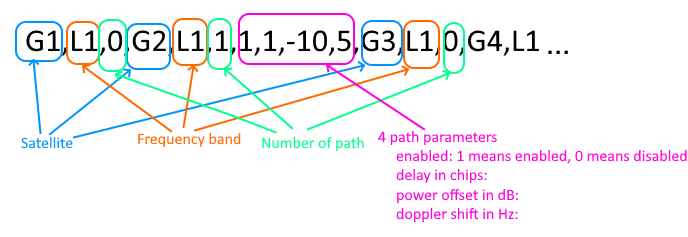
|
SCPI Command |
[:SOURce]:RADio:GNSS:WAVeform:CCARrier:MULTipath <value> [:SOURce]:RADio:GNSS:WAVeform:CCARrier:MULTipath? |
|
SCPI Example |
RAD:GNSS:WAV:CCAR:MULT "G1,L1,0,G2,L1,0,G3,L1,0,G4,L1,0,G5,L1,0,G6,L1,0,G7,L1,0,G8,L1,0,G9,L1,0,G10,L1,0,G11,L1,0,G12,L1,0,G13,L1,0,G14,L1,0,G15,L1,0,G16,L1,0,G17,L1,0,G18,L1,0,G19,L1,0,G20,L1,0,G21,L1,0,G22,L1,0,G23,L1,0,G24,L1,0,G25,L1,0,G26,L1,0,G27,L1,0,G28,L1,0,G29,L1,0,G30,L1,0,G31,L1,0,G32,L1,0,G1,L5,0,G2,L5,0,G3,L5,0,G4,L5,0,G5,L5,0,G6,L5,0,G7,L5,0,G8,L5,0,G9,L5,0,G10,L5,0,G11,L5,0,G12,L5,0,G13,L5,0,G14,L5,0,G15,L5,0,G16,L5,0,G17,L5,0,G18,L5,0,G19,L5,0,G20,L5,0,G21,L5,0,G22,L5,0,G23,L5,0,G24,L5,0,G25,L5,0,G26,L5,0,G27,L5,0,G28,L5,0,G29,L5,0,G30,L5,0,G31,L5,0,G32,L5,0,E1,E1,0,E2,E1,0,E3,E1,0,E4,E1,0,E5,E1,0,E6,E1,0,E7,E1,0,E8,E1,0,E9,E1,0,E10,E1,0,E11,E1,0,E12,E1,0,E13,E1,0,E14,E1,0,E15,E1,0,E16,E1,0,E17,E1,0,E18,E1,0,E19,E1,0,E20,E1,0,E21,E1,0,E22,E1,0,E23,E1,0,E24,E1,0,E25,E1,0,E26,E1,0,E27,E1,0,E28,E1,0,E29,E1,0,E30,E1,0,E31,E1,0,E32,E1,0,E33,E1,0,E34,E1,0,E35,E1,0,E36,E1,0,E37,E1,0,E38,E1,0,E39,E1,0,E40,E1,0,E41,E1,0,E42,E1,0,E43,E1,0,E44,E1,0,E45,E1,0,E46,E1,0,E47,E1,0,E48,E1,0,E49,E1,0,E50,E1,0,E1,E5,0,E2,E5,0,E3,E5,0,E4,E5,0,E5,E5,0,E6,E5,0,E7,E5,0,E8,E5,0,E9,E5,0,E10,E5,0,E11,E5,0,E12,E5,0,E13,E5,0,E14,E5,0,E15,E5,0,E16,E5,0,E17,E5,0,E18,E5,0,E19,E5,0,E20,E5,0,E21,E5,0,E22,E5,0,E23,E5,0,E24,E5,0,E25,E5,0,E26,E5,0,E27,E5,0,E28,E5,0,E29,E5,0,E30,E5,0,E31,E5,0,E32,E5,0,E33,E5,0,E34,E5,0,E35,E5,0,E36,E5,0,E37,E5,0,E38,E5,0,E39,E5,0,E40,E5,0,E41,E5,0,E42,E5,0,E43,E5,0,E44,E5,0,E45,E5,0,E46,E5,0,E47,E5,0,E48,E5,0,E49,E5,0,E50,E5,0,Q193,L1,0,Q194,L1,0,Q195,L1,0,Q196,L1,0,Q197,L1,0,Q198,L1,0,Q199,L1,0,Q200,L1,0,Q201,L1,0,Q202,L1,0,Q203,L1,0,Q204,L1,0,Q205,L1,0,Q206,L1,0,Q193,L5,0,Q194,L5,0,Q195,L5,0,Q196,L5,0,Q197,L5,0,Q198,L5,0,Q199,L5,0,Q200,L5,0,Q201,L5,0,Q202,L5,0,Q203,L5,0,Q204,L5,0,Q205,L5,0,Q206,L5,0,B1,B1I,0,B2,B1I,0,B3,B1I,0,B4,B1I,0,B5,B1I,0,B6,B1I,0,B7,B1I,0,B8,B1I,0,B9,B1I,0,B10,B1I,0,B11,B1I,0,B12,B1I,0,B13,B1I,0,B14,B1I,0,B15,B1I,0,B16,B1I,0,B17,B1I,0,B18,B1I,0,B19,B1I,0,B20,B1I,0,B21,B1I,0,B22,B1I,0,B23,B1I,0,B24,B1I,0,B25,B1I,0,B26,B1I,0,B27,B1I,0,B28,B1I,0,B29,B1I,0,B30,B1I,0,B31,B1I,0,B32,B1I,0,B33,B1I,0,B34,B1I,0,B35,B1I,0,B36,B1I,0,B37,B1I,0,B38,B1I,0,B39,B1I,0,B40,B1I,0,B41,B1I,0,B42,B1I,0,B43,B1I,0,B44,B1I,0,B45,B1I,0,B46,B1I,0,B47,B1I,0,B48,B1I,0,B49,B1I,0,B50,B1I,0,B51,B1I,0,B52,B1I,0,B53,B1I,0,B54,B1I,0,B55,B1I,0,B56,B1I,0,B57,B1I,0,B58,B1I,0,B59,B1I,0,B60,B1I,0,B61,B1I,0,B62,B1I,0,B63,B1I,0,B1,B1C,0,B2,B1C,0,B3,B1C,0,B4,B1C,0,B5,B1C,0,B6,B1C,0,B7,B1C,0,B8,B1C,0,B9,B1C,0,B10,B1C,0,B11,B1C,0,B12,B1C,0,B13,B1C,0,B14,B1C,0,B15,B1C,0,B16,B1C,0,B17,B1C,0,B18,B1C,0,B19,B1C,0,B20,B1C,0,B21,B1C,0,B22,B1C,0,B23,B1C,0,B24,B1C,0,B25,B1C,0,B26,B1C,0,B27,B1C,0,B28,B1C,0,B29,B1C,0,B30,B1C,0,B31,B1C,0,B32,B1C,0,B33,B1C,0,B34,B1C,0,B35,B1C,0,B36,B1C,0,B37,B1C,0,B38,B1C,0,B39,B1C,0,B40,B1C,0,B41,B1C,0,B42,B1C,0,B43,B1C,0,B44,B1C,0,B45,B1C,0,B46,B1C,0,B47,B1C,0,B48,B1C,0,B49,B1C,0,B50,B1C,0,B51,B1C,0,B52,B1C,0,B53,B1C,0,B54,B1C,0,B55,B1C,0,B56,B1C,0,B57,B1C,0,B58,B1C,0,B59,B1C,0,B60,B1C,0,B61,B1C,0,B62,B1C,0,B63,B1C,0,B1,B2a,0,B2,B2a,0,B3,B2a,0,B4,B2a,0,B5,B2a,0,B6,B2a,0,B7,B2a,0,B8,B2a,0,B9,B2a,0,B10,B2a,0,B11,B2a,0,B12,B2a,0,B13,B2a,0,B14,B2a,0,B15,B2a,0,B16,B2a,0,B17,B2a,0,B18,B2a,0,B19,B2a,0,B20,B2a,0,B21,B2a,0,B22,B2a,0,B23,B2a,0,B24,B2a,0,B25,B2a,0,B26,B2a,0,B27,B2a,0,B28,B2a,0,B29,B2a,0,B30,B2a,0,B31,B2a,0,B32,B2a,0,B33,B2a,0,B34,B2a,0,B35,B2a,0,B36,B2a,0,B37,B2a,0,B38,B2a,0,B39,B2a,0,B40,B2a,0,B41,B2a,0,B42,B2a,0,B43,B2a,0,B44,B2a,0,B45,B2a,0,B46,B2a,0,B47,B2a,0,B48,B2a,0,B49,B2a,0,B50,B2a,0,B51,B2a,0,B52,B2a,0,B53,B2a,0,B54,B2a,0,B55,B2a,0,B56,B2a,0,B57,B2a,0,B58,B2a,0,B59,B2a,0,B60,B2a,0,B61,B2a,0,B62,B2a,0,B63,B2a,0,R1,L1,0,R2,L1,0,R3,L1,0,R4,L1,0,R5,L1,0,R6,L1,0,R7,L1,0,R8,L1,0,R9,L1,0,R10,L1,0,R11,L1,0,R12,L1,0,R13,L1,0,R14,L1,0,R15,L1,0,R16,L1,0,R17,L1,0,R18,L1,0,R19,L1,0,R20,L1,0,R21,L1,0,R22,L1,0,R23,L1,0,R24,L1,0,I1,L5,0,I2,L5,0,I3,L5,0,I4,L5,0,I5,L5,0,I6,L5,0,I7,L5,0,I8,L5,0,I9,L5,0,I10,L5,0,I11,L5,0,I12,L5,0,I13,L5,0,I14,L5,0" RAD:GNSS:WAV:CCAR:MULT? |
|
Preset |
G1,L1,0,G2,L1,0,G3,L1,0,G4,L1,0,G5,L1,0,G6,L1,0,G7,L1,0,G8,L1,0,G9,L1,0,G10,L1,0,G11,L1,0,G12,L1,0,G13,L1,0,G14,L1,0,G15,L1,0,G16,L1,0,G17,L1,0,G18,L1,0,G19,L1,0,G20,L1,0,G21,L1,0,G22,L1,0,G23,L1,0,G24,L1,0,G25,L1,0,G26,L1,0,G27,L1,0,G28,L1,0,G29,L1,0,G30,L1,0,G31,L1,0,G32,L1,0,G1,L5,0,G2,L5,0,G3,L5,0,G4,L5,0,G5,L5,0,G6,L5,0,G7,L5,0,G8,L5,0,G9,L5,0,G10,L5,0,G11,L5,0,G12,L5,0,G13,L5,0,G14,L5,0,G15,L5,0,G16,L5,0,G17,L5,0,G18,L5,0,G19,L5,0,G20,L5,0,G21,L5,0,G22,L5,0,G23,L5,0,G24,L5,0,G25,L5,0,G26,L5,0,G27,L5,0,G28,L5,0,G29,L5,0,G30,L5,0,G31,L5,0,G32,L5,0,E1,E1,0,E2,E1,0,E3,E1,0,E4,E1,0,E5,E1,0,E6,E1,0,E7,E1,0,E8,E1,0,E9,E1,0,E10,E1,0,E11,E1,0,E12,E1,0,E13,E1,0,E14,E1,0,E15,E1,0,E16,E1,0,E17,E1,0,E18,E1,0,E19,E1,0,E20,E1,0,E21,E1,0,E22,E1,0,E23,E1,0,E24,E1,0,E25,E1,0,E26,E1,0,E27,E1,0,E28,E1,0,E29,E1,0,E30,E1,0,E31,E1,0,E32,E1,0,E33,E1,0,E34,E1,0,E35,E1,0,E36,E1,0,E37,E1,0,E38,E1,0,E39,E1,0,E40,E1,0,E41,E1,0,E42,E1,0,E43,E1,0,E44,E1,0,E45,E1,0,E46,E1,0,E47,E1,0,E48,E1,0,E49,E1,0,E50,E1,0,E1,E5,0,E2,E5,0,E3,E5,0,E4,E5,0,E5,E5,0,E6,E5,0,E7,E5,0,E8,E5,0,E9,E5,0,E10,E5,0,E11,E5,0,E12,E5,0,E13,E5,0,E14,E5,0,E15,E5,0,E16,E5,0,E17,E5,0,E18,E5,0,E19,E5,0,E20,E5,0,E21,E5,0,E22,E5,0,E23,E5,0,E24,E5,0,E25,E5,0,E26,E5,0,E27,E5,0,E28,E5,0,E29,E5,0,E30,E5,0,E31,E5,0,E32,E5,0,E33,E5,0,E34,E5,0,E35,E5,0,E36,E5,0,E37,E5,0,E38,E5,0,E39,E5,0,E40,E5,0,E41,E5,0,E42,E5,0,E43,E5,0,E44,E5,0,E45,E5,0,E46,E5,0,E47,E5,0,E48,E5,0,E49,E5,0,E50,E5,0,Q193,L1,0,Q194,L1,0,Q195,L1,0,Q196,L1,0,Q197,L1,0,Q198,L1,0,Q199,L1,0,Q200,L1,0,Q201,L1,0,Q202,L1,0,Q203,L1,0,Q204,L1,0,Q205,L1,0,Q206,L1,0,Q193,L5,0,Q194,L5,0,Q195,L5,0,Q196,L5,0,Q197,L5,0,Q198,L5,0,Q199,L5,0,Q200,L5,0,Q201,L5,0,Q202,L5,0,Q203,L5,0,Q204,L5,0,Q205,L5,0,Q206,L5,0,B1,B1I,0,B2,B1I,0,B3,B1I,0,B4,B1I,0,B5,B1I,0,B6,B1I,0,B7,B1I,0,B8,B1I,0,B9,B1I,0,B10,B1I,0,B11,B1I,0,B12,B1I,0,B13,B1I,0,B14,B1I,0,B15,B1I,0,B16,B1I,0,B17,B1I,0,B18,B1I,0,B19,B1I,0,B20,B1I,0,B21,B1I,0,B22,B1I,0,B23,B1I,0,B24,B1I,0,B25,B1I,0,B26,B1I,0,B27,B1I,0,B28,B1I,0,B29,B1I,0,B30,B1I,0,B31,B1I,0,B32,B1I,0,B33,B1I,0,B34,B1I,0,B35,B1I,0,B36,B1I,0,B37,B1I,0,B38,B1I,0,B39,B1I,0,B40,B1I,0,B41,B1I,0,B42,B1I,0,B43,B1I,0,B44,B1I,0,B45,B1I,0,B46,B1I,0,B47,B1I,0,B48,B1I,0,B49,B1I,0,B50,B1I,0,B51,B1I,0,B52,B1I,0,B53,B1I,0,B54,B1I,0,B55,B1I,0,B56,B1I,0,B57,B1I,0,B58,B1I,0,B59,B1I,0,B60,B1I,0,B61,B1I,0,B62,B1I,0,B63,B1I,0,B1,B1C,0,B2,B1C,0,B3,B1C,0,B4,B1C,0,B5,B1C,0,B6,B1C,0,B7,B1C,0,B8,B1C,0,B9,B1C,0,B10,B1C,0,B11,B1C,0,B12,B1C,0,B13,B1C,0,B14,B1C,0,B15,B1C,0,B16,B1C,0,B17,B1C,0,B18,B1C,0,B19,B1C,0,B20,B1C,0,B21,B1C,0,B22,B1C,0,B23,B1C,0,B24,B1C,0,B25,B1C,0,B26,B1C,0,B27,B1C,0,B28,B1C,0,B29,B1C,0,B30,B1C,0,B31,B1C,0,B32,B1C,0,B33,B1C,0,B34,B1C,0,B35,B1C,0,B36,B1C,0,B37,B1C,0,B38,B1C,0,B39,B1C,0,B40,B1C,0,B41,B1C,0,B42,B1C,0,B43,B1C,0,B44,B1C,0,B45,B1C,0,B46,B1C,0,B47,B1C,0,B48,B1C,0,B49,B1C,0,B50,B1C,0,B51,B1C,0,B52,B1C,0,B53,B1C,0,B54,B1C,0,B55,B1C,0,B56,B1C,0,B57,B1C,0,B58,B1C,0,B59,B1C,0,B60,B1C,0,B61,B1C,0,B62,B1C,0,B63,B1C,0,B1,B2a,0,B2,B2a,0,B3,B2a,0,B4,B2a,0,B5,B2a,0,B6,B2a,0,B7,B2a,0,B8,B2a,0,B9,B2a,0,B10,B2a,0,B11,B2a,0,B12,B2a,0,B13,B2a,0,B14,B2a,0,B15,B2a,0,B16,B2a,0,B17,B2a,0,B18,B2a,0,B19,B2a,0,B20,B2a,0,B21,B2a,0,B22,B2a,0,B23,B2a,0,B24,B2a,0,B25,B2a,0,B26,B2a,0,B27,B2a,0,B28,B2a,0,B29,B2a,0,B30,B2a,0,B31,B2a,0,B32,B2a,0,B33,B2a,0,B34,B2a,0,B35,B2a,0,B36,B2a,0,B37,B2a,0,B38,B2a,0,B39,B2a,0,B40,B2a,0,B41,B2a,0,B42,B2a,0,B43,B2a,0,B44,B2a,0,B45,B2a,0,B46,B2a,0,B47,B2a,0,B48,B2a,0,B49,B2a,0,B50,B2a,0,B51,B2a,0,B52,B2a,0,B53,B2a,0,B54,B2a,0,B55,B2a,0,B56,B2a,0,B57,B2a,0,B58,B2a,0,B59,B2a,0,B60,B2a,0,B61,B2a,0,B62,B2a,0,B63,B2a,0,R1,L1,0,R2,L1,0,R3,L1,0,R4,L1,0,R5,L1,0,R6,L1,0,R7,L1,0,R8,L1,0,R9,L1,0,R10,L1,0,R11,L1,0,R12,L1,0,R13,L1,0,R14,L1,0,R15,L1,0,R16,L1,0,R17,L1,0,R18,L1,0,R19,L1,0,R20,L1,0,R21,L1,0,R22,L1,0,R23,L1,0,R24,L1,0,I1,L5,0,I2,L5,0,I3,L5,0,I4,L5,0,I5,L5,0,I6,L5,0,I7,L5,0,I8,L5,0,I9,L5,0,I10,L5,0,I11,L5,0,I12,L5,0,I13,L5,0,I14,L5,0 |
|
State Saved |
Yes |
|
Initial S/W Revision |
A.19.01 |
The parameters in the Scenario Settings tab are further grouped into the following three tabs.
General Settings
Orbit Settings
Atmosphere Models
Select the scenario type to be generated.
If you select Static, static scenarios will be generated for a static GPS receiver with fixed longitude, latitude, and altitude.
If you select Dynamic, dynamic scenarios will be generated for a moving GPS receiver based on the provided trajectory data.
|
SCPI Command |
[:SOURce]:RADio:GNSS:WAVeform:CCARrier:STYPe STATic|UTFile|TGSettings [:SOURce]:RADio:GNSS:WAVeform:CCARrier:STYPe? |
|
SCPI Example |
RADio:GNSS:WAVeform:CCAR:STYP STAT RADio:GNSS:WAVeform:CCAR:STYP? |
|
Preset |
STAT |
|
State Saved |
Yes |
|
Range |
STATic|UTFile|TGSettings |
|
Initial S/W Revision |
A.18.00 |
Positive values are for the East and negative values are for the West. Inputing a negative value can change the suffix from W to E or from E to W.
This setting is displayed and valid only when Scenario Type is Static.
|
SCPI Command |
[:SOURce]:RADio:GNSS:WAVeform:CCARrier:LONGitude <value> [:SOURce]:RADio:GNSS:WAVeform:CCARrier:LONGitude? |
|
SCPI Example |
RADio:GNSS:WAVeform:CCAR:LONG 116 RADio:GNSS:WAVeform:CCAR:LONG? |
|
Preset |
122.711557 |
|
State Saved |
Yes |
|
Range |
-180 to 180 |
|
Initial S/W Revision |
A.16.00 |
Positive values are for the North and negative values are for the South. Inputing a negative value can change the suffix from S to N or from N to S.
This setting is displayed and valid only when Scenario Type is Static.
|
SCPI Command |
[:SOURce]:RADio:GNSS:WAVeform:CCARrier:LATitude <value> [:SOURce]:RADio:GNSS:WAVeform:CCARrier:LATitude? |
|
SCPI Example |
RADio:GNSS:WAVeform:CCAR:LAT 0 RADio:GNSS:WAVeform:CCAR:LAT? |
|
Preset |
38.48181 |
|
State Saved |
Yes |
|
Range |
-90 to 90 |
|
Initial S/W Revision |
A.16.00 |
This setting is displayed and valid only when Scenario Type is Static.
|
SCPI Command |
[:SOURce]:RADio:GNSS:WAVeform:CCARrier:ALTitude <value> [:SOURce]:RADio:GNSS:WAVeform:CCARrier:ALTitude? |
|
SCPI Example |
RADio:GNSS:WAVeform:CCAR:ALT 100 RADio:GNSS:WAVeform:CCAR:ALT? |
|
Preset |
170 |
|
State Saved |
Yes |
|
Range |
-100 to 18828 |
|
Initial S/W Revision |
A.16.00 |
Select a trajectory file for dynamic scenario creation.
This file can be a:
NMEA message file, which contains GGA messages. The sampling rate of input NMEA message file should be 1 Hz or higher. The minimum sampling points in the file is 3.
csv file containing one position per line. Each line has latitude, longitude and altitude separated by a comma.
This setting is displayed and is valid only when Scenario Type is User Trajectory file.
|
SCPI Command |
[:SOURce]:RADio:GNSS:WAVeform:CCARrier:NMEA:FILE <value> [:SOURce]:RADio:GNSS:WAVeform:CCARrier:NMEA:FILE? |
|
SCPI Example |
RADio:GNSS:WAVeform:CCAR:NMEA:FILE "c:\temp\test.gga" RADio:GNSS:WAVeform:CCAR:NMEA:FILE? |
|
Preset |
System demo file |
|
State Saved |
Yes |
|
Initial S/W Revision |
A.16.00 |
Select the mode of importing NMEA data into scenario generation. When the NMEA message file reaches the end, you can choose to:
hold at the last location
or make an auto rewind to the beginning
or make a round trip back.
This setting is displayed and valid only when Scenario Type is Dynamic.
|
SCPI Command |
[:SOURce]:RADio:GNSS:WAVeform:CCARrier:TRAJectory:MODE REWind| HOLD|ROUNdtrip [:SOURce]:RADio:GNSS:WAVeform:CCARrier:TRAJectory:MODE? |
|
SCPI Example |
RADio:GNSS:WAVeform:CCAR:TRAJ:MODE ROUN RADio:GNSS:WAVeform:CCAR:TRAJ:MODE? |
|
Preset |
REWind |
|
State Saved |
Yes |
|
Range |
REWind| HOLD|ROUNdtrip |
|
Initial S/W Revision |
A.16.00 |
Sets the start date and GPS time for the scenario simulation. Start GPS Time must be later than 1980-01-06 00:00:00. It is automatically updated by Time of Application (TOA) information in the selected almanac file.
For dynamic scenarios, the start time is automatically updated by the first GGA message in the selected NMEA file.
You can ignore the auto-updated date time and manually enter your own value, but it is recommended to use the same date as the almanac date and make the start time on a 6 second boundary.
Using the Start GPS Time dialog or SCPI commands, you can set the Start GPS Time in the following two ways.
Set Date and Time
Set Week and TOW. Here, Week is the week number from 1980-01-06 and TOW is the number of seconds from the start of the current week.
Whichever way you use, the specified set of values result in automatic calculation of the other set of values. For instance, if you set the Date and Time values, then the Week and TOW values are automatically calculated.
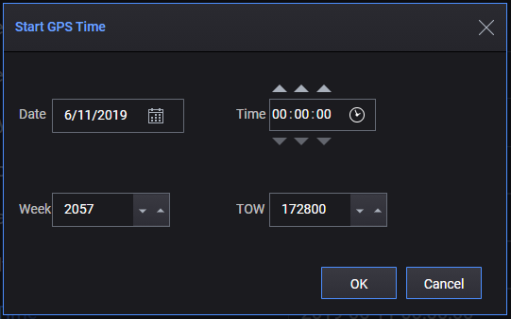
The format of Start GPS Date and Time is 'YYYY-MM-DD hh:mm:ss'.
|
SCPI Command |
[:SOURce]:RADio:GNSS:WAVeform:CCARrier:STARt:GPS:DTIMe <value> [:SOURce]:RADio:GNSS:WAVeform:CCARrier:STARt:GPS:DTIMe? |
|
SCPI Example |
RADio:GNSS:WAVeform:CCAR:STAR:GPS:DTIM "2024-01-05 12:00:00" RADio:GNSS:WAVeform:CCAR:STAR:GPS:DTIM? |
|
State Saved |
Yes |
|
Initial S/W Revision |
A.16.00 |
Sets the week for Start GPS Time. This is the week number from 1980-01-06.
You can either set "Start GPS Time" or "Start GPS Time (Week)" and "Start GPS Time (TOW)".
|
SCPI Command |
[:SOURce]:RADio:GNSS:WAVeform:CCARrier:STARt:GPS:WEEK [:SOURce]:RADio:GNSS:WAVeform:CCARrier:STARt:GPS:WEEK? |
|
SCPI Example |
RADio:GNSS:WAVeform:CCAR:STAR:GPS:WEEK 2057 RADio:GNSS:WAVeform:CCAR:STAR:GPS:WEEK? |
| Preset | 2347 |
| Range | 0 to 8192 |
|
State Saved |
Yes |
|
Initial S/W Revision |
A.16.00 |
Sets the Time of Week (TOW) for Start GPS Time. This is the number of seconds from the start of the current week.
You can either set "Start GPS Time" or "Start GPS Time (Week)" and "Start GPS Time (TOW)".
|
SCPI Command |
[:SOURce]:RADio:GNSS:WAVeform:CCARrier:STARt:GPS:TOW [:SOURce]:RADio:GNSS:WAVeform:CCARrier:STARt:GPS:TOW? |
|
SCPI Example |
RADio:GNSS:WAVeform:CCAR:STAR:GPS:TOW 0 RADio:GNSS:WAVeform:CCAR:STAR:GPS:TOW? |
| Preset | 259200 |
| Range | 0 to 604800 |
|
State Saved |
Yes |
|
Initial S/W Revision |
A.16.00 |
Selects whether or not to use the official leap seconds.
|
SCPI Command |
[:SOURce]:RADio:GNSS:WAVeform:CCARrier:LSEConds:MODel OFFicial|UDEFined [:SOURce]:RADio:GNSS:WAVeform:CCARrier:LSEConds:MODel? |
|
SCPI Example |
RAD:GNSS:WAV:CCAR:LSEC:MOD OFF RAD:GNSS:WAV:CCAR:LSEC:MOD? |
|
Preset |
OFFicial |
|
State Saved |
Yes |
|
Range |
OFFicial|UDEFined |
|
Initial S/W Revision |
A.18.00 |
Sets the leap seconds list that is used instead of official leap seconds. This setting is applicable only when Leap Second Model is set to "User Defined".
You can click the button displayed with this field to edit this setting in the User Leap Seconds dialog box as shown below.
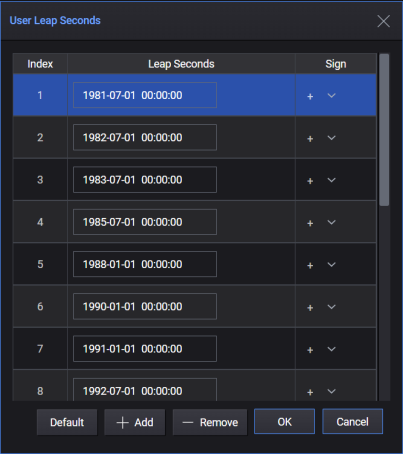
|
SCPI Command |
[:SOURce]:RADio:GNSS:WAVeform:CCARrier:LSEConds:MODel:PARameters <value> [:SOURce]:RADio:GNSS:WAVeform:CCARrier:LSEConds:MODel:PARameters? |
|
SCPI Example |
RAD:GNSS:WAV:CCAR:LSEC:MOD:PAR "18 Leap Seconds Defined;1981-07-01 00:00:00,p;1982-07-01 00:00:00,p;1983-07-01 00:00:00,p;1985-07-01 00:00:00,p;1988-01-01 00:00:00,p;1990-01-01 00:00:00,p;1991-01-01 00:00:00,p;1992-07-01 00:00:00,p;1993-07-01 00:00:00,p;1994-07-01 00:00:00,p;1996-01-01 00:00:00,p;1997-07-01 00:00:00,p;1999-01-01 00:00:00,p;2006-01-01 00:00:00,p;2009-01-01 00:00:00,p;2012-07-01 00:00:00,p;2015-07-01 00:00:00,p;2017-01-01 00:00:00,p" RADio:GNSS:WAV:CCAR:LSEC:MOD:PAR? |
|
Preset |
"18 Leap Seconds Defined;1981-07-01 00:00:00,p;1982-07-01 00:00:00,p;1983-07-01 00:00:00,p;1985-07-01 00:00:00,p;1988-01-01 00:00:00,p;1990-01-01 00:00:00,p;1991-01-01 00:00:00,p;1992-07-01 00:00:00,p;1993-07-01 00:00:00,p;1994-07-01 00:00:00,p;1996-01-01 00:00:00,p;1997-07-01 00:00:00,p;1999-01-01 00:00:00,p;2006-01-01 00:00:00,p;2009-01-01 00:00:00,p;2012-07-01 00:00:00,p;2015-07-01 00:00:00,p;2017-01-01 00:00:00,p" |
|
State Saved |
Yes |
|
Range |
|
|
Initial S/W Revision |
A.18.00 |
Enter the angle above the horizon which constitutes valid satellite data. The software only recognizes satellites that appear above the mask angle. Satellites below this angle will not be used. Increasing this angle will reduce the number of visible satellites in the generated scenario.
|
SCPI Command |
[:SOURce]:RADio:GNSS:WAVeform:CCARrier:EMANgle <value> [:SOURce]:RADio:GNSS:WAVeform:CCARrier:EMANgle? |
|
SCPI Example |
RAD:GNSS:WAV:CCAR:EMAN 5 RAD:GNSS:WAV:CCAR:EMAN? |
|
Preset |
5 |
|
State Saved |
Yes |
|
Range |
0 to 30 |
|
Initial S/W Revision |
A.16.00 |
Select which Orbit Data Type to be used to calculate satellite position and generate ephemeris.
|
SCPI Command |
[:SOURce]:RADio:GNSS:WAVeform:CCARrier:ORBit:TYPE ALManac| RINex|MRINex [:SOURce]:RADio:GNSS:WAVeform:CCARrier:ORBit:TYPE? |
|
SCPI Example |
RADio:GNSS:WAVeform:CCAR:ORB:TYPE ALM RADio:GNSS:WAVeform:CCAR:ORB:TYPE? |
|
Preset |
ALManac |
|
State Saved |
Yes |
|
Range |
ALManac|RINex|MRINex |
|
Initial S/W Revision |
A.18.00 |
Select the GPS almanac data file in YUMA format for scenario creation.
This setting is applicable and visible only when the Orbit Data Type is set to Almanac.
|
SCPI Command |
[:SOURce]:RADio:GNSS:WAVeform:CCARrier:GPS:ALManac <value> [:SOURce]:RADio:GNSS:WAVeform:CCARrier:GPS:ALManac? |
|
SCPI Example |
RADio:GNSS:WAVeform:CCAR:GPS:ALM "c:\temp\test.alm" RADio:GNSS:WAVeform:CCAR:GPS:ALM? |
|
Preset |
System demo file |
|
State Saved |
Yes |
|
Initial S/W Revision |
A.16.00 |
Select Galileo almanac data file in XML format for scenario creation.
This setting is applicable and visible only when the Orbit Data Type is set to Almanac.
|
SCPI Command |
[:SOURce]:RADio:GNSS:WAVeform:CCARrier:GALileo:ALManac <value> [:SOURce]:RADio:GNSS:WAVeform:CCARrier:GALileo:ALManac? |
|
SCPI Example |
RADio:GNSS:WAVeform:CCAR:GAL:ALM "c:\temp\test.xml" RADio:GNSS:WAVeform:CCAR:GAL:ALM? |
|
Preset |
System demo file |
|
State Saved |
Yes |
|
Initial S/W Revision |
A.16.00 |
Select BeiDou almanac data file in YUMA format for scenario creation.
This setting is applicable and visible only when the Orbit Data Type is set to Almanac.
|
SCPI Command |
[:SOURce]:RADio:GNSS:WAVeform:CCARrier:BEIDou:ALManac <value> [:SOURce]:RADio:GNSS:WAVeform:CCARrier:BEIDou:ALManac? |
|
SCPI Example |
RADio:GNSS:WAVeform:CCAR:BEID:ALM "c:\temp\test.alm" RADio:GNSS:WAVeform:CCAR:BEID:ALM? |
|
Preset |
System demo file |
|
State Saved |
Yes |
|
Initial S/W Revision |
A.18.00 |
Select QZSS almanac data file in YUMA format for scenario creation.
This setting is applicable and visible only when the Orbit Data Type is set to Almanac.
|
SCPI Command |
[:SOURce]:RADio:GNSS:WAVeform:CCARrier:QZSS:ALManac <value> [:SOURce]:RADio:GNSS:WAVeform:CCARrier:QZSS:ALManac? |
|
SCPI Example |
RADio:GNSS:WAVeform:CCAR:QZSS:ALM "c:\temp\test.alm" RADio:GNSS:WAVeform:CCAR:QZSS:ALM? |
|
Preset |
System demo file |
|
State Saved |
Yes |
|
Initial S/W Revision |
A.19.00 |
Select GLONASS almanac data file in AGL format for scenario creation.
This setting is applicable and visible only when the Orbit Data Type is set to Almanac.
|
SCPI Command |
[:SOURce]:RADio:GNSS:WAVeform:CCARrier:GLONass:ALManac <value> [:SOURce]:RADio:GNSS:WAVeform:CCARrier:GLONass:ALManac? |
|
SCPI Example |
RADio:GNSS:WAVeform:CCAR:GLON:ALM "c:\temp\test.agl" RADio:GNSS:WAVeform:CCAR:GLON:ALM? |
|
Preset |
System demo file |
|
State Saved |
Yes |
|
Initial S/W Revision |
A.19.00 |
Select NavIC almanac data file in YUMA format for scenario creation.
This setting is applicable and visible only when the Orbit Data Type is set to Almanac.
|
SCPI Command |
[:SOURce]:RADio:GNSS:WAVeform:CCARrier:NAVic:ALManac <value> [:SOURce]:RADio:GNSS:WAVeform:CCARrier:NAVic:ALManac? |
|
SCPI Example |
RADio:GNSS:WAVeform:CCAR:NAV:ALM "c:\temp\test.alm" RADio:GNSS:WAVeform:CCAR:NAV:ALM? |
|
Preset |
System demo file |
|
State Saved |
Yes |
|
Initial S/W Revision |
A.19.00 |
Select GPS RINEX file with version no less than 3.0 for scenario creation. The file name always ends with "_GN.rnx".
This setting is applicable and visible only when the Orbit Data Type is set to RINEX.
|
SCPI Command |
[:SOURce]:RADio:GNSS:WAVeform:CCARrier:GPS:RINex <value> [:SOURce]:RADio:GNSS:WAVeform:CCARrier:GPS:RINex? |
|
SCPI Example |
RADio:GNSS:WAVeform:CCAR:GPS:RIN "c:\temp\test.rnx" RADio:GNSS:WAVeform:CCAR:GPS:RIN? |
|
Preset |
System demo file |
|
State Saved |
Yes |
|
Initial S/W Revision |
A.18.00 |
Select Galileo RINEX file with version no less than 3.0 for scenario creation. The file name always ends with "_EN.rnx".
This setting is applicable and visible only when the Orbit Data Type is set to RINEX.
|
SCPI Command |
[:SOURce]:RADio:GNSS:WAVeform:CCARrier:GALileo:RINex <value> [:SOURce]:RADio:GNSS:WAVeform:CCARrier:GALileo:RINex? |
|
SCPI Example |
RADio:GNSS:WAVeform:CCAR:GAL:RIN "c:\temp\test.rnx" RADio:GNSS:WAVeform:CCAR:GAL:RIN? |
|
Preset |
System demo file |
|
State Saved |
Yes |
|
Initial S/W Revision |
A.18.00 |
Select BeiDou RINEX file with version no less than 3.0 for scenario creation. The file name always ends with "_CN.rnx".
This setting is applicable and visible only when the Orbit Data Type is set to RINEX.
|
SCPI Command |
[:SOURce]:RADio:GNSS:WAVeform:CCARrier:BEIDou:RINex <value> [:SOURce]:RADio:GNSS:WAVeform:CCARrier:BEIDou:RINex? |
|
SCPI Example |
RAD:GNSS:WAV:CCAR:BEID:RIN "c:\temp\test.rnx" RAD:GNSS:WAV:CCAR:BEID:RIN? |
|
Preset |
System demo file |
|
State Saved |
Yes |
|
Initial S/W Revision |
A.18.00 |
Select Mixed RINEX file with version no less than 3.0 for scenario creation. The file name always ends with “_MN.rnx”.
This setting is applicable and visible only when the Orbit Data Type is set to Mixed RINEX.
|
SCPI Command |
[:SOURce]:RADio:GNSS:WAVeform:CCARrier:MIXed:RINex <value> [:SOURce]:RADio:GNSS:WAVeform:CCARrier:MIXed:RINex? |
|
SCPI Example |
RAD:GNSS:WAV:CCAR:MIX:RIN "c:\temp\test_MN.rnx" RAD:GNSS:WAV:CCAR:MIX:RIN? |
|
Preset |
System demo file |
|
State Saved |
Yes |
|
Initial S/W Revision |
A.18.00 |
Select which GPS navigation message type is to be used in RINEX. This setting is read-only because only "LNAV (L1 C/A)" is supported.
This setting is applicable and visible only when the Orbit Data Type is set to RINEX or Mixed RINEX.
|
SCPI Command |
[:SOURce]:RADio:GNSS:WAVeform:CCARrier:GPS:NAV? |
|
SCPI Example |
RAD:GNSS:WAV:CCAR:GPS:NAV? |
|
Preset |
LNAV |
|
State Saved |
Yes |
|
Initial S/W Revision |
A.18.00 |
Select which BeiDou navigation message type is to be used in RINEX. This setting is read-only because only "D1/D2 (B1I)" is supported.
This setting is applicable and visible only when the Orbit Data Type is set to RINEX or Mixed RINEX.
|
SCPI Command |
[:SOURce]:RADio:GNSS:WAVeform:CCARrier:BEIDou:NAV? |
|
SCPI Example |
RAD:GNSS:WAV:CCAR:BEID:NAV? |
|
Preset |
D1D2 |
|
State Saved |
Yes |
|
Initial S/W Revision |
A.18.00 |
Select QZSS RINEX file with version no less than 3.0 for scenario creation. The file name always ends with "_JN.rnx".
This setting is applicable and visible only when the Orbit Data Type is set to RINEX.
|
SCPI Command |
[:SOURce]:RADio:GNSS:WAVeform:CCARrier:QZSS:RINex <value> [:SOURce]:RADio:GNSS:WAVeform:CCARrier:QZSS:RINex? |
|
SCPI Example |
RAD:GNSS:WAV:CCAR:QZSS:RIN "c:\temp\test.rnx" RAD:GNSS:WAV:CCAR:QZSS:RIN? |
|
Preset |
System demo file |
|
State Saved |
Yes |
|
Initial S/W Revision |
A.19.00 |
Select GLONASS RINEX file with version no less than 3.0 for scenario creation. The file name always ends with "_RN.rnx".
This setting is applicable and visible only when the Orbit Data Type is set to RINEX.
|
SCPI Command |
[:SOURce]:RADio:GNSS:WAVeform:CCARrier:GLONass:RINex <value> [:SOURce]:RADio:GNSS:WAVeform:CCARrier:GLONass:RINex? |
|
SCPI Example |
RAD:GNSS:WAV:CCAR:GLON:RIN "c:\temp\test.rnx" RAD:GNSS:WAV:CCAR:GLON:RIN? |
|
Preset |
System demo file |
|
State Saved |
Yes |
|
Initial S/W Revision |
A.19.00 |
Select NavIC RINEX file with version no less than 3.0 for scenario creation. The file name always ends with "_IN.rnx".
This setting is applicable and visible only when the Orbit Data Type is set to RINEX.
|
SCPI Command |
[:SOURce]:RADio:GNSS:WAVeform:CCARrier:NAVic:RINex <value> [:SOURce]:RADio:GNSS:WAVeform:CCARrier:NAVic:RINex? |
|
SCPI Example |
RAD:GNSS:WAV:CCAR:NAV:RIN "c:\temp\test.rnx" RAD:GNSS:WAV:CCAR:NAV:RIN? |
|
Preset |
System demo file |
|
State Saved |
Yes |
|
Initial S/W Revision |
A.19.00 |
Select the troposphere model applied to satellite signals in the generated scenario.
|
SCPI Command |
[:SOURce]:RADio:GNSS:WAVeform:CCARrier:TROPosphere:MODel NONE|NATO|HOPField|SAAStamoinen|UNB3|WAAS|ALTShuler [:SOURce]:RADio:GNSS:WAVeform:CCARrier:TROPosphere:MODel? |
|
SCPI Example |
RADio:GNSS:WAVeform:CCAR:TROP:MOD NATO RADio:GNSS:WAVeform:CCAR:TROP:MOD? |
|
Preset |
NATO |
|
State Saved |
Yes |
|
Range |
NONE|NATO|HOPField|SAAStamoinen|UNB3|WAAS|ALTShuler |
|
Initial S/W Revision |
A.16.00 |
Select the Ionosphere model applied to satellite signals in the generated scenario.
|
SCPI Command |
[:SOURce]:RADio:GNSS:WAVeform:CCARrier:IONosphere:MODel NONE|KLOBuchar [:SOURce]:RADio:GNSS:WAVeform:CCARrier:IONosphere:MODel? |
|
SCPI Example |
RADio:GNSS:WAVeform:CCAR:ION:MOD KLOB RADio:GNSS:WAVeform:CCAR:ION:MOD? |
|
Preset |
KLOB |
|
State Saved |
Yes |
|
Range |
NONE|KLOBuchar |
|
Initial S/W Revision |
A.16.00 |
Select the Ionosphere model applied to Galileo satellite signals in the generated scenario.
|
SCPI Command |
[:SOURce]:RADio:GNSS:WAVeform:CCARrier:GALileo:IONosphere:MODel NONE|KLOBuchar|NEQuick [:SOURce]:RADio:GNSS:WAVeform:CCARrier:GALileo:IONosphere:MODel? |
|
SCPI Example |
RADio:GNSS:WAVeform:CCAR:GAL:ION:MOD KLOB RADio:GNSS:WAVeform:CCAR:GAL:ION:MOD? |
|
Preset |
NEQuick |
|
State Saved |
Yes |
|
Range |
NONE|KLOBuchar|NEQuick |
|
Initial S/W Revision |
A.18.00 |
Select the Ionosphere model applied to BeiDou satellite signals in the generated scenario.
|
SCPI Command |
[:SOURce]:RADio:GNSS:WAVeform:CCARrier:BEIDou:IONosphere:MODel NONE|KLOBuchar|BDGim [:SOURce]:RADio:GNSS:WAVeform:CCARrier:BEIDou:IONosphere:MODel? |
|
SCPI Example |
RADio:GNSS:WAVeform:CCAR:BEID:ION:MOD KLOB RADio:GNSS:WAVeform:CCAR: BEID:ION:MOD? |
|
Preset |
KLOBuchar |
|
State Saved |
Yes |
|
Range |
NONE|KLOBuchar|BDGim |
|
Initial S/W Revision |
A.18.00 |
Select the Ionosphere model applied to QZSS satellite signals in the generated scenario.
|
SCPI Command |
[:SOURce]:RADio:GNSS:WAVeform:CCARrier:QZSS:IONosphere:MODel NONE|KLOBuchar [:SOURce]:RADio:GNSS:WAVeform:CCARrier:QZSS:IONosphere:MODel? |
|
SCPI Example |
RADio:GNSS:WAVeform:CCAR:QZSS:ION:MOD KLOB RADio:GNSS:WAVeform:CCAR:QZSS:ION:MOD? |
|
Preset |
KLOB |
|
State Saved |
Yes |
|
Range |
NONE|KLOBuchar |
|
Initial S/W Revision |
A.19.00 |
Select the Ionosphere model applied to GLONASS satellite signals in the generated scenario.
|
SCPI Command |
[:SOURce]:RADio:GNSS:WAVeform:CCARrier:GLONass:IONosphere:MODel NONE|KLOBuchar [:SOURce]:RADio:GNSS:WAVeform:CCARrier:GLONass:IONosphere:MODel? |
|
SCPI Example |
RADio:GNSS:WAVeform:CCAR:GLONass:ION:MOD KLOB RADio:GNSS:WAVeform:CCAR:GLONass:ION:MOD? |
|
Preset |
KLOB |
|
State Saved |
Yes |
|
Range |
NONE|KLOBuchar |
|
Initial S/W Revision |
A.19.00 |
Select the Ionosphere model applied to NavIC satellite signals in the generated scenario.
|
SCPI Command |
[:SOURce]:RADio:GNSS:WAVeform:CCARrier:NAVic:IONosphere:MODel NONE|KLOBuchar [:SOURce]:RADio:GNSS:WAVeform:CCARrier:NAVic:IONosphere:MODel? |
|
SCPI Example |
RADio:GNSS:WAVeform:CCAR:NAV:ION:MOD KLOB RADio:GNSS:WAVeform:CCAR:NAV:ION:MOD? |
|
Preset |
KLOB |
|
State Saved |
Yes |
|
Range |
NONE|KLOBuchar |
|
Initial S/W Revision |
A.19.00 |
This property displays Alpha[n] and Beta[n] values configured for the Klobuchar Ionosphere Model.
|
SCPI Command |
[:SOURce]:RADio:GNSS:WAVeform:CCARrier:IONosphere::[KLOBuchar:]PARameters <value> [:SOURce]:RADio:GNSS:WAVeform:CCARrier:IONosphere: [KLOBuchar:]PARameters? |
|
SCPI Example |
RADio:GNSS:WAVeform:CCAR:ION:PAR "4.6566129E-9,1.4901161E-8,-5.96046E-8,-5.96046E-8,79872,65536,-65536,-393216 RADio:GNSS:WAVeform:CCAR:ION:PAR? |
|
Preset |
2.7940E-08,2.2352E-08,-1.1921E-07,5.9605E-08,1.5155E+05,-1.9661E+05,-6.5536E+04,3.2768E+05 |
|
State Saved |
Yes |
|
Initial S/W Revision |
A.16.00 |
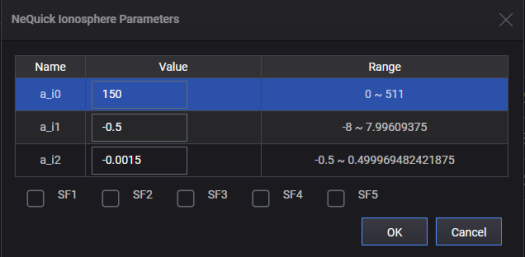
This property displays a_i[n] and SF[n] values configured for the NeQuick Ionosphere Model.
|
SCPI Command |
[:SOURce]:RADio:GNSS:WAVeform:CCARrier:IONosphere:NEQuick:PARameters <value> [:SOURce]:RADio:GNSS:WAVeform:CCARrier:IONosphere:NEQuick:PARameters? |
|
SCPI Example |
RADio:GNSS:WAVeform:CCAR:ION:NEQ:PAR "150,-0.5,-1.5e-3,00000" RADio:GNSS:WAVeform:CCAR:ION:NEQ:PAR? |
|
Preset |
150,-0.5,-1.5e-3,00000 |
|
State Saved |
Yes |
|
Range |
|
|
Initial S/W Revision |
A.16.00 |
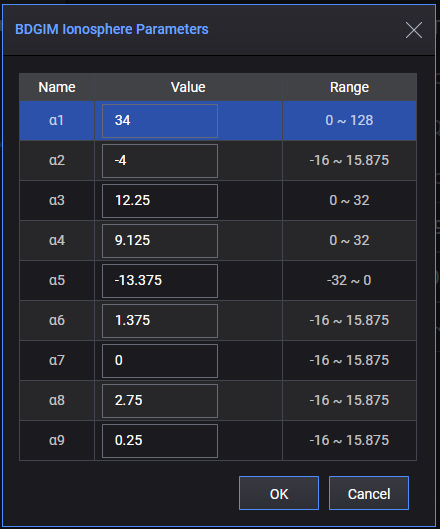
This property displays Alpha[n] values configured for the BDGIM Ionosphere Model.
|
SCPI Command |
[:SOURce]:RADio:GNSS:WAVeform:CCARrier:IONosphere:BDGim:PARameters <value> [:SOURce]:RADio:GNSS:WAVeform:CCARrier:IONosphere:BDGim:PARameters? |
|
SCPI Example |
RADio:GNSS:WAVeform:CCAR:ION:BDG:PAR "34,-4,12.25,9.125,-13.375,1.375,0,2.75,0.25" RADio:GNSS:WAVeform:CCAR:ION:BDG:PAR? |
|
Preset |
34,-4,12.25,9.125,-13.375,1.375,0,2.75,0.25 |
|
State Saved |
Yes |
|
Range |
|
|
Initial S/W Revision |
A.18.00 |
The Satellite Settings tab displays the satellite information after playing, and is also used to enable/disable and set the power for each played satellite.
When State is set to On:
Settings listed in the table below are visible and their values are refreshed per second.
"Enabled", "Relative Power (dB)", and "Absolute Power (dBm)" settings are editable.
|
Setting |
Name |
Description |
|
Ch |
Channel |
Physical Channel Number |
|
SVID |
Space Vehicle ID |
G means GPS. E means Galileo. B means BeiDou. Q means QZSS. R means GLONASS. I means NavIC. |
|
Enabled |
Enabled |
|
|
Freq |
Frequency Band |
It can be:
|
|
Relative Power (dB) |
Relative Power in dB |
These two settings are coupled. If one is changed, the other will change to the correct value. |
|
Absolute Power(dBm) |
Absolute Power in dBm |
|
|
Elevation |
Elevation |
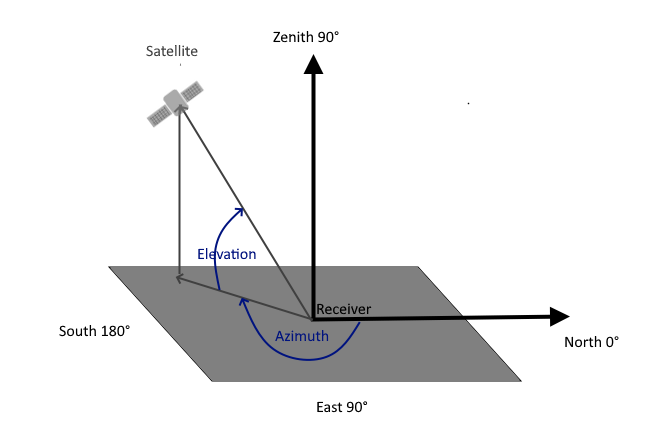
Displays the angle of elevation of the satellite, in degrees. Elevation is the angle of elevation from the horizontal line to the line from receiver to satellite. |
|
Azimuth |
Azimuth |
Displays the azimuth of the satellite, in degrees. Azimuth is a horizontal angle that starts from the north and goes clockwise. |
|
The following figure illustrates the azimuth and elevation. Elevation ranges from -90 to 90 degrees and the zenith is 90 degrees. Azimuth ranges from 0 to 360 degrees. 90 degrees is the east and 180 degrees is the south.
|
||
|
Pseudorange(m) |
Pseudorange in meter |
Displays the pseudorange of the satellite with respect to the receiver, in meters. This value is calculated based on GPS L1. |
|
Doppler Shift (Hz) |
Doppler Shift effect in Hz |
Displays the instant Doppler shift of a satellite towards the receiver. The value, in Hz, is calculated based on GPS L1. |
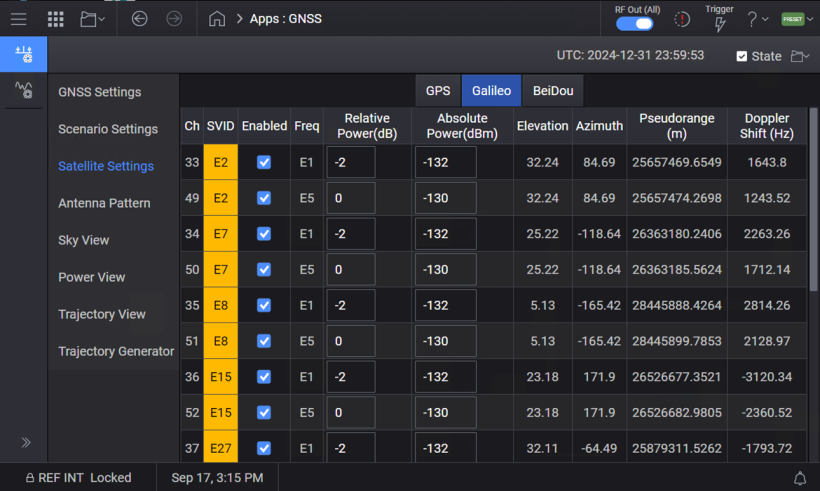
Querying or configuring these settings using SCPI commands / GUI is described below.
Query only.
SCPI only, no GUI option.
|
SCPI Command |
[:SOURce]:RADio:GNSS:WAVeform:CCARrier:VSATellites? |
|
SCPI Example |
RAD:GNSS:WAV:CCAR:VSAT? "G6_L1,G6_L5,G11_L1,G11_L5,G12_L1,G13_L1,G14_L1,G14_L5,G15_L1,G17_L1,G19_L1,G24_L1,G24_L5,E2_E1,E2_E5,E7_E1,E7_E5,E15_E1,E15_E5,E27_E1,E27_E5,E29_E1,E29_E5,E30_E1,E30_E5,E34_E1,E34_E5,E36_E1,E36_E5,B12_B1I,B24_B1I,B24_B1C,B24_B2a,B25_B1I,B25_B1C,B25_B2a,B26_B1I,B26_B1C,B26_B2a,B34_B1I,B34_B1C,B34_B2a,B35_B1I,B35_B1C,B35_B2a,B44_B1I,B44_B1C,B44_B2a,B45_B1I,B45_B1C,B45_B2a,R3_L1,R11_L1,R12_L1,R13_L1,R21_L1,R22_L1,R23_L1" |
|
Preset |
|
|
State Saved |
No |
|
Range |
|
|
Initial S/W Revision |
A.19.00 |
SCPI only, no GUI option.
Select a satellite and the signal format. The satellite name and signal format name are separated by "_". You can choose one from the return values of Visible Satellites.
When this command returns "NONE", it means no satellite is selected. Once a satellite is selected, the parameters can be queried or set using the SCPI commands described below.
|
SCPI Command |
[:SOURce]:RADio:GNSS:WAVeform:CCARrier:SELect:SATellite <string> [:SOURce]:RADio:GNSS:WAVeform:CCARrier:SELect:SATellite? |
|
SCPI Example |
RAD:GNSS:WAV:CCAR:SEL:SAT "G6_L1" RAD:GNSS:WAV:CCAR:SEL:SAT? |
|
Preset |
"NONE" |
|
State Saved |
No |
|
Range |
|
|
Initial S/W Revision |
A.19.00 |
|
SCPI Command |
[:SOURce]:RADio:GNSS:WAVeform:CCARrier:SATellite:ENABled ON|OFF|1|0 [:SOURce]:RADio:GNSS:WAVeform:CCARrier:SATellite:ENABled? |
|
SCPI Example |
RAD:GNSS:WAV:CCAR:SAT:ENAB 0 RAD:GNSS:WAV:CCAR:SAT:ENAB? |
|
Preset |
1 |
|
State Saved |
No |
|
Range |
|
|
Initial S/W Revision |
A.19.00 |
Query only.
|
SCPI Command |
[:SOURce]:RADio:GNSS:WAVeform:CCARrier:SATellite:SVID? |
|
SCPI Example |
RAD:GNSS:WAV:CCAR:SAT:SVID? |
|
Preset |
G1 |
|
State Saved |
No |
|
Range |
|
|
Initial S/W Revision |
A.19.00 |
Query only.
|
SCPI Command |
[:SOURce]:RADio:GNSS:WAVeform:CCARrier:SATellite:FREQuency? |
|
SCPI Example |
RAD:GNSS:WAV:CCAR:SAT:FREQuency? |
|
Preset |
L1 |
|
State Saved |
No |
|
Range |
|
|
Initial S/W Revision |
A.19.00 |
|
SCPI Command |
[:SOURce]:RADio:GNSS:WAVeform:CCARrier:SATellite:RPOWer <value> [:SOURce]:RADio:GNSS:WAVeform:CCARrier:SATellite:RPOWer? |
|
SCPI Example |
RAD:GNSS:WAV:CCAR:SAT:RPOW -3 |
|
Preset |
0 |
|
State Saved |
No |
|
Range |
0 to -40 |
|
Initial S/W Revision |
A.19.00 |
|
SCPI Command |
[:SOURce]:RADio:GNSS:WAVeform:CCARrier:SATellite:APOWer <value> [:SOURce]:RADio:GNSS:WAVeform:CCARrier:SATellite:APOWer? |
|
SCPI Example |
RAD:GNSS:WAV:CCAR:SAT:APOW -125 |
|
Preset |
-130 |
|
State Saved |
No |
|
Range |
Depands on relative power and satellite power reference |
|
Initial S/W Revision |
A.19.00 |
Query only
|
SCPI Command |
[:SOURce]:RADio:GNSS:WAVeform:CCARrier:SATellite:ELEVation? |
|
SCPI Example |
RAD:GNSS:WAV:CCAR:SAT:ELEV? |
|
Preset |
5 |
|
State Saved |
No |
|
Range |
|
|
Initial S/W Revision |
A.19.00 |
Query only
|
SCPI Command |
[:SOURce]:RADio:GNSS:WAVeform:CCARrier:SATellite:AZIMuth? |
|
SCPI Example |
RAD:GNSS:WAV:CCAR:SAT:AZIM? |
|
Preset |
5 |
|
State Saved |
No |
|
Range |
|
|
Initial S/W Revision |
A.19.00 |
Query only
|
SCPI Command |
[:SOURce]:RADio:GNSS:WAVeform:CCARrier:SATellite:PRANge? |
|
SCPI Example |
RAD:GNSS:WAV:CCAR:SAT:PRAN? |
|
Preset |
0 |
|
State Saved |
No |
|
Range |
|
|
Initial S/W Revision |
A.19.00 |
|
SCPI Command |
[:SOURce]:RADio:GNSS:WAVeform:CCARrier:SATellite:PRERror <value> [:SOURce]:RADio:GNSS:WAVeform:CCARrier:SATellite:PRERror? |
|
SCPI Example |
RAD:GNSS:WAV:CCAR:SAT: PRER? RAD:GNSS:WAV:CCAR:SAT: PRER -0.1 |
|
Preset |
0 |
|
State Saved |
No |
|
Range |
|
|
Initial S/W Revision |
A.19.01 |
Query only
|
SCPI Command |
[:SOURce]:RADio:GNSS:WAVeform:CCARrier:SATellite:DSHift? |
|
SCPI Example |
RAD:GNSS:WAV:CCAR:SAT:DSHift? |
|
Preset |
0 |
|
State Saved |
No |
|
Range |
|
|
Initial S/W Revision |
A.19.00 |
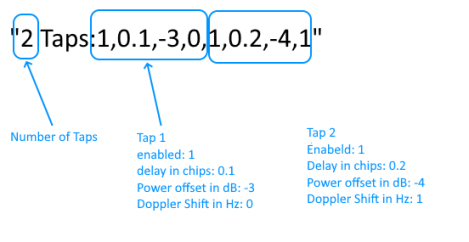
The dialog that opens is similar to the dialog when you click the  button displayed with the Multipath setting under Carrier/GNSS Settings/Advanced Setting node. The difference is constellation, frequency band, and satellite are read-only and displays the correct information of this channel.
Multipath is set and displayed as a string. The following is am example to describe various sections in this string.
|
SCPI Command |
[:SOURce]:RADio:GNSS:WAVeform:CCARrier:SATellite:MULTipath <value> [:SOURce]:RADio:GNSS:WAVeform:CCARrier:SATellite:MULTipath? |
|
SCPI Example |
RAD:GNSS:WAV:CCAR:SAT:MULT "1 Tap:1,0.01,0,0" RAD:GNSS:WAV:CCAR:SAT:MULT "0 Taps" RAD:GNSS:WAV:CCAR:SAT:MULT? |
|
Preset |
0 Taps |
|
State Saved |
No |
|
Range |
|
|
Initial S/W Revision |
A.19.01 |
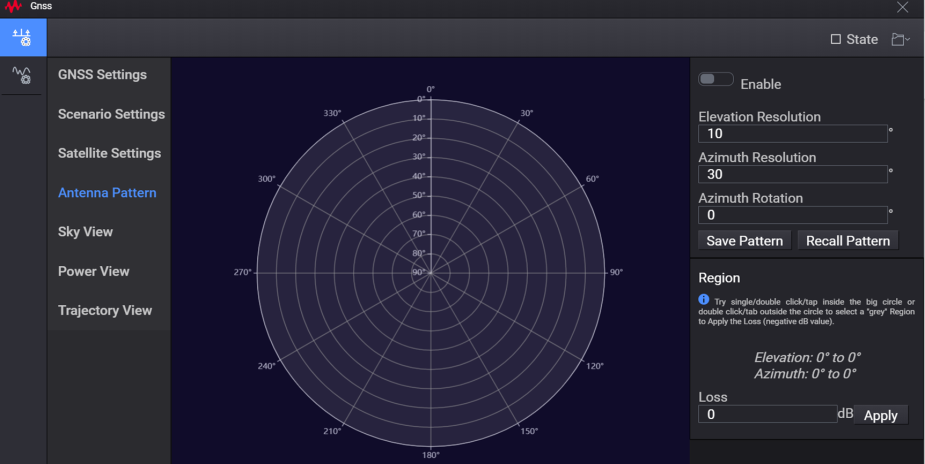
Antenna Pattern is used to display the antenna pattern of receiver.
|
Setting Name |
Min Value |
Max Value |
Default Value | Step Size |
Description |
| Enable | N/A | N/A | Off (On) | N/A | Antenna Pattern Enable/Disable |
| Elevation Resolution | 1 | 90 | 10 | 0.01 | Set the Elevation Resolution |
| Azimuth Resolution | 1 | 90 | 30 | 0.01 | Set the Azimuth Resolution |
| Azimuth Rotation | 0 | 360 | 0 | 0.01 | Set the Azimuth Rotation |
| Loss | -60 | 0 | 0 | 0.01 | You can single/double-click or tap inside the big circle or double-click/tap outside the circle to select a "grey" region. Then click Apply to apply the Loss (negative dB value). |
|
SCPI Command |
RAD:GNSS:WAV:CCAR:APAT[:STATe] ON|OFF|1|0 RAD:GNSS:WAV:CCAR:APAT? |
|
SCPI Example |
RAD:GNSS:WAV:CCAR:APAT 1 |
|
Preset |
0 |
|
State Saved |
Yes |
|
Initial S/W Revision |
A.17.00 |
|
SCPI Command |
RAD:GNSS:WAV:CCAR:APAT:APST <value> RAD:GNSS:WAV:CCAR:APAT:APST? |
|
SCPI Example |
RAD:GNSS:WAV:CCAR:APAT:APST "KEYSIGHT,REV1,FILENAME,20,50,10;Azi/Elv 0,20,40,60,80,100;50,0,0,0,0,0;100,0,0,0,0,0;150,0,0,0,0,0;200,0,0,0,0,0;250,0,0,0,0,0;300,0,0,0,0,0;350,0,0,0,0,0;400,0,0,0,0,0" RAD:GNSS:WAV:CCAR:APAT:APST "KEYSIGHT,REV1,FILENAME,10,30,0;Azi/Elv 0,10,20,30,40,50,60,70,80,90;30,0,-10,-20,-40,0,0,0,0,0;60,0,0,0,0,0,0,0,0,0;90,0,0,0,0,0,0,0,0,0;120,0,0,0,0,0,0,0,0,0;150,0,0,0,0,0,0,0,0,0;180,0,0,0,0,0,0,0,0,0;210,0,0,0,0,0,0,0,0,0;240,0,0,0,0,0,0,0,0,0;270,0,0,0,0,0,0,0,0,0;300,0,0,0,0,0,0,0,0,0;330,0,0,0,0,0,0,0,0,0;360,0,0,0,0,0,0,0,0,0" |
|
Preset |
KEYSIGHT,REV1,FILENAME,10,30,0 Azi/Elv 0,10,20,30,40,50,60,70,80,90 30,0,0,0,0,0,0,0,0,0 60,0,0,0,0,0,0,0,0,0 90,0,0,0,0,0,0,0,0,0 120,0,0,0,0,0,0,0,0,0 150,0,0,0,0,0,0,0,0,0 180,0,0,0,0,0,0,0,0,0 210,0,0,0,0,0,0,0,0,0 240,0,0,0,0,0,0,0,0,0 270,0,0,0,0,0,0,0,0,0 300,0,0,0,0,0,0,0,0,0 330,0,0,0,0,0,0,0,0,0 360,0,0,0,0,0,0,0,0,0 |
|
State Saved |
Yes |
|
Initial S/W Revision |
A.17.00 |
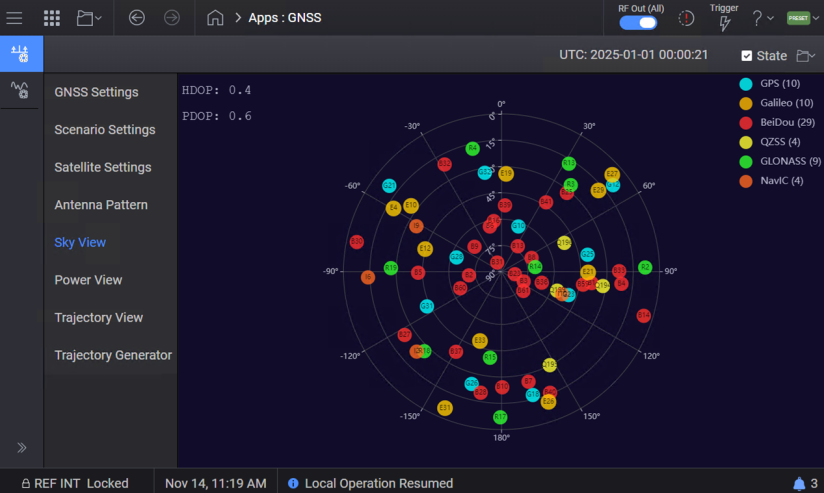
Sky view is used to display the elevation and azimuth of the currently visible satellites, from a receiver’s point of view.
You can move mouse over a particular satellite to display a tooltip, showing detailed real-time information about the satellite, such as SV ID, Power, Pseudorange, and Doppler shift.
For L1+L5 satellite, only pseudorange and doppler shift of L1 are displayed in the tooltip.
For Galileo E1+E5 satellite, only pseudorange and doppler shift of E1 are displayed in the tooltip.
For BeiDou B1i/B1C/B2a satellite, only pseudorange and doppler shift of B1I are displayed in the tooltip.
For QZSS L1+L5 satellite, only pseudorange and doppler shift of L1 are displayed on the tooltip.
You can click the legend of each constellations to show/hide all satellites in this constellation. This is for Sky view display only and real-time signal is not affected.
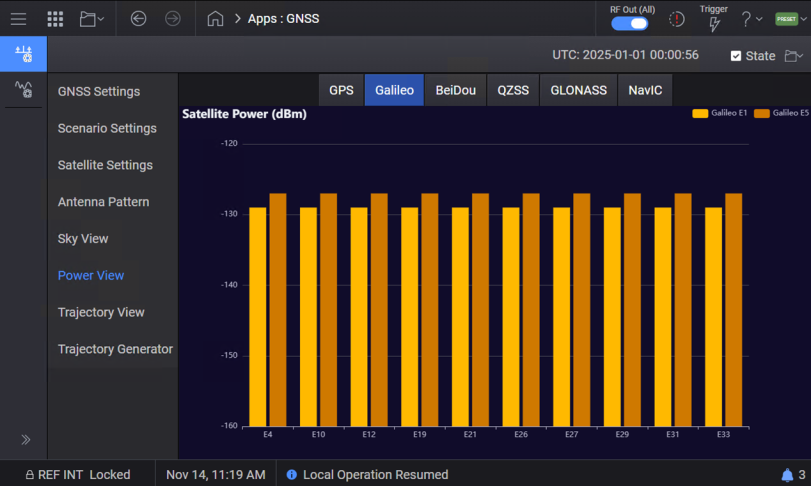
Power view is used to display the absolute power of each satellite.
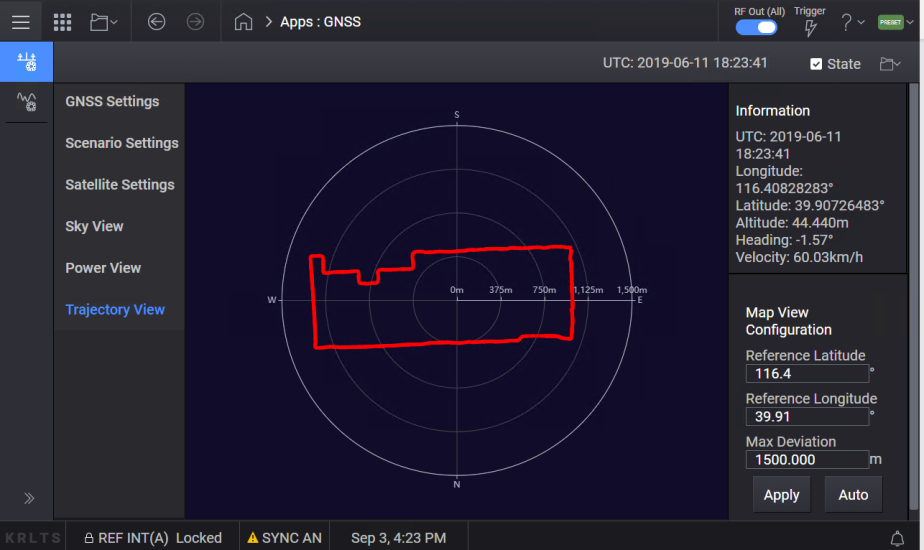
Real-time Trajectory view is used to display the trajectory of receiver.
For Static scenario type, it will be only one point.
You can set the Reference position (Latitude and Longitude) and Max Deviation in the Map View Configuration, and click “Apply”. Or, you can click “Auto” to set the central position and scaling automatically.
The parameters in the Trajectory Generator tab are further grouped into the following three tabs.
General Settings
Trajectory Settings - Various settings in this tab allow you to define the trajectory. There are three types of trajectory segments.
Wait
Straight
Turn
Each segment supports a variety of configurable parameters, including:
Duration
Distance
Acceleration
Ending Velocity
Angle
Radius
Climb
These parameters allow precise customization of the trajectory profile based on a specific test or simulation requirements.
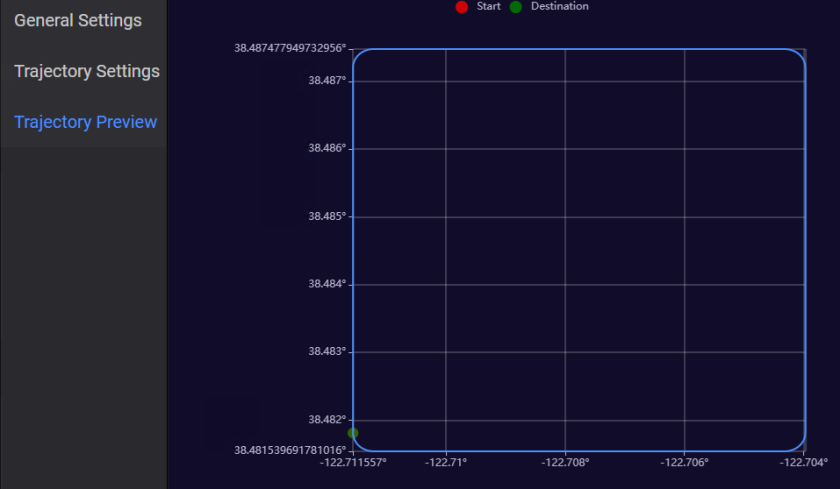
Trajectory Preview - This tab provides a visual preview of the trajectory that you defined in the Trajectory Settings. The start and destination points are clearly marked in this view to indicate the beginning and end of the trajectory. The following is a sample trajectory preview when the Shape is set to Rectangle in the Trajectory Settings tab.
|
SCPI Command |
RADio:GNSS:WAVeform:CCARrier:TGENerator:LONGitude <value> RADio:GNSS:WAVeform:CCARrier:TGENerator:LONGitude? |
|
SCPI Example |
RAD:GNSS:WAV:CCAR:TGEN:LONG -122 |
|
Preset |
-122.711557 |
|
State Saved |
Yes |
|
Range |
-180 to 180 |
|
Initial S/W Revision |
A.18.00 |
|
SCPI Command |
RADio:GNSS:WAVeform:CCARrier:TGENerator:LATitude<value> RADio:GNSS:WAVeform:CCARrier:TGENerator:LATitude? |
|
SCPI Example |
RAD:GNSS:WAV:CCAR:TGEN:LAT 40 |
|
Preset |
38.48181 |
|
State Saved |
Yes |
|
Range |
-90 to 90 |
|
Initial S/W Revision |
A.18.00 |
|
SCPI Command |
RADio:GNSS:WAVeform:CCARrier:TGENerator:ALTitude <value> RADio:GNSS:WAVeform:CCARrier:TGENerator:ALTitude? |
|
SCPI Example |
RAD:GNSS:WAV:CCAR:TGEN:ALT 200 |
|
Preset |
100 |
|
State Saved |
Yes |
|
Range |
-100 to 18288 |
|
Initial S/W Revision |
A.18.00 |
|
SCPI Command |
RADio:GNSS:WAVeform:CCARrier:TGENerator:IVELocity <value> RADio:GNSS:WAVeform:CCARrier:TGENerator:IVELocity? |
|
SCPI Example |
RAD:GNSS:WAV:CCAR:TGEN:IVEL 100 |
|
Preset |
0 |
|
State Saved |
Yes |
|
Range |
0 to 600 |
|
Initial S/W Revision |
A.18.00 |
|
SCPI Command |
RADio:GNSS:WAVeform:CCARrier:TGENerator:IDIRection <value> RADio:GNSS:WAVeform:CCARrier:TGENerator:IDIRection? |
|
SCPI Example |
RAD:GNSS:WAV:CCAR:TGEN:IDIR 90 |
|
Preset |
0 |
|
State Saved |
Yes |
|
Range |
0 to 360 |
|
Initial S/W Revision |
A.18.00 |
|
SCPI Command |
RADio:GNSS:WAVeform:CCARrier:TGENerator:SRATe <value> RADio:GNSS:WAVeform:CCARrier:TGENerator:SRATe? |
|
SCPI Example |
RAD:GNSS:WAV:CCAR:TGEN:SRAT 10 |
|
Preset |
1 |
|
State Saved |
Yes |
|
Range |
1 to 20 |
|
Initial S/W Revision |
A.18.00 |
|
SCPI Command |
RADio:GNSS:WAVeform:CCARrier:TGENerator:STIMe <value> RADio:GNSS:WAVeform:CCARrier:TGENerator:STIMe? |
|
SCPI Example |
RAD:GNSS:WAV:CCAR:TGEN:STIM "12:00:00" |
|
Preset |
00:00:00 |
|
State Saved |
Yes |
|
Range |
00:00:00 to 23.59.59 |
|
Initial S/W Revision |
A.18.00 |
|
SCPI Command |
RADio:GNSS:WAVeform:CCARrier:TGENerator:SLENgth DUR|DIST RADio:GNSS:WAVeform:CCARrier:TGENerator:SLENgth? |
|
SCPI Example |
RAD:GNSS:WAV:CCAR:TGEN:SLEN DIST |
|
Preset |
DUR |
|
State Saved |
Yes |
|
Range |
|
|
Initial S/W Revision |
A.18.00 |
|
SCPI Command |
RADio:GNSS:WAVeform:CCARrier:TGENerator:RNUMber <value> RADio:GNSS:WAVeform:CCARrier:TGENerator:RNUMber? |
|
SCPI Example |
RAD:GNSS:WAV:CCAR:TGEN:RNUM 1 |
|
Preset |
1 |
|
State Saved |
Yes |
|
Range |
1 to 100 |
|
Initial S/W Revision |
A.18.00 |