 Setup
SetupThis tab brings up a display of instrument information.
The Copy button copies this information to the clipboard for pasting into Windows programs.
Some of this information is available via SCPI commands, as described in Internal Versions.
|
GUI Location |
System Menu (triple bar icon) > Settings (gear icon) > Instrument Information |
|
Initial S/W Revision |
A.01.00 |
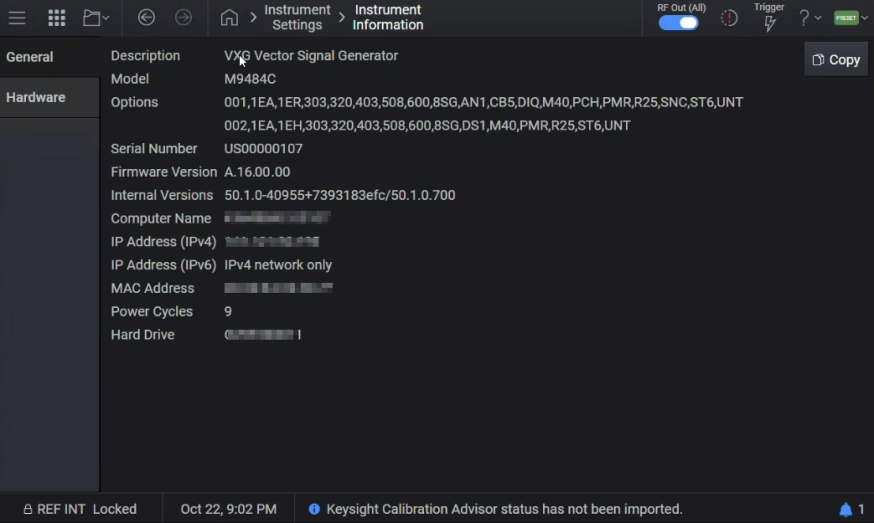
The instrument software contains a number of internal components. The Internal Versions displays versions of the primary internal components as determined by Keysight Technologies. The number of versions reported and the formatting may change on any given software release.
|
GUI Location |
System Menu (triple bar icon) > Settings (gear icon) > Instrument Information > Internal Versions |
|
SCPI Command |
:DIAGnostic[:CPU]:INFormation:REVision? |
|
SCPI Example |
DIAG:INF:REV? |
|
Notes |
The return value is a string. The formatting and number of versions may change in any given software release. Thus, any program using this string should be implemented in a way that does not rely on the contents in a strict manner. |
|
Initial S/W Revision |
A.01.00 |
|
Modified S/W Revision |
A.04.00 |
Some of this information is available via SCPI commands as follows:
*IDN? - Identification Query provides Model number, Serial number, and Firmware version.
*OPT? - Query Instrument Options provides the comma separated options string.
Displays the operating system on which the instrument software is running.
|
GUI Location |
System Menu (triple bar icon) > Settings (gear icon) > Instrument Information > Computer System |
|
SCPI Command |
:SYSTem:CSYStem? |
|
SCPI Example |
SYST:CSYS? |
|
Notes |
The return value is the name of the operating system on which the instrument software is running. |
|
Initial S/W Revision |
A.17.02 |
Query only command.
Returns the CPU version for the instrument.
|
GUI Location |
System Menu (triple bar icon) > Settings (gear icon) > Instrument Information > CPU Version |
|
SCPI Command |
:SYSTem:CSYStem:CPU? |
|
SCPI Example |
SYST:CSYS:CPU? |
|
Notes |
Returns a number (as a string) that corresponds to the CPU version of the instrument.
|
|
Initial S/W Revision |
A.17.02 |
Query only command.
Returns the CPU Assembly name for the instrument.
|
GUI Location |
System Menu (triple bar icon) > Settings (gear icon) > Instrument Information > CPU Assembly Name |
|
SCPI Command |
:SYSTem:CSYStem:CPU:NAME? |
|
SCPI Example |
SYST:CSYS:CPU:NAME? |
|
Initial S/W Revision |
A.17.02 |
A list of control data is accessible in the Control Data tab to provide Keysight support engineers with product behavioral insight. Each control data item in the list is embedded with the following attributes:
Control Data: a string value, naming the control data.
Version: consisting of two numeric values representing major version and minor version, separated by a decimal, for example, 0.1.
|
GUI Location |
System Menu (triple bar icon) > Settings (gear icon) > Instrument Information > Control Data tab |
Query only
|
SCPI Command |
:SYSTem[:RF<channel>]:CALibration:VERSion? |
|
SCPI Example |
:SYST:CAL:VERS? |
|
Notes |
Channel 1 query will include system level control data versions. Returned string list will be in the following format, with control data entries separated by a comma: "<control_data_1>: <version>","…" If no control data versions exist, an empty string ("") is returned. |
|
State Saved |
No |
|
Initial S/W Revision |
A.17.00 |