Pulse Building
Display Pattern (Antenna Panel)
Add (PRI Pattern Type Staggered)
Import (PRI Pattern Type Staggered)
Edit (PRI Pattern Type Staggered)
Stores the Pattern name.
|
SCPI Command |
[:SOURce]:RADio:PBUilding:WAVeform:PTLBrary:PATTern<patternindex>:NAMe? |
|
SCPI Example |
RADio:PBUilding:WAVeform:PTLBrary:PATTern1:NAMe? |
|
Couplings |
|
|
Preset |
Pattern 1 |
|
State Saved |
Yes |
|
Initial S/W Revision |
A.18.00 |
Adds a new pattern to the end of the pattern library.
Default Name: “Pattern N” where N is automatically incremented. Pattern names must be unique.
|
SCPI Command |
[:SOURce]:RADio:PBUilding:WAVeform:PTLBrary:ADDPattern |
|
SCPI Example |
RADio:PBUilding:WAVeform:PTLBrary:ADDPattern |
|
Couplings |
|
|
Note |
|
|
Preset |
|
|
State Saved |
Yes |
|
Initial S/W Revision |
A.18.00 |
Deletes the selected Pattern from the Pattern library of the project.
|
SCPI Command |
[:SOURce]:RADio:PBUilding:WAVeform:PTLBrary:DELPattern <index> |
|
SCPI Example |
RADio:PBUilding:WAVeform:PTLBrary:DELPattern 2 |
|
Couplings |
|
|
Note |
|
|
Preset |
|
|
State Saved |
Yes |
|
Initial S/W Revision |
A.18.00 |
Renames the selected Pattern.
|
SCPI Command |
[:SOURce]:RADio:PBUilding:WAVeform:PTLBrary:RENPattern<index,string> |
|
SCPI Example |
RADio:PBUilding:WAVeform:PTLBrary:RENPattern 1,"new123" |
|
Couplings |
|
|
Note |
|
|
Preset |
|
|
State Saved |
Yes |
|
Initial S/W Revision |
A.18.00 |
Creates a copy of the selected Pattern in the Pattern library of the project.
|
SCPI Command |
[:SOURce]:RADio:PBUilding:WAVeform:PTLBrary:COPYpattern <index> |
|
SCPI Example |
RADio:PBUilding:WAVeform:PTLBrary:COPYpattern 1 |
|
Couplings |
|
|
Note |
|
|
Preset |
|
|
State Saved |
Yes |
|
Initial S/W Revision |
A.18.00 |
Returns the item name from the Pattern library of the project.
|
SCPI Command |
[:SOURce]:RADio:PBUilding:WAVeform:PTLBrary:PATTern<patternindex>:ITEM<patternitemindex>:NAMe? |
|
SCPI Example |
RADio:PBUilding:WAVeform:PTLBrary:PATTern1:ITEM:NAMe? |
|
Couplings |
|
|
Note |
|
|
Preset |
Item 1 |
|
State Saved |
Yes |
|
Initial S/W Revision |
A.18.00 |
Adds a new item to the end of the pattern library.
Default Name: Item N where N is automatically incremented. Item names must be unique.
|
SCPI Command |
[:SOURce]:RADio:PBUilding:WAVeform:PTLBrary:PATTern<patternindex>:ADDitem |
|
SCPI Example |
RADio:PBUilding:WAVeform:PTLBrary:PATTern:ADDitem |
|
Couplings |
|
|
Note |
|
|
Preset |
|
|
State Saved |
Yes |
|
Initial S/W Revision |
A.18.00 |
Deletes the selected Pattern Item from the pattern library of the project.
|
SCPI Command |
[:SOURce]:RADio:PBUilding:WAVeform:PTLBrary:PATTern<patternindex>:DELitem <index> |
|
SCPI Example |
RADio:PBUilding:WAVeform:PTLBrary:PATTern:DELitem 2 |
|
Couplings |
|
|
Preset |
|
|
State Saved |
Yes |
|
Initial S/W Revision |
A.18.00 |
Renames the selected PatternItem.
|
SCPI Command |
[:SOURce]:RADio:PBUilding:WAVeform:PTLBrary:PATTern<patternindex>:RENitem<index,string> |
|
SCPI Example |
RADio:PBUilding:WAVeform:PTLBrary:PATTern:RENitem 1,"new123" |
|
Couplings |
|
|
Preset |
|
|
State Saved |
Yes |
|
Initial S/W Revision |
A.18.00 |
Creates a copy of the selected pattern Item in the pattern library of the project.
|
SCPI Command |
[:SOURce]:RADio:PBUilding:WAVeform:PTLBrary:PATTern<patternindex>:COPYitem<index> |
|
SCPI Example |
RADio:PBUilding:WAVeform:PTLBrary:PATTern:COPYitem 1 |
|
Couplings |
|
|
Preset |
|
|
State Saved |
Yes |
|
Initial S/W Revision |
A.18.00 |
Inserts an item below the selected item in the pattern library of the project.
|
SCPI Command |
[:SOURce]:RADio:PBUilding:WAVeform:PTLBrary:PATTern<patternindex>:INSertitem <index> |
|
SCPI Example |
RADio:PBUilding:WAVeform:PTLBrary:PATTern:INSertitem 1 |
|
Couplings |
|
|
Preset |
|
|
State Saved |
Yes |
|
Initial S/W Revision |
A.18.00 |
The index number identifies an item in the pattern. There can be numerous items that make up the pattern. For example, a pattern may consist of 10 different pulses. Each pulse is an item of the pattern and has its own index number. The index number is auto-generated and not user-defined.
|
SCPI Command |
RADio:PBUilding:WAVeform:PTLBrary:PATTern:ITEM:INDex? |
|
SCPI Example |
|
|
Couplings |
|
|
Preset |
|
|
State Saved |
|
|
Min |
|
|
Max |
|
|
Initial S/W Revision |
A.18.00 |
The start time of the object.
This is a read-only field. The start time is automatically calculated and is dependent on the Duration of all previous objects in the list.
|
SCPI Command |
[:SOURce]:RADio:PBUilding:WAVeform:PTLBrary:PATTern<patternindex>:ITEM<patternitemindex>:STIMe? |
|
SCPI Example |
RADio:PBUilding:WAVeform:PTLBrary:PATTern:ITEM:STIMe? |
|
Couplings |
|
|
Preset |
0 |
|
State Saved |
Yes |
|
Min |
|
|
Max |
|
|
Initial S/W Revision |
A.18.00 |
This is a read-only field if the item is a pulse or a pattern and displays the calculated value for the duration of a pattern item.
For Object Types or , this is a read-only field and displays the calculated value for the duration of a pattern item.
For Object Type , this is a user-defined entry field for the total off time of a pattern item.
|
SCPI Command |
[:SOURce]:RADio:PBUilding:WAVeform:PTLBrary:PATTern<patternindex>:ITEM<patternitemindex>:DURation? |
|
SCPI Example |
RADio:PBUilding:WAVeform:PTLBrary:PATTern:ITEM:DURation? |
|
Couplings |
|
|
Preset |
20.3 us |
|
State Saved |
Yes |
|
Min |
0 |
|
Max |
|
|
Initial S/W Revision |
A.18.00 |
Selects the type of pattern item list object to be generated. The Object Type refers to a Pulse, Pattern, or Off time object.
When the Object Type is set to Off Time, all other values for the object are ignored except the Off_Time_us, which is used for the off time length.
When the Object Type is set to Pattern, the Object Name cannot be the current pattern, as this would cause a circular reference and is not supported.
|
SCPI Command |
[:SOURce]:RADio:PBUilding:WAVeform:PTLBrary:PATTern<patternindex>:ITEM<patternitemindex>:OBJect:TYPe PULSe|PATTern|OFFTime [:SOURce]:RADio:PBUilding:WAVeform:PTLBrary:PATTern<patternindex>:ITEM<patternitemindex>:OBJect:TYPe? |
|
SCPI Example |
RADio:PBUilding:WAVeform:PTLBrary:PATTern:ITEM:OBJect:TYPe PULS RADio:PBUilding:WAVeform:PTLBrary:PATTern:ITEM:OBJect:TYPe? |
|
Couplings |
|
|
Preset |
PULSe |
|
State Saved |
Yes |
|
Initial S/W Revision |
A.18.00 |
The Object Name refers to the name of the pulse or pattern object as it is named in the Pulse or Pattern tab.
If the Object Type is set to Pattern, the Object Name pull-down list box lists all the patterns created using the Pattern tab.
If the Object Type is set to Pulse, the Object Name pull-down list box lists all the pulses created using the Pulses tab.
If the Object Type is set to Off Time, the Object Name setting is not applicable.
|
SCPI Command |
[:SOURce]:RADio:PBUilding:WAVeform:PTLBrary:PATTern<patternindex>:ITEM<patternitemindex>:OBJect:NAMe <Name> [:SOURce]:RADio:PBUilding:WAVeform:PTLBrary:PATTern<patternindex>:ITEM<patternitemindex>:OBJect:NAMe? |
|
SCPI Example |
RADio:PBUilding:WAVeform:PTLBrary:PATTern:ITEM:OBJect:NAMe "Pulse 1" RADio:PBUilding:WAVeform:PTLBrary:PATTern:ITEM:OBJect:NAMe? |
|
Couplings |
|
|
Preset |
Pulse 1 |
|
State Saved |
Yes |
|
Initial S/W Revision |
A.18.00 |
The object length, in seconds, is a read-only field that displays the total time duration of an object.
For Object Type , the Object Length is the sum of rise time (0-100%), pulse Width (100%-100%), and fall time (100%-0) as defined in the Pulse Library.
For Object Type , the Object Length is the time duration of the pattern. The time measurement for a pattern is calculated from the repetition interval for the object type. For example, if a pattern has one pattern item that is 10 us long and is repeated twice then the object length is 20 us.
For Object Type , this field is blank.
|
SCPI Command |
[:SOURce]:RADio:PBUilding:WAVeform:PTLBrary:PATTern<patternindex>:ITEM<patternitemindex>:OBJect:LENGth? |
|
SCPI Example |
RADio:PBUilding:WAVeform:PTLBrary:PATTern:ITEM:OBJect:LENGth? |
|
Couplings |
|
|
Preset |
2.06 us |
|
State Saved |
Yes |
|
Min |
0 |
|
Max |
The maximum value of Object Length depends on other parameters such as Rise time, Fall Time, Pulse Width, and Sample Rate. The maximum number of samples supported is 1Gsamples. So, Object Length * Sample Rate should not exceed 1GSamples. |
|
Initial S/W Revision |
A.18.00 |
Sets the repetition interval used with this object.
The Repetition Interval indicates the time duration of the object before the next object. It also indicates the minimum time required before a pulse or pattern, can be repeated. The Repetition Interval must be equal to or greater then the Object Length.
The Repetition Interval is measured from the first point of the object to the last point of the object and includes off time. For example, if the item type is a pattern, the Repetition Interval is the time from the first point on the first pulse to the last point of the last pulse's off time. Specifically, the Repetition Interval is:
The distance, in time, from the first point of the object to the first point of the next object. Note that the next object may be the same if the repeat parameter for the object is greater than 1 or the next pattern item is the same object name.
For Object Types and , Repetition Interval is an entry field (units are time) specifying the time interval at which the object can be repeated. The pulse or pattern starts at the beginning of the repetition interval. Time that is not consumed by a pulse or pattern signal (Repetition Interval – Object Length) is filled with zeros.
For Object Type , this field is not applicable.
The following diagram shows the repetition interval definitions. Note that the off time following the last pulse in the pattern is included as part of the pattern repetition interval.
The repetition interval property is coupled to the PRI Start property. When a PRI pattern is specified, the actual time between objects can change and may not equal the repetition interval.
|
SCPI Command |
[:SOURce]:RADio:PBUilding:WAVeform:PTLBrary:PATTern<patternindex>:ITEM<patternitemindex>:REP:INTerval <real> [:SOURce]:RADio:PBUilding:WAVeform:PTLBrary:PATTern<patternindex>:ITEM<patternitemindex>:REP:INTerval? |
|
SCPI Example |
RADio:PBUilding:WAVeform:PTLBrary:PATTern:ITEM:REP:INTerval 0.0000203 RADio:PBUilding:WAVeform:PTLBrary:PATTern:ITEM:REP:INTerval? |
|
Couplings |
|
|
Preset |
20.3 us |
|
State Saved |
Yes |
|
Min |
10 ns |
|
Max |
3 s |
|
Initial S/W Revision |
A.18.00 |
Repeat specifies the number of times to repeat the object. The object may be a pulse or a pattern. Repeat must be greater than 1 when generating patterns with Width Jitter Type, Edge Jitter Type, and PRI Pattern Type.
Repeat is not applicable when the Object Type is Off Time.
|
SCPI Command |
[:SOURce]:RADio:PBUilding:WAVeform:PTLBrary:PATTern<patternindex>:ITEM<patternitemindex>:REPeat <integer> [:SOURce]:RADio:PBUilding:WAVeform:PTLBrary:PATTern<patternindex>:ITEM<patternitemindex>:REPeat? |
|
SCPI Example |
RADio:PBUilding:WAVeform:PTLBrary:PATTern:ITEM:REPeat 1 RADio:PBUilding:WAVeform:PTLBrary:PATTern:ITEM:REPeat? |
|
Couplings |
|
|
Preset |
1 |
|
State Saved |
Yes |
|
Min |
1 |
|
Max |
For M9484C: 27000 |
|
Initial S/W Revision |
A.18.00 |
Returns the number of repeats required for one complete scan of the current antenna pattern. The number of repeats is dependent on the current PRI including any PRI pattern.
|
SCPI Command |
[:SOURce]:RADio:PBUilding:WAVeform:PTLBrary:PATTern<patternindex>:ITEM<patternitemindex>:REPeat:FULL:SCAN |
|
SCPI Example |
|
|
Notes |
In the GUI, this button is displayed when Antenna Pattern Type is not None. |
|
Preset |
|
|
State Saved |
Yes |
|
Initial S/W Revision |
A.18.00 |
Sets the amplitude offset applied to the object.
Phase Offset is the phase difference of the carrier phase of a pattern item relative to the carrier phase of another pattern item. If only one pattern item defines a pattern, then the phase offset is relative to the carrier.
|
SCPI Command |
[:SOURce]:RADio:PBUilding:WAVeform:PTLBrary:PATTern<patternindex>:ITEM<patternitemindex>:POFFset <real> [:SOURce]:RADio:PBUilding:WAVeform:PTLBrary:PATTern<patternindex>:ITEM<patternitemindex>:POFFset? |
|
SCPI Example |
RADio:PBUilding:WAVeform:PTLBrary:PATTern:ITEM:POFFset 0 RADio:PBUilding:WAVeform:PTLBrary:PATTern:ITEM:POFFset? |
|
Couplings |
|
|
Preset |
0 |
|
State Saved |
Yes |
|
Min |
-180 deg |
|
Max |
180 deg |
|
Initial S/W Revision |
A.18.00 |
Sets the Frequency Offset applied to the object.
Frequency Offset is the difference in the frequency of the pattern item and the frequency of the signal generator.
The maximum frequency offset is established by the Arb Sampling Rate.
This feature allows pulse to pulse frequency agility with a hop bandwidth that is less than or equal to 80% of the Arb sampling rate.
The Pulse Building application allows you to enter any value into the Freq Offset field up to ±5 GHz. However, only values less than or equal to ±40% of the Arb sampling rate are valid.
|
SCPI Command |
[:SOURce]:RADio:PBUilding:WAVeform:PTLBrary:PATTern<patternindex>:ITEM<patternitemindex>:FOFFset <real> [:SOURce]:RADio:PBUilding:WAVeform:PTLBrary:PATTern<patternindex>:ITEM<patternitemindex>:FOFFset? |
|
SCPI Example |
RADio:PBUilding:WAVeform:PTLBrary:PATTern:ITEM:FOFFset 0 RADio:PBUilding:WAVeform:PTLBrary:PATTern:ITEM:FOFFset? |
|
Couplings |
|
|
Preset |
0 |
|
State Saved |
Yes |
|
Min |
-200 GHz |
|
Max |
200 GHz |
|
Initial S/W Revision |
A.18.00 |
Scales the pattern item power relative to the other items in the current pattern. For example, if a pattern with two identical pulses was generated, and the second pulse was scaled by –3dB, the second pulse would have half the power of the first pulse.
The offset is additive. So if the Power Scale is set to -10 dB, and an antenna scan is applied to 1000 pulses, the amplitude for each pulse produced by the antenna patterns is reduced by 10 dB. With the Power Scale set to 0 dB, the maximum possible amplitude from the antenna pattern is 0 dB.
|
SCPI Command |
[:SOURce]:RADio:PBUilding:WAVeform:PTLBrary:PATTern<patternindex>:ITEM<patternitemindex>:POWScale <real> [:SOURce]:RADio:PBUilding:WAVeform:PTLBrary:PATTern<patternindex>:ITEM<patternitemindex>:POWScale? |
|
SCPI Example |
RADio:PBUilding:WAVeform:PTLBrary:PATTern:ITEM:POWScale 0 RADio:PBUilding:WAVeform:PTLBrary:PATTern:ITEM:POWScale? |
|
Couplings |
|
|
Preset |
0 |
|
State Saved |
Yes |
|
Min |
-200 dB |
|
Max |
200 dB |
|
Initial S/W Revision |
A.18.00 |
The frequency hop pattern is implemented in the I/Q waveform data. The maximum frequency deviation from the RF carrier is about +- (Arb sample rate)/2.5. FM modulation (a.k.a chirps) are implemented in the I/Q waveform data along with hops. This means that the sum of the FM deviation and the hop pattern deviation cannot exceed the limit.
A few properties such as Number of Pulses or Number of Steps have ranges that are hardware specific.
Hop Pattern Type sets the pattern type for the frequency Hop.
Available Hop pattern types are:
None
Linear Ramp
Staggered
Stepped
Refer to Hop Pattern Types to know moreHop Pattern Types
|
SCPI Command |
[:SOURce]:RADio:PBUilding:WAVeform:PTLBrary:PATTern<patternindex>:ITEM<patternitemindex>:HOP:TYPe NONe|LINRamp|STAGgered|STEPped [:SOURce]:RADio:PBUilding:WAVeform:PTLBrary:PATTern<patternindex>:ITEM<patternitemindex>:HOP:TYPe? |
|
SCPI Example |
RADio:PBUilding:WAVeform:PTLBrary:PATTern:ITEM:HOP:TYPe STEP RADio:PBUilding:WAVeform:PTLBrary:PATTern:ITEM:HOP:TYPe? |
|
Couplings |
|
|
Preset |
NONe |
|
State Saved |
Yes |
|
Initial S/W Revision |
A.18.00 |
Enables or disables the displayed Hop plot in the Display Pattern tab.
Enable Pattern allows you to easily disable the current hop pattern without setting the hop pattern type to None. This preserves your entries for the pattern. Changing the Hop Pattern type causes hop pattern properties to be reset to their default values.
|
SCPI Command |
[:SOURce]:RADio:PBUilding:WAVeform:PTLBrary:PATTern<patternindex>:ITEM<patternitemindex>:HOP:ENABle:PATTern ON|OFF|1|0 [:SOURce]:RADio:PBUilding:WAVeform:PTLBrary:PATTern<patternindex>:ITEM<patternitemindex>:HOP:ENABle:PATTern? |
|
SCPI Example |
RADio:PBUilding:WAVeform:PTLBrary:PATTern:ITEM:HOP:ENABle:PATTern ON RADio:PBUilding:WAVeform:PTLBrary:PATTern:ITEM:HOP:ENABle:PATTern? |
|
Couplings |
|
|
Preset |
ON |
|
State Saved |
Yes |
|
Initial S/W Revision |
A.18.00 |
Sets the start value for the frequency hop pattern. This property is used by the hop pattern types None, Linear Ramp, and Stepped.
Changing the Hop Pattern Type resets this property.
|
SCPI Command |
[:SOURce]:RADio:PBUilding:WAVeform:PTLBrary:PATTern<patternindex>:ITEM<patternitemindex>:HOP:STARt <real> [:SOURce]:RADio:PBUilding:WAVeform:PTLBrary:PATTern<patternindex>:ITEM<patternitemindex>:HOP:STARt? |
|
SCPI Example |
RADio:PBUilding:WAVeform:PTLBrary:PATTern:ITEM:HOP:STARt -2000000 RADio:PBUilding:WAVeform:PTLBrary:PATTern:ITEM:HOP:STARt? |
|
Couplings |
|
|
Preset |
-2 MHz |
|
State Saved |
Yes |
|
Min |
-300 GHz |
|
Max |
300 GHz |
|
Initial S/W Revision |
A.18.00 |
Sets the stop value for the frequency hop pattern. This setting is used only by the Linear Ramp hop pattern type.
Changing the Hop Pattern Type resets this setting.
|
SCPI Command |
[:SOURce]:RADio:PBUilding:WAVeform:PTLBrary:PATTern<patternindex>:ITEM<patternitemindex>:HOP:STOP <real> [:SOURce]:RADio:PBUilding:WAVeform:PTLBrary:PATTern<patternindex>:ITEM<patternitemindex>:HOP:STOP? |
|
SCPI Example |
RADio:PBUilding:WAVeform:PTLBrary:PATTern:ITEM:HOP:STOP 2000000 RADio:PBUilding:WAVeform:PTLBrary:PATTern:ITEM:HOP:STOP? |
|
Couplings |
|
|
Preset |
2 MHz |
|
State Saved |
Yes |
|
Min |
-300 GHz |
|
Max |
300 GHz |
|
Initial S/W Revision |
A.18.00 |
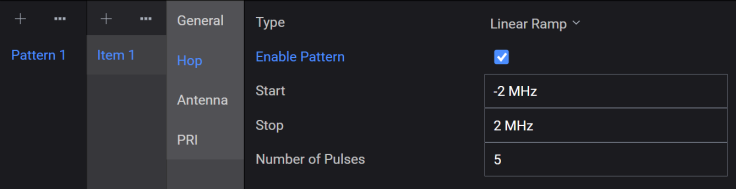
Sets the number of pulses in the frequency hop pattern.
This property is used only by the Linear Ramp hop pattern type.
|
SCPI Command |
[:SOURce]:RADio:PBUilding:WAVeform:PTLBrary:PATTern<patternindex>:ITEM<patternitemindex>:HOP:NUMBer:PULSes <integer> [:SOURce]:RADio:PBUilding:WAVeform:PTLBrary:PATTern<patternindex>:ITEM<patternitemindex>:HOP:NUMBer:PULSes? |
|
SCPI Example |
RADio:PBUilding:WAVeform:PTLBrary:PATTern:ITEM:HOP:NUMBer:PULSes 5 RADio:PBUilding:WAVeform:PTLBrary:PATTern:ITEM:HOP:NUMBer:PULSes? |
|
Couplings |
|
|
Preset |
5 |
|
State Saved |
Yes |
|
Min |
1 |
|
Max |
100000000 |
|
Initial S/W Revision |
A.18.00 |
Sets the step value for the frequency hop pattern. This property is used only by the Stepped hop pattern type.
Changing the Hop Pattern Type resets this property.
|
SCPI Command |
[:SOURce]:RADio:PBUilding:WAVeform:PTLBrary:PATTern<patternindex>:ITEM<patternitemindex>:HOP:HSTep <real> [:SOURce]:RADio:PBUilding:WAVeform:PTLBrary:PATTern<patternindex>:ITEM<patternitemindex>:HOP:HSTep? |
|
SCPI Example |
RADio:PBUilding:WAVeform:PTLBrary:PATTern:ITEM:HOP:HSTep 1000000 RADio:PBUilding:WAVeform:PTLBrary:PATTern:ITEM:HOP:HSTep? |
|
Couplings |
|
|
Preset |
1 MHz |
|
State Saved |
Yes |
|
Min |
-300 GHz |
|
Max |
300 GHz |
|
Initial S/W Revision |
A.18.00 |
Sets the number of steps for the frequency hop pattern. This property is used only by the Stepped hop pattern type. Total pulses in the pattern equals Pulses Per Step times Number of Steps. The maximum pulse limit is hardware dependent.
Changing the Hop Pattern Type resets this property.
|
SCPI Command |
[:SOURce]:RADio:PBUilding:WAVeform:PTLBrary:PATTern<patternindex>:ITEM<patternitemindex>:HOP:NUMBer:STEPs <integer> [:SOURce]:RADio:PBUilding:WAVeform:PTLBrary:PATTern<patternindex>:ITEM<patternitemindex>:HOP:NUMBer:STEPs? |
|
SCPI Example |
RADio:PBUilding:WAVeform:PTLBrary:PATTern:ITEM:HOP:NUMBer:STEPs 5 RADio:PBUilding:WAVeform:PTLBrary:PATTern:ITEM:HOP:NUMBer:STEPs? |
|
Couplings |
|
|
Preset |
4 |
|
State Saved |
Yes |
|
Min |
0 |
|
Max |
100000000 |
|
Initial S/W Revision |
A.18.00 |
Sets the number of pulses per step for the frequency hop pattern. This property is used only by the Stepped hop pattern type. Total pulses in the pattern equals Pulses Per Step times Number of Steps. The maximum pulse limit is hardware dependent.
Changing the Hop Pattern Type resets this property.
|
SCPI Command |
[:SOURce]:RADio:PBUilding:WAVeform:PTLBrary:PATTern<patternindex>:ITEM<patternitemindex>:HOP:PULSes:PER:STEP <integer> [:SOURce]:RADio:PBUilding:WAVeform:PTLBrary:PATTern<patternindex>:ITEM<patternitemindex>:HOP:PULSes:PER:STEP? |
|
SCPI Example |
RADio:PBUilding:WAVeform:PTLBrary:PATTern:ITEM:HOP:PULSes:PER:STEP 1 RADio:PBUilding:WAVeform:PTLBrary:PATTern:ITEM:HOP:PULSes:PER:STEP? |
|
Couplings |
|
|
Preset |
1 |
|
State Saved |
Yes |
|
Min |
1 |
|
Max |
100000000 |
|
Initial S/W Revision |
A.18.00 |
Adds the specified number of new hop items to the end in the hop pattern table to create a user-defined frequency hop pattern. This setting is used by the Staggered Hop Pattern Type and is displayed only when you select Staggered as the Hop Type.
|
SCPI Command |
[:SOURce]:RADio:PBUilding:WAVeform:PTLBrary:PATTern<patternindex>:ITEM<patternitemindex>:HOP:HOPStagered:ADD <hop;hop;hop> |
|
SCPI Example |
RADio:PBUilding:WAVeform:PTLBrary:PATTern:ITEM:HOP:HOPStagered:ADD "0,1,0,1" |
|
Notes |
By default, Hop value is -2 MHz. |
|
Preset |
|
|
State Saved |
|
|
Min |
|
|
Max |
|
|
Initial S/W Revision |
A.18.00 |
Imports the staggered hop pattern values from a .csv or .txt file to create a user-defined frequency hop pattern table. This setting is used by the Staggered Hop Pattern Type and is displayed only when you select Staggered as the Hop Type.
The file format is ASCII and the data is assumed to be in Hz. The number of hops in the custom pattern is determined by the number of values imported.
Changing the hop pattern type deletes the imported hop data. Existing hop data is deleted before a new import.
The Import allows partial and multiple repetitions of the pattern to be generated. The Import menu option (shown below) opens the Open File dialog that allows you to import a .csv or .txt file containing custom hop pattern items into the hop pattern table.

|
SCPI Command |
[:SOURce]:RADio:PBUilding:WAVeform:PTLBrary:PATTern<patternindex>:ITEM<patternitemindex>:HOP:HOPStaggered:IMPort<filepath> |
|
SCPI Example |
RADio:PBUilding:WAVeform:PTLBrary:PATTern:ITEM:HOP:HOPStaggered:IMPort "C:\test\pb.csv" |
|
Couplings |
|
| Notes | |
|
Preset |
|
|
State Saved |
Yes |
|
Initial S/W Revision |
A.18.00 |
Allows you to edit the hop pattern table values. This setting is used by the Staggered Hop Pattern Type and is displayed only when you select Staggered as the Hop Type.
|
SCPI Command |
[:SOURce]:RADio:PBUilding:WAVeform:PTLBrary:PATTern<patternindex>:ITEM<patternitemindex>:HOP:HopStaggered:EDIT |
|
SCPI Example |
RADio:PBUilding:WAVeform:PTLBrary:PATTern:ITEM:HOP:HOPStaggered:EDIT 1,"1" |
|
Couplings |
|
|
Preset |
|
|
State Saved |
Yes |
|
Initial S/W Revision |
A.18.00 |
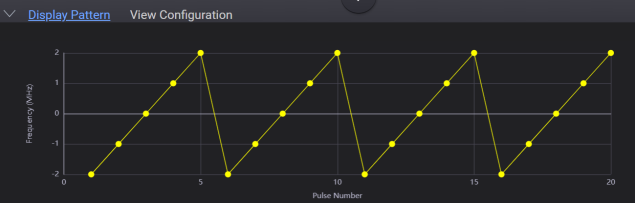
Provides a plot of the frequency hop pattern data. The plot shows frequency versus repetition of pulses. The plot is based on the current Hop Pattern properties. You may zoom in on the hop pattern plot by clicking and dragging across the area of interest.
The figures below show a Linear Ramp hop pattern and the corresponding Hop pattern tab settings.
The Pulse Building software supports antenna scan modulation patterns. A unique antenna pattern can be applied to each pulse Object Type in the Pulse Building Pattern.
The antenna pattern is applied to the pulsed signal by scaling the individual pulse amplitudes. This means that the antenna pattern is highly coupled and dependent on the pulsed signal pattern. The pulsed signal must contain enough pulses to see the entire amplitude pattern. For example, if the pulsed signal has a repetition rate of 100 us and the length of the antenna pattern is 1 s, you must generate 10,000 (1s/100us) pulses to see the entire pattern.
Pulse Building provides accurate output power when the antenna scan is enabled. The ALC is disabled when a signal containing an antenna scan is downloaded. A power search, if enabled, is used to get accurate output power. Pulse Building manages the waveform RMS voltage and uses this for the power search reference. See Getting Correct Output Power for more detail.
Pulse Building generates partial antenna scan patterns based on the number of pulses specified by the Repeat property.
The scan rate limits are dependent on the other antenna modulation properties and the hardware system configuration. The scan rate units are dependent on the scan type.
Sets the pattern type for the antenna scan. Refer to Antenna Pattern Types to know more.
|
SCPI Command |
[:SOURce]:RADio:PBUilding:WAVeform:PTLBrary:PATTern<patternindex>:ITEM<patternitemindex>:ANTenna:SCAN:TYPe NONe|CIRCular|CONical|CUSTom|BRASter|URASter|BSECtor|USECtor [:SOURce]:RADio:PBUilding:WAVeform:PTLBrary:PATTern<patternindex>:ITEM<patternitemindex>:ANTenna:SCAN:TYPe? |
|
SCPI Example |
RADio:PBUilding:WAVeform:PTLBrary:PATTern:ITEM:ANTenna:SCAN:TYPe CIRCular
|
|
Couplings |
|
|
Preset |
NONe |
|
State Saved |
Yes |
|
Initial S/W Revision |
A.18.00 |
Enables or disables the displayed Antenna plot in the Display Pattern (Antenna Panel) tab.
When you disable this setting, the current antenna scan modulation is disabled without setting the antenna pattern type to None. This preserves your entries for the pattern.
|
SCPI Command |
[:SOURce]:RADio:PBUilding:WAVeform:PTLBrary:PATTern<patternindex>:ITEM<patternitemindex>:ANTenna:ENABle:PATTern ON|OFF|1|0 [:SOURce]:RADio:PBUilding:WAVeform:PTLBrary:PATTern<patternindex>:ITEM<patternitemindex>:ANTenna:ENABle:PATTern? |
|
SCPI Example |
RADio:PBUilding:WAVeform:PTLBrary:PATTern:ITEM:ANTenna:ENABle:PATTern ON |
|
Couplings |
|
|
Preset |
ON |
|
State Saved |
Yes |
|
Initial S/W Revision |
A.18.00 |
Enabling this setting allows the Antenna Scan Refresh message to be displayed when Antenna Type is not None and when the pattern item duration changes.
By default, this setting is disabled.
|
SCPI Command |
[:SOURce]:RADio:PBUilding:WAVeform:PTLBrary:PATTern<patternindex>:ITEM<patternitemindex>:ANTenna:ENABle:ANTenna:REFResh:NEEDed ON|OFF|1|0 [:SOURce]:RADio:PBUilding:WAVeform:PTLBrary:PATTern<patternindex>:ITEM<patternitemindex>:ANTenna:ENABle:ANTenna:REFResh:NEEDed? |
|
SCPI Example |
RADio:PBUilding:WAVeform:PTLBrary:PATTern:ITEM:ANTenna:ENABle:ANTenna:REFResh:NEEDed OFF |
|
Couplings |
|
|
Preset |
OFF |
|
State Saved |
Yes |
|
Initial S/W Revision |
A.18.00 |
Sets the antenna scan rate when the Antenna Pattern Type is set to Circular.
|
SCPI Command |
[:SOURce]:RADio:PBUilding:WAVeform:PTLBrary:PATTern<patternindex>:ITEM<patternitemindex>:ANTenna:CIRCular:SCAN:RATe <real> [:SOURce]:RADio:PBUilding:WAVeform:PTLBrary:PATTern<patternindex>:ITEM<patternitemindex>:ANTenna:CIRCular:SCAN:RATe? |
|
SCPI Example |
RADio:PBUilding:WAVeform:PTLBrary:PATTern:ITEM:ANTenna:CIRCular:SCAN:RATe 15
|
|
Couplings |
|
|
Preset |
15 RPM |
| Min | 0.05 RPM |
| Max | 10000000 RPM |
|
State Saved |
Yes |
|
Initial S/W Revision |
A.18.00 |
Sets the antenna scan rate when the Antenna Pattern Type is set to Conical or Custom.
|
SCPI Command |
[:SOURce]:RADio:PBUilding:WAVeform:PTLBrary:PATTern<patternindex>:ITEM<patternitemindex>:ANTenna:CONical:SCAN:RATe <real> [:SOURce]:RADio:PBUilding:WAVeform:PTLBrary:PATTern<patternindex>:ITEM<patternitemindex>:ANTenna:CONical:SCAN:RATe? |
|
SCPI Example |
RADio:PBUilding:WAVeform:PTLBrary:PATTern:ITEM:ANTenna:CONical:SCAN:RATe 100 |
|
Couplings |
|
|
Preset |
100 Hz |
| Min | 0.05 Hz |
| Max | 10000000 Hz |
|
State Saved |
Yes |
|
Initial S/W Revision |
A.18.00 |
Sets the cone radius when using a Conical scan.
This setting is applicable when the Antenna Pattern Type is set to Conical.
|
SCPI Command |
[:SOURce]:RADio:PBUilding:WAVeform:PTLBrary:PATTern<patternindex>:ITEM<patternitemindex>:ANTenna:CONe:RADius <real> [:SOURce]:RADio:PBUilding:WAVeform:PTLBrary:PATTern<patternindex>:ITEM<patternitemindex>:ANTenna:CONe:RADius? |
|
SCPI Example |
RADio:PBUilding:WAVeform:PTLBrary:PATTern:ITEM:ANTenna:CONe:RADius 5 |
|
Couplings |
|
|
Preset |
5 deg |
| Min | 0 deg |
| Max | 180 deg |
|
State Saved |
Yes |
|
Initial S/W Revision |
A.18.00 |
Sets the type of interpolation to use on the Custom Scan Data, which are equally time-spaced amplitude values. The period between amplitude values is 1 divided by the number of points in the custom scan times the scan rate. For example, if the scan rate is 10 Hz and there are 10,000 points in the custom scan data, the time spacing is 1/(10*10000) or 10 us.
This setting is applicable when the Antenna Pattern Type is set to Custom.
|
SCPI Command |
[:SOURce]:RADio:PBUilding:WAVeform:PTLBrary:PATTern<patternindex>:ITEM<patternitemindex>:ANTenna:INTerpolation:TYPe NONe|LINear|LOGarithmic [:SOURce]:RADio:PBUilding:WAVeform:PTLBrary:PATTern<patternindex>:ITEM<patternitemindex>:ANTenna:INTerpolation:TYPe? |
|
SCPI Example |
RADio:PBUilding:WAVeform:PTLBrary:PATTern:ITEM:ANTenna:INTerpolation:TYPe LINear |
|
Couplings |
|
|
Preset |
NONe |
|
State Saved |
Yes |
|
Initial S/W Revision |
A.18.00 |
Adds the specified number of new amplitude items to the end in the amplitude pattern table to create a user-defined custom amplitude pattern. This setting is used by the Custom Antenna Pattern Type and is displayed only when you select Custom as the Antenna Pattern Type.
|
SCPI Command |
[:SOURce]:RADio:PBUilding:WAVeform:PTLBrary:PATTern<patternindex>:ITEM<patternitemindex>:ANTenna:CANTenna:ADD<amplitude;amplitude;amplitude> |
|
SCPI Example |
RADio:PBUilding:WAVeform:PTLBrary:PATTern:ITEM:ANTenna:CANTenna:ADD "0,1,0,1" |
|
Notes |
By default, no rows are added to the custom antenna pattern table. |
|
Preset |
|
|
State Saved |
Yes |
|
Initial S/W Revision |
A.18.00 |
Imports the Custom Antenna pattern values from a .csv or .txt file containing amplitude data to create a user-defined custom amplitude pattern. The Import option is used by the Custom Antenna Pattern Type and is displayed only when you select Custom as the Antenna Pattern Type.
The file format is ASCII CSV and the data is assumed to be in dB. The valid data range is from -100 dB to 0 dB. Time is assumed to be constant and equal between data points. It is assumed that the file contains one complete scan of the amplitude pattern. The time increment between data points is established using the scan rate property. The Custom amplitude pattern is not combined with any other antenna properties except Null Depth. The maximum dynamic range of the amplitude pattern is hardware specific and most likely less than 100 dB.
The Import menu option (shown below) opens the Open File dialog that allows you to import a .csv or .txt file containing amplitude data.

|
SCPI Command |
[:SOURce]:RADio:PBUilding:WAVeform:PTLBrary:PATTern<patternindex>:ITEM<patternitemindex>:ANTenna:CANTenna:IMPort<filepath> |
|
SCPI Example |
RADio:PBUilding:WAVeform:PTLBrary:PATTern:ITEM:ANTenna:CANTenna:IMPort "C:\test\pb.csv" |
|
Preset |
|
|
State Saved |
Yes |
|
Initial S/W Revision |
A.18.00 |
Allows you to edit the Custom Antenna pattern values.
|
SCPI Command |
[:SOURce]:RADio:PBUilding:WAVeform:PTLBrary:PATTern<patternindex>:ITEM<patternitemindex>:ANTenna:CANTenna:EDIT |
|
SCPI Example |
RADio:PBUilding:WAVeform:PTLBrary:PATTern:ITEM:ANTenna:CANTenna:EDIT 1,"1" In the above example, "1" is set as the value for row 1 in the custom antenna pattern table. |
|
Preset |
|
|
State Saved |
Yes |
|
Initial S/W Revision |
A.18.00 |
Sets the Beam on Retrace setting to On or Off.
When this setting is enabled (On), the antenna scan is displayed during retrace.
When this setting is disabled (Off), the amplitude level is set to Null Depth during retrace.
This setting is applicable when the Antenna Pattern Type is set to Bidirectional Raster or Unidirectional Raster.
|
SCPI Command |
[:SOURce]:RADio:PBUilding:WAVeform:PTLBrary:PATTern<patternindex>:ITEM<patternitemindex>:ANTenna:RASTer:BEAM:RETRace:TIMe ON|OFF|1|0 [:SOURce]:RADio:PBUilding:WAVeform:PTLBrary:PATTern<patternindex>:ITEM<patternitemindex>:ANTenna:RASTer:BEAM:RETRace:TIMe? |
|
SCPI Example |
RADio:PBUilding:WAVeform:PTLBrary:PATTern:ITEM:ANTenna:RASTer:BEAM:RETRace:TIMe ON |
|
Couplings |
|
|
Preset |
OFF |
|
State Saved |
Yes |
|
Initial S/W Revision |
A.18.00 |
Sets the antenna scan rate when the Antenna Pattern Type is set to Bidirectional Raster, Unidirectional Raster, Bidirectional Sector, or Unidirectional Sector.
|
SCPI Command |
[:SOURce]:RADio:PBUilding:WAVeform:PTLBrary:PATTern<patternindex>:ITEM<patternitemindex>:ANTenna:SECTor:RASTer:SCAN:RATe <real> [:SOURce]:RADio:PBUilding:WAVeform:PTLBrary:PATTern<patternindex>:ITEM<patternitemindex>:ANTenna: SECTor:RASTer:SCAN:RATe? |
|
SCPI Example |
RADio:PBUilding:WAVeform:PTLBrary:PATTern:ITEM:ANTenna:SECTor:RASTer:SCAN:RATe 100 |
|
Couplings |
|
|
Preset |
100 deg/s |
| Min | 0.05 deg/s |
| Max | 10000000 deg/s |
|
State Saved |
Yes |
|
Initial S/W Revision |
A.18.00 |
Sets the raster width when using Bidirectional or Unidirectional Raster scan.
This setting is applicable when the Antenna Pattern Type is set to Bidirectional Raster or Unidirectional Raster.
|
SCPI Command |
[:SOURce]:RADio:PBUilding:WAVeform:PTLBrary:PATTern<patternindex>:ITEM<patternitemindex>:ANTenna:RASTer:WIDTh <real> [:SOURce]:RADio:PBUilding:WAVeform:PTLBrary:PATTern<patternindex>:ITEM<patternitemindex>:ANTenna:RASTer:WIDTh? |
|
SCPI Example |
RADio:PBUilding:WAVeform:PTLBrary:PATTern:ITEM:ANTenna:RASTer:WIDTh 50 |
|
Couplings |
|
|
Preset |
50 deg |
| Min | 0 |
|---|---|
| Max | 360 deg |
|
State Saved |
Yes |
|
Initial S/W Revision |
A.18.00 |
Sets the flyback time when using Unidirectional Raster or Unidirectional Sector scan.
Flyback time is the time taken to move from the end of the sector or raster to the start of the next sector or raster.
|
SCPI Command |
[:SOURce]:RADio:PBUilding:WAVeform:PTLBrary:PATTern<patternindex>:ITEM<patternitemindex>:ANTenna:FLYBack:TIMe <real> [:SOURce]:RADio:PBUilding:WAVeform:PTLBrary:PATTern<patternindex>:ITEM<patternitemindex>:ANTenna:FLYBack:TIMe? |
|
SCPI Example |
RADio:PBUilding:WAVeform:PTLBrary:PATTern:ITEM:ANTenna:FLYBack:TIMe 0.002 |
|
Couplings |
|
|
Preset |
2 ms |
| Min | 0 |
| Max | 100 ms |
|
State Saved |
Yes |
|
Initial S/W Revision |
A.18.00 |
Sets the number of raster bars when using Bidirectional Raster or Unidirectional Raster scan.
|
SCPI Command |
[:SOURce]:RADio:PBUilding:WAVeform:PTLBrary:PATTern<patternindex>:ITEM<patternitemindex>:ANTenna:NUMBer:BARS <integer> [:SOURce]:RADio:PBUilding:WAVeform:PTLBrary:PATTern<patternindex>:ITEM<patternitemindex>:ANTenna:NUMBer:BARS? |
|
SCPI Example |
RADio:PBUilding:WAVeform:PTLBrary:PATTern:ITEM:ANTenna:NUMBer:BARS 3 |
|
Couplings |
|
|
Preset |
3 |
| Min | 0 |
| Max | 10000 |
|
State Saved |
Yes |
|
Initial S/W Revision |
A.18.00 |
Sets the angle between the raster bars when using Bidirectional Raster or Unidirectional Raster scan.
|
SCPI Command |
[:SOURce]:RADio:PBUilding:WAVeform:PTLBrary:PATTern<patternindex>:ITEM<patternitemindex>:ANTenna:BAR:WIDTh <real> [:SOURce]:RADio:PBUilding:WAVeform:PTLBrary:PATTern<patternindex>:ITEM<patternitemindex>:ANTenna:BAR:WIDTh? |
|
SCPI Example |
RADio:PBUilding:WAVeform:PTLBrary:PATTern:ITEM:ANTenna:BAR:WIDTh 4 |
|
Couplings |
|
|
Preset |
4 deg |
| Min | 0 |
| Max | 360 deg |
|
State Saved |
Yes |
|
Initial S/W Revision |
A.18.00 |
Sets the retrace time when using Bidirectional Raster or Unidirectional Raster scan. This is the time taken to move from the end of the last raster to the beginning of the first one.
|
SCPI Command |
[:SOURce]:RADio:PBUilding:WAVeform:PTLBrary:PATTern<patternindex>:ITEM<patternitemindex>:ANTenna:RETRace:TIMe <real> [:SOURce]:RADio:PBUilding:WAVeform:PTLBrary:PATTern<patternindex>:ITEM<patternitemindex>:ANTenna:RETRace:TIMe? |
|
SCPI Example |
RADio:PBUilding:WAVeform:PTLBrary:PATTern:ITEM:ANTenna:RETRace:TIMe 0.0005 |
|
Couplings |
|
|
Preset |
500 us |
| Min | 0 |
| Max | 100 ms |
|
State Saved |
Yes |
|
Initial S/W Revision |
A.18.00 |
Sets the sector width when using Bidirectional or Unidirectional Sector scan.
|
SCPI Command |
[:SOURce]:RADio:PBUilding:WAVeform:PTLBrary:PATTern<patternindex>:ITEM<patternitemindex>:ANTenna:SECTor:WIDTh <real> [:SOURce]:RADio:PBUilding:WAVeform:PTLBrary:PATTern<patternindex>:ITEM<patternitemindex>:ANTenna:SECTor:WIDTh? |
|
SCPI Example |
RADio:PBUilding:WAVeform:PTLBrary:PATTern:ITEM:ANTenna:SECTor:WIDTh 50 |
|
Couplings |
|
|
Preset |
50 deg |
| Min | 0 |
| Max | 360 deg |
|
State Saved |
Yes |
|
Initial S/W Revision |
A.18.00 |
This tab is not available if the Antenna Pattern Type is set to None.
Sets the radiation pattern for the antenna scan.
The following radiation pattern types are supported.
Blackman - Smooth taper window with good sidelobe suppression, moderate main-lobe width.
Cosine1 - Raised cosine window with simple cosine taper, lowest sidelobe suppression in the cosine family.
Cosine2 (Hanning) - Standard Hann window; good balance between main-lobe width and sidelobe suppression.
Cosine3 - Third-order cosine taper with better sidelobe roll-off than Cosine2.
Cosine4 - Fourth-order cosine taper offering even higher sidelobe suppression.
Cosine5 - Fifth-order cosine taper with strongest sidelobe suppression among the cosine windows.
Exact Blackman - Blackman variant with coefficients calculated for maximum sidelobe suppression accuracy.
Hamming - Window optimized to minimize nearest sidelobe amplitude; narrower main-lobe than Blackman.
Programmable - User-defined window where 1st sidelobe level and roll-off can be set manually.
Rectangular - No taper (all ones); narrowest main-lobe but highest sidelobes.
Three Term - Three-coefficient window with balanced main-lobe width and sidelobe suppression.
Three Term Minimum - Variant of Three Term optimized for minimum sidelobe levels.
|
SCPI Command |
[:SOURce]:RADio:PBUilding:WAVeform:PTLBrary:PATTern<patternindex>:ITEM<patternitemindex>:ANTenna:RADiation:TYPe BLACkman|COSine1|COSine2|COSine3|COSine4|COSine5|EXBLackman|HAMMing|PROGrammable|RECTangular|THRTerm|TMINimum [:SOURce]:RADio:PBUilding:WAVeform:PTLBrary:PATTern<patternindex>:ITEM<patternitemindex>:ANTenna:RADiation:TYPe? |
|
SCPI Example |
RADio:PBUilding:WAVeform:PTLBrary:PATTern:ITEM:ANTenna:RADiation:TYPe RECTangular |
|
Couplings |
|
|
Preset |
RECTangular |
|
State Saved |
Yea |
|
Initial S/W Revision |
A.18.00 |
Sets the level of the first side lobe in the antenna pattern.
|
SCPI Command |
[:SOURce]:RADio:PBUilding:WAVeform:PTLBrary:PATTern<patternindex>:ITEM<patternitemindex>:ANTenna:FIRSt:SIDe:LOBe <real> [:SOURce]:RADio:PBUilding:WAVeform:PTLBrary:PATTern<patternindex>:ITEM<patternitemindex>:ANTenna:FIRSt:SIDe:LOBe? |
|
SCPI Example |
RADio:PBUilding:WAVeform:PTLBrary:PATTern:ITEM:ANTenna:FIRSt:SIDe:LOBe -13.2 |
|
Couplings |
|
|
Preset |
-13.2 dB |
| Min | -90 dB |
| Max | 0 |
|
State Saved |
Yes |
|
Initial S/W Revision |
A.18.00 |
Sets the side lobe roll off of the antenna radiation.
|
SCPI Command |
[:SOURce]:RADio:PBUilding:WAVeform:PTLBrary:PATTern<patternindex>:ITEM<patternitemindex>:ANTenna:ROLL:OFF <real> [:SOURce]:RADio:PBUilding:WAVeform:PTLBrary:PATTern<patternindex>:ITEM<patternitemindex>:ANTenna:ROLL:OFF? |
|
SCPI Example |
RADio:PBUilding:WAVeform:PTLBrary:PATTern:ITEM:ANTenna:ROLL:OFF 6 |
|
Couplings |
|
|
Preset |
6 dB |
| Min | 0 |
| Max | 36 dB |
|
State Saved |
Yes |
|
Initial S/W Revision |
A.18.00 |
Sets the azimuth for the 3 dB beam width.
|
SCPI Command |
[:SOURce]:RADio:PBUilding:WAVeform:PTLBrary:PATTern<patternindex>:ITEM<patternitemindex>:ANTenna:AZIMuth:BEAM:WIDTh <real> [:SOURce]:RADio:PBUilding:WAVeform:PTLBrary:PATTern<patternindex>:ITEM<patternitemindex>:ANTenna:AZIMuth:BEAM:WIDTh? |
|
SCPI Example |
RADio:PBUilding:WAVeform:PTLBrary:PATTern:ITEM:ANTenna:AZIMuth:BEAM:WIDTh 1 |
|
Couplings |
|
|
Preset |
1 deg |
| Min | 0.01 deg |
| Max | 360 deg |
|
State Saved |
Yes |
|
Initial S/W Revision |
A.18.00 |
Sets the elevation for the 3 dB beam width.
|
SCPI Command |
[:SOURce]:RADio:PBUilding:WAVeform:PTLBrary:PATTern<patternindex>:ITEM<patternitemindex>:ANTenna:ELEVation:BEAM:WIDTh <real> [:SOURce]:RADio:PBUilding:WAVeform:PTLBrary:PATTern<patternindex>:ITEM<patternitemindex>:ANTenna:ELEVation:BEAM:WIDTh? |
|
SCPI Example |
RADio:PBUilding:WAVeform:PTLBrary:PATTern:ITEM:ANTenna:ELEVation:BEAM:WIDTh 2 |
|
Couplings |
|
|
Preset |
2 deg |
| Min | 0.01 deg |
| Max | 360 deg |
|
State Saved |
Yes |
|
Initial S/W Revision |
A.18.00 |
Sets the minimum amplitude level that the antenna pattern generator will produce.
|
SCPI Command |
[:SOURce]:RADio:PBUilding:WAVeform:PTLBrary:PATTern<patternindex>:ITEM<patternitemindex>:ANTenna:NULL:DEPTh <real> [:SOURce]:RADio:PBUilding:WAVeform:PTLBrary:PATTern<patternindex>:ITEM<patternitemindex>:ANTenna:NULL:DEPTh? |
|
SCPI Example |
RADio:PBUilding:WAVeform:PTLBrary:PATTern:ITEM:ANTenna:NULL:DEPTh -65 |
|
Couplings |
|
|
Preset |
-65 dB |
| Min | -140 dB |
| Max | 0 |
|
State Saved |
Yes |
|
Initial S/W Revision |
A.18.00 |
Sets the receiver horizontal location relative to the main beam at the start of the scan.
|
SCPI Command |
[:SOURce]:RADio:PBUilding:WAVeform:PTLBrary:PATTern<patternindex>:ITEM<patternitemindex>:ANTenna:HORizontal:LOCation <real> [:SOURce]:RADio:PBUilding:WAVeform:PTLBrary:PATTern<patternindex>:ITEM<patternitemindex>:ANTenna:HORizontal:LOCation? |
|
SCPI Example |
RADio:PBUilding:WAVeform:PTLBrary:PATTern:ITEM:ANTenna:HORizontal:LOCation 180 |
|
Couplings |
|
|
Preset |
0 |
| Min | -180 deg |
| Max | 180 deg |
|
State Saved |
Yes |
|
Initial S/W Revision |
A.18.00 |
Sets the receiver vertical location relative to the main beam at the start of the scan.
|
SCPI Command |
[:SOURce]:RADio:PBUilding:WAVeform:PTLBrary:PATTern<patternindex>:ITEM<patternitemindex>:ANTenna:VERTical:LOCation <real> [:SOURce]:RADio:PBUilding:WAVeform:PTLBrary:PATTern<patternindex>:ITEM<patternitemindex>:ANTenna:VERTical:LOCation? |
|
SCPI Example |
RADio:PBUilding:WAVeform:PTLBrary:PATTern:ITEM:ANTenna:VERTical:LOCation 180 |
|
Couplings |
|
|
Preset |
0 |
| Min | -180 deg |
| Max | 180 deg |
|
State Saved |
Yes |
|
Initial S/W Revision |
A.18.00 |
Provides a simulation of the antenna scan.
The plot displayed in the Display Pattern tab indicates how the antenna pattern should look. The simulated data assumes equally spaced time values and is generated using the current antenna scan properties.
The figure below shows a simulated antenna scan for a Circular antenna pattern type with Radiation Pattern set to Rectangular.
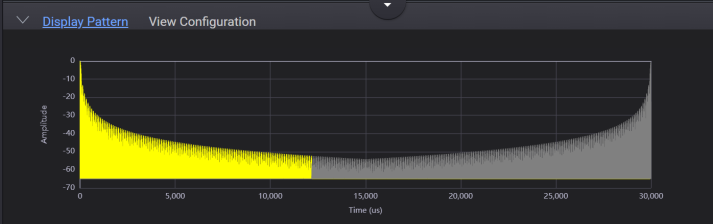
The yellow portion of the plot indicates what portion of the antenna scan will be generated based on the number of repeats. If a portion of the plot is grey, increase the number of repeats.
Sets the pattern type for the PRI. Available PRI pattern types are:
None
Bursted
Staggered
LinearRamp
Stepped
Refer to PRI Pattern Types To know more about these types.
|
SCPI Command |
[:SOURce]:RADio:PBUilding:WAVeform:PTLBrary:PATTern<patternindex>:ITEM<patternitemindex>:PRI:PATTern:TYPe NONe|BURSted|LINRamp|STEPped|STAGgered [:SOURce]:RADio:PBUilding:WAVeform:PTLBrary:PATTern<patternindex>:ITEM<patternitemindex>:PRI:PATTern:TYPe? |
|
SCPI Example |
RADio:PBUilding:WAVeform:PTLBrary:PATTern:ITEM:PRI:PATTern:TYPe BURS RADio:PBUilding:WAVeform:PTLBrary:PATTern:ITEM:PRI:PATTern:TYPe? |
|
Couplings |
|
|
Preset |
NONe |
|
State Saved |
Yes |
|
Initial S/W Revision |
A.18.00 |
Enables or disables the displayed PRI plot in the Display Pattern tab.
Enable Pattern allows you to easily disable the current PRI pattern without setting the PRI pattern type to None. This preserves your entries for the pattern. Changing the PRI Pattern type causes PRI pattern properties to be reset to their default values. PRI Wobbulation and PRI Jitter are also disabled when the PRI Pattern is disabled.
|
SCPI Command |
[:SOURce]:RADio:PBUilding:WAVeform:PTLBrary:PATTern<patternindex>:ITEM<patternitemindex>:PRI:ENABle:PATTern ON|OFF|1|0 [:SOURce]:RADio:PBUilding:WAVeform:PTLBrary:PATTern<patternindex>:ITEM<patternitemindex>:PRI:ENABle:PATTern? |
|
SCPI Example |
RADio:PBUilding:WAVeform:PTLBrary:PATTern:ITEM:PRI:ENABle:PATTern ON RADio:PBUilding:WAVeform:PTLBrary:PATTern:ITEM:PRI:ENABle:PATTern? |
|
Couplings |
|
|
Preset |
ON |
|
State Saved |
Yes |
|
Initial S/W Revision |
A.18.00 |
Sets the start value for the PRI pattern. This property is used by the PRI pattern types None, Linear Ramp, and Stepped.
Changing the PRI Pattern Type resets this property.
This property value also maps to the current Repetition Interval property.
|
SCPI Command |
[:SOURce]:RADio:PBUilding:WAVeform:PTLBrary:PATTern<patternindex>:ITEM<patternitemindex>:PRI:STARt <real> [:SOURce]:RADio:PBUilding:WAVeform:PTLBrary:PATTern<patternindex>:ITEM<patternitemindex>:PRI:STARt? |
|
SCPI Example |
RADio:PBUilding:WAVeform:PTLBrary:PATTern:ITEM:PRI:STARt 0.0000203 RADio:PBUilding:WAVeform:PTLBrary:PATTern:ITEM:PRI:STARt? |
|
Couplings |
|
|
Preset |
20.3 us |
|
State Saved |
Yes |
|
Min |
10 ns |
|
Max |
3 s |
|
Initial S/W Revision |
A.18.00 |
Sets the stop value for the PRI pattern. This property is used only by the Linear Ramp PRI pattern type.
Changing the PRI Pattern Type resets this property.
|
SCPI Command |
[:SOURce]:RADio:PBUilding:WAVeform:PTLBrary:PATTern<patternindex>:ITEM<patternitemindex>:PRI:STOP <real> [:SOURce]:RADio:PBUilding:WAVeform:PTLBrary:PATTern<patternindex>:ITEM<patternitemindex>:PRI:STOP? |
|
SCPI Example |
RADio:PBUilding:WAVeform:PTLBrary:PATTern:ITEM:PRI:STOP 0.0001 RADio:PBUilding:WAVeform:PTLBrary:PATTern:ITEM:PRI:STOP? |
|
Couplings |
|
|
Preset |
100 us |
|
State Saved |
Yes |
|
Min |
10 ns |
|
Max |
1.0e4 s |
|
Initial S/W Revision |
A.18.00 |
Sets the interval value for the PRI pattern. This property is used only by the Bursted PRI pattern type. The Burst Interval must be greater than or equal to the Number of Pulses times the PRI Start value.
Changing the PRI Pattern Type resets this property.
|
SCPI Command |
[:SOURce]:RADio:PBUilding:WAVeform:PTLBrary:PATTern<patternindex>:ITEM<patternitemindex>:PRI:BURSt:INTerval <real> [:SOURce]:RADio:PBUilding:WAVeform:PTLBrary:PATTern<patternindex>:ITEM<patternitemindex>:PRI:BURSt:INTerval? |
|
SCPI Example |
RADio:PBUilding:WAVeform:PTLBrary:PATTern:ITEM:PRI:BURSt:INTerval 0.0001 RADio:PBUilding:WAVeform:PTLBrary:PATTern:ITEM:PRI:BURSt:INTerval? |
|
Couplings |
|
|
Preset |
100 us |
|
State Saved |
Yes |
|
Min |
10 ns |
|
Max |
1.0e4 s |
|
Initial S/W Revision |
A.18.00 |
Specifies the number of times the PRI Start value is repeated in the burst pattern.
|
SCPI Command |
[:SOURce]:RADio:PBUilding:WAVeform:PTLBrary:PATTern<patternindex>:ITEM<patternitemindex>:PRI:NUMBer:PULSes <integer> [:SOURce]:RADio:PBUilding:WAVeform:PTLBrary:PATTern<patternindex>:ITEM<patternitemindex>:PRI:NUMBer:PULSes? |
|
SCPI Example |
RADio:PBUilding:WAVeform:PTLBrary:PATTern:ITEM:PRI:NUMBer:PULSes 5 RADio:PBUilding:WAVeform:PTLBrary:PATTern:ITEM:PRI:NUMBer:PULSes? |
|
Couplings |
|
|
Preset |
5 |
|
State Saved |
Yes |
|
Min |
1 |
|
Max |
100000000 |
|
Initial S/W Revision |
A.18.00 |
Sets the step value for the PRI pattern. This property is used only by the Stepped PRI pattern type.
Changing the PRI Pattern Type resets this property.
|
SCPI Command |
[:SOURce]:RADio:PBUilding:WAVeform:PTLBrary:PATTern<patternindex>:ITEM<patternitemindex>:PRI:STEP <real> [:SOURce]:RADio:PBUilding:WAVeform:PTLBrary:PATTern<patternindex>:ITEM<patternitemindex>:PRI:STEP? |
|
SCPI Example |
RADio:PBUilding:WAVeform:PTLBrary:PATTern:ITEM:PRI:STEP 0.000005 RADio:PBUilding:WAVeform:PTLBrary:PATTern:ITEM:PRI:STEP? |
|
Couplings |
|
|
Preset |
5 us |
|
State Saved |
Yes |
|
Min |
-1.0e4 s |
|
Max |
1.0e4 s |
|
Initial S/W Revision |
A.18.00 |
Sets the number of steps for the frequency hop pattern. This property is used only by the Stepped hop pattern type. Total pulses in the pattern equals Pulses Per Step times Number of Steps. The maximum pulse limit is hardware dependent.
Changing the Hop Pattern Type resets this property.
|
SCPI Command |
[:SOURce]:RADio:PBUilding:WAVeform:PTLBrary:PATTern<patternindex>:ITEM<patternitemindex>:PRI:NUMBer:STEPs <integer> [:SOURce]:RADio:PBUilding:WAVeform:PTLBrary:PATTern<patternindex>:ITEM<patternitemindex>:PRI:NUMBer:STEPs? |
|
SCPI Example |
RADio:PBUilding:WAVeform:PTLBrary:PATTern:ITEM:PRI:NUMBer:STEPs 4 RADio:PBUilding:WAVeform:PTLBrary:PATTern:ITEM:PRI:NUMBer:STEPs? |
|
Couplings |
|
|
Preset |
4 |
|
State Saved |
Yes |
|
Min |
0 |
|
Max |
46340 |
|
Initial S/W Revision |
A.18.00 |
Sets the number of pulses per step for the frequency hop pattern. This property is used only by the Stepped hop pattern type. Total pulses in the pattern equals Pulses Per Step times Number of Steps. The maximum pulse limit is hardware dependent.
Changing the Hop Pattern Type resets this property.
|
SCPI Command |
[:SOURce]:RADio:PBUilding:WAVeform:PTLBrary:PATTern<patternindex>:ITEM<patternitemindex>:PRI:PULSes:PER:STEP <integer> [:SOURce]:RADio:PBUilding:WAVeform:PTLBrary:PATTern<patternindex>:ITEM<patternitemindex>:PRI:PULSes:PER:STEP? |
|
SCPI Example |
RADio:PBUilding:WAVeform:PTLBrary:PATTern:ITEM:PRI:PULSes:PER:STEP 1 RADio:PBUilding:WAVeform:PTLBrary:PATTern:ITEM:PRI:PULSes:PER:STEP? |
|
Couplings |
|
|
Preset |
1 |
|
State Saved |
Yes |
|
Min |
1 |
|
Max |
46340 |
|
Initial S/W Revision |
A.18.00 |
Adds the specified number of new PRI items to the end in the PRI pattern table to create a user-defined PRI pattern. This setting is used by the Staggered PRI Pattern Type and is displayed only when you select Staggered as the PRI Pattern Type.
|
SCPI Command |
[:SOURce]:RADio:PBUilding:WAVeform:PTLBrary:PATTern<patternindex>:ITEM<patternitemindex>:PRI:PRIStaggered:ADD<PRIs;PRIs;PRIs> |
|
SCPI Example |
RADio:PBUilding:WAVeform:PTLBrary:PATTern:ITEM:PRI:PRIStaggered:ADD "0,1,0,1" |
|
Notes |
By default, PRI value is 20.3 us. |
|
Preset |
|
|
State Saved |
|
|
Initial S/W Revision |
A.18.00 |
Imports the staggered PRI pattern values from a .csv or .txt file to create a user-defined staggered PRI pattern table. This setting is used by the Staggered PRI Pattern Type and is displayed only when you select Staggered as the PRI Pattern Type.
The number of repeats specifies the total number of pulses generated. This allows partial and multiple repetitions of the pattern to be generated.
The file format is ASCII and the data is assumed to be in seconds. The valid PRI data range is from 50 ns to 10 seconds. The first PRI in the Staggered pattern is also mapped to the Repetition Interval property. The number of pulses in the custom pattern is determined by the number of values imported.
Changing the PRI pattern type deletes the imported PRI data. Existing PRI data is deleted before a new import.
The Import menu option (shown below) opens the Open File dialog that allows you to import a .csv or .txt file containing custom PRI pattern items into the PRI pattern table.

|
SCPI Command |
[:SOURce]:RADio:PBUilding:WAVeform:PTLBrary:PATTern<patternindex>:ITEM<patternitemindex>:PRI:PRIStaggered:IMPort<filepath> |
|
SCPI Example |
RADio:PBUilding:WAVeform:PTLBrary:PATTern:ITEM:PRI:PRIStaggered:IMPort "C:\test\pb.csv" |
|
Couplings |
|
| Notes | |
|
Preset |
|
|
State Saved |
Yes |
|
Initial S/W Revision |
A.18.00 |
Allows you to edit the PRI pattern values in the user-defined staggered PRI pattern table.
This setting is used by the Staggered PRI Pattern Type and is displayed only when you select Staggered as the PRI Pattern Type.
|
SCPI Command |
[:SOURce]:RADio:PBUilding:WAVeform:PTLBrary:PATTern<patternindex>:ITEM<patternitemindex>:PRI:PRIStaggered:EDIT<index,string> |
|
SCPI Example |
RADio:PBUilding:WAVeform:PTLBrary:PATTern:ITEM:PRI:PRIStaggered:EDIT 1,"1" |
|
Couplings |
|
| Notes | |
|
Preset |
|
|
State Saved |
Yes |
|
Initial S/W Revision |
A.18.00 |
Sets the jitter type to Gaussian, Uniform, or Ushaped.
|
SCPI Command |
[:SOURce]:RADio:PBUilding:WAVeform:PTLBrary:PATTern<patternindex>:ITEM<patternitemindex>:PRI:JITTer:TYPe NONe|GAUSsian|UNIForm|USHaped [:SOURce]:RADio:PBUilding:WAVeform:PTLBrary:PATTern<patternindex>:ITEM<patternitemindex>:PRI:JITTer:TYPe? |
|
SCPI Example |
RADio:PBUilding:WAVeform:PTLBrary:PATTern:ITEM:PRI:JITTer:TYPe GAUSsian |
|
Preset |
NONe |
|
State Saved |
Yes |
|
Initial S/W Revision |
A.18.00 |
Specified as the maximum ± time excursion for any jitter. The width of the pulse (100%-100%) is changed by jittering the falling edge of the pulse using the selected probability model.
|
SCPI Command |
[:SOURce]:RADio:PBUilding:WAVeform:PTLBrary:PATTern<patternindex>:ITEM<patternitemindex>:PRI:JITTer:DEViation <real> [:SOURce]:RADio:PBUilding:WAVeform:PTLBrary:PATTern<patternindex>:ITEM<patternitemindex>:PRI:JITTer:DEViation? |
|
SCPI Example |
RADio:PBUilding:WAVeform:PTLBrary:PATTern:ITEM:PRI:JITTer:DEViation 1 |
|
Notes |
|
|
Preset |
0 |
|
State Saved |
Yes |
|
Min |
0 s |
|
Max |
1 s |
|
Initial S/W Revision |
A.18.00 |
Sets the wobbulation type applied to the PRI pattern. The wobbulation pattern is calculated assuming an ideal signal from the PRI pattern.
For a positive deviation, the wobbulation pattern always starts at 0 and increases.
For a negative deviation, the wobbulation pattern always starts at 0 and decreases.
See Wobbulation Types to know more.
|
SCPI Command |
[:SOURce]:RADio:PBUilding:WAVeform:PTLBrary:PATTern<patternindex>:ITEM<patternitemindex>:PRI:WOBBulation:TYPe NONe|SAWTooth|SINusoidal|TRIangular [:SOURce]:RADio:PBUilding:WAVeform:PTLBrary:PATTern<patternindex>:ITEM<patternitemindex>:PRI:WOBBulation:TYPe? |
|
SCPI Example |
RADio:PBUilding:WAVeform:PTLBrary:PATTern:ITEM:PRI:WOBBulation:TYPe SAWTooth |
|
Preset |
NONe |
|
State Saved |
Yes |
|
Initial S/W Revision |
A.18.00 |
Sets the wobbulation deviation for Sawtooth, Sinusoidal, or Triangular PRI Wobbulation impairment. The wobbulation deviation can be a positive or a negative value. A positive value causes the pattern to start at zero and increase. A negative value causes the pattern to start at zero and decrease.
|
SCPI Command |
[:SOURce]:RADio:PBUilding:WAVeform:PTLBrary:PATTern<patternindex>:ITEM<patternitemindex>:PRI:WOBBulation:DEViation <real> [:SOURce]:RADio:PBUilding:WAVeform:PTLBrary:PATTern<patternindex>:ITEM<patternitemindex>:PRI:WOBBulation:DEViation? |
|
SCPI Example |
RADio:PBUilding:WAVeform:PTLBrary:PATTern:ITEM:PRI:WOBBulation:DEViation 10 |
|
Preset |
0 |
| Min | -10 s |
| Max | 10 s |
|
State Saved |
Yes |
|
Initial S/W Revision |
A.18.00 |
Sets the wobbulation rate for Sawtooth, Sinusoidal, or Triangular PRI Wobbulation impairment.
The wobbulation rate is not forced to be an integer multiple of the Average PRF. Instead, it has infinite resolution based on the total time of the signal. It is possible to have a discontinuity at the end of the wobbulation pattern unless you force the wobbulation rate to be an integer multiple of the signal's average PRF.
|
SCPI Command |
[:SOURce]:RADio:PBUilding:WAVeform:PTLBrary:PATTern<patternindex>:ITEM<patternitemindex>:PRI:WOBBulation:RATe <real> [:SOURce]:RADio:PBUilding:WAVeform:PTLBrary:PATTern<patternindex>:ITEM<patternitemindex>:PRI:WOBBulation:RATe? |
|
SCPI Example |
RADio:PBUilding:WAVeform:PTLBrary:PATTern:ITEM:PRI:WOBBulation:RATe 5000000000 |
|
Preset |
0 |
| Min | 0 |
| Max | 5 GHz |
|
State Saved |
Yes |
|
Initial S/W Revision |
A.18.00 |
Sets the wobbulation start time offset. This effectively allows you to control the starting point of the wobbulation pattern.
|
SCPI Command |
[:SOURce]:RADio:PBUilding:WAVeform:PTLBrary:PATTern<patternindex>:ITEM<patternitemindex>:PRI:WOBBulation:STARt:OFFSet <real> [:SOURce]:RADio:PBUilding:WAVeform:PTLBrary:PATTern<patternindex>:ITEM<patternitemindex>:PRI:WOBBulation:STARt:OFFSet? |
|
SCPI Example |
RADio:PBUilding:WAVeform:PTLBrary:PATTern:ITEM:PRI:WOBBulation:STARt:OFFSet 1 |
|
Preset |
0 |
| Min | 0 |
| Max | 100000 s |
|
State Saved |
Yes |
|
Initial S/W Revision |
A.18.00 |
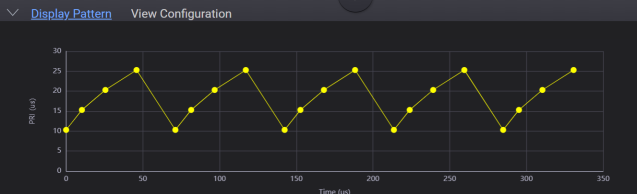
Provides a plot of the PRI pattern data, including the jitter and wobbulation impairment, if specified. The plot shows PRI versus time. The plot is based on the current PRI Pattern properties. You may zoom in on the PRI pattern plot by clicking and dragging across the area of interest.
The screens below show a Stepped PRI pattern and the corresponding PRI pattern tab settings.