Pulse Building
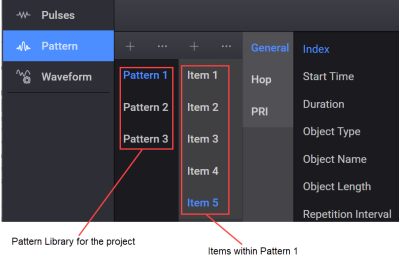
A pattern consists of a series or sequence of pulses, other patterns, or off-times. A pattern describes how the pulses are combined and played back by the signal generator. The Pulse Building application allows creation of patterns consisting of items such as off-times, pulses, patterns, or patterns within patterns. Each of the off-times, pulses, or patterns included in a pattern are called pattern items.
You can generate and play a waveform for selected pattern only and not for individual pulses.
There can be one or more items that make up a pattern. The purpose of items is to allow you to include different object types within a pattern to replicate varied signal situations. For example, if you want to include 10 different pulses in a pattern, you can add each of these pulses in items of the pattern. Each item has its own index number.
A pattern item can be repeated sequentially or repeated after other items in the pattern have played. For example, you want to create a pattern consisting of two different pulses, Pulse 1 and Pulse 2, along with another, previously created pattern, Pattern 3. Using the Pulse Building application, you can create a pattern that repeats Pulse 1 ten times, plays Pulse 2 once, repeats Pattern 3 twice, and repeats Pulse 1 five times. Any combination of repeats or sequences of patterns and pulses can be created restricted only by the limits of the signal generator's baseband memory.
Pattern items are played out consecutively in time. Each pattern item is played according to the configuration parameters such as repeats and then the next item in the pattern is played.
Once a pattern / item is created with the default name (Pattern <n> and Item <n>), you can rename it and it is automatically saved to the Pattern Library of the current project.
