Digital Signal Interface Module Commands
These commands configure the Digital Signal Interface Module (DSIM)
when it is assigned as an external instrument.
Numerical
Choices:
DSIM[1]2|3|4 – These choices correspond to
the number of DSIMs being used. If only one DSIM is used, regardless of
the I/O port where it is connected, the DSIM will be DSIM1 in SCPI.
:CONTrol:DSIM[1]2|3|4[:EXTernal]:CLOCk:CPSample
ONE|TWO|FOU
:CONTrol:DSIM[1]2|3|4[:EXTernal]:CLOCk:CPSample?
This
command sets the number of clock cycles per sample output by the N5102A
Digital Interface. When you select a number of clocks per sample that
is greater than one, the sample is held for the selected number of clock
cycles. This reduces the sample rate relative to the clock rate by a factor
equal to the clocks per sample value.
This command
is only valid when the Port Connection is Parallel.
:CONTrol:DSIM[1]2|3|4[:EXTernal]:CLOCk:OSRate <val>
:CONTrol:DSIM[1]2|3|4[:EXTernal]:CLOCk:OSRate?
This command sets the output sample rate for the
DSIM. The available range for the output sample rate depends on the Port
Configuration settings and is limited by the maximum clock rate. Changing
the Clock Rate, Clocks per Sample, or Port Configuration will cause this
value to be recalculated. This sample rate is matched to the IO output
sample rate when the configuration is loaded and cannot be changed during
runtime.
The value <val> is expressed in Hz.
Range: 1000 to
200E+06
:CONTrol:DSIM[1]2|3|4[:EXTernal]:CLOCk:PHASe D0|D90|D180|D270
:CONTrol:DSIM[1]2|3|4[:EXTernal]:CLOCk:PHASe?
This command adjusts the clock phase in 90-degree
increments to 0, 90, 180, or 270 degrees. This value is runtime adjustable
while the waveform is playing.
:CONTrol:DSIM[1]2|3|4[:EXTernal]:CLOCk:POLarity POSitive|NEGative
:CONTrol:DSIM[1]2|3|4[:EXTernal]:CLOCk:POLarity?
This command sets the alignment for the clock signal
to positive or negative. This value is runtime adjustable while the waveform
is playing.
|
POSitive
|
This choice sets the sample alignment to occur on the rising edge transition
of the clock signal.
|
|
NEGative
|
This choice sets sample alignment to occur on the falling edge transition
of the clock signal. The Negative selection functions the same as setting
the clock phase to 180 degrees.
|
:CONTrol:DSIM[1]2|3|4[:EXTernal]:CLOCk:RATE <val>
:CONTrol:DSIM[1]2|3|4[:EXTernal]:CLOCk:RATE?
This command sets the clock rate at the user or DUT
side of the N5102A digital interface module. This includes all effects
on the clock such as serialization, and interleaving. Because of these
settings, the clock rate can be different from the sample rate. Changing
the Port Configuration will cause this value to be recalculated. This
value is runtime adjustable while the waveform is playing.
The variable <val> is a expressed in Hz.
Range: 1kHz
to 200 MHz (10E+06 if
clock source is set to internal)
:CONTrol:DSIM[1]2|3|4:[EXTernal]:CLOCk:REFerence:FREQuency
<val>
:CONTrol:DSIM[1]2|3|4:[EXTernal]:CLOCk:REFerence:FREQuency?
This command allows you to specify the frequency
of the external reference supplied to the Freq Ref connector. This command
is valid only when the clock source is set to internal. If this command
is executed when the clock source is not set to internal, the parameter
value is changed, but it is not used until the clock source is changed
to internal.
Because a query returns the currently set value,
regardless of the clock source, you must query both states (reference
frequency and clock source) to know the current setup.
The variable <val> is expressed Hz.
Range: 1
kHz to 100 MHz
:CONTrol:DSIM[1]2|3|4[:EXTernal]:CLOCk:REFerence:SOURce
INTernal|EXTernal
:CONTrol:DSIM[1]2|3|4[:EXTernal]:CLOCk:REFerence:SOURce?
This command sets the clock reference source to internal
or external.
|
INTernal
|
The N5102A digital interface module generates the sample clock.
|
|
EXTernal
|
The N5102A digital interface uses a clock provided by an external source
through the Ext Clock In connector. The external clock is also available
to the DUT at the Ext Clock Out connector.
|
:CONTrol:DSIM[1]2|3|4[:EXTernal]:CLOCk:SKEW <val>
:CONTrol:DSIM[1]2|3|4[:EXTernal]:CLOCk:SKEW?
This command provides a fine-adjustment for aligning
the clock to the valid portion of the data. Because this is a fine adjustment,
it provides greater benefit at higher clock rates.
The maximum range for this value is +/- 5 nS, but
the actual range depends on the clock rate. The clock skew value will
be rounded to a resolution of 1/sample rate and is only active when the
clock rate is greater than 25 MHz. If the sample rate is changed, the
clock skew will adjust based on the previous number of samples skewed.
This value is runtime adjustable while the waveform is playing.
The variable <val> is expressed in nanoseconds.
Range: –5 to 5
:CONTrol:DSIM[1]2|3|4[:EXTernal]:CLOCk:SOURce INTernal|EXTernal|DEVice
:CONTrol:DSIM[1]2|3|4[:EXTernal]:CLOCk:SOURce?
This command selects one of three possible clock
sources.
|
INTernal
|
With this choice, the N5102A digital interface module generates the
sample clock. When the clock source is internal, both Reference Frequency
and Frequency Reference Source become active.
|
|
EXTernal
|
With this choice, the N5102A digital interface uses a clock provided
by an external source through the Ext Clock In connector. The external
clock is also available to the DUT at the Ext Clock Out connector.
|
|
DEVice
|
With this choice, the DUT provides the clock to the N5102A digital interface
through a pin on the breakout board connector ribbon cable. See the N5102A
Digital Signal Interface Module Installation Guide for information
about breakout boards.
|
:CONTrol:DSIM[1]2|3|4[:EXTernal]:DATA:ALIGnment LSB|MSB
:CONTrol:DSIM[1]2|3|4[:EXTernal]:DATA:ALIGnment?
This command selects the bit alignment of words smaller
than 16 bits to begin at either boundary of the data bus. The word alignment
is coupled with the word size and the word order. This command is only
valid in parallel mode. The Data
Format Graph in the user interface updates to reflect changes to this
selection.
|
LSB
|
With this choice, the data will be aligned with the left data boundary
(data line zero) for both I and Q.
|
|
MSB
|
With this choice, the data will be aligned with the right data boundary
(data line 15) for both I and Q.
|
:CONTrol:DSIM[1]2|3|4[:EXTernal]:DATA:BORDer
LSB|MSB
:CONTrol:DSIM[1]2|3|4[:EXTernal]:DATA:BORDer?
This command selects the bit order for data transmitted
through the N5102A module. In serial mode, data can be in least significant
(LSB) bit first or most significant (MSB) bit first (data line zero).
In parallel mode, you can assign the bit order of the data words to either
the lowest or highest lines of the data word. The Data Format Graph in the user interface
updates to reflect changes to this selection.
|
LSB
|
With this choice, for a serial port configuration, the LSB of the data
will be the first bit (data line zero) in a sample. In parallel or parallel
interleaved port configuration, the LSB of the data word will appear on
the lowest lines of the data word.
|
|
MSB
|
For a serial port configuration, the MSB will be the first bit in a
sample. In parallel or parallel interleaved port configuration, the MSB
of the data word will appear on the lowest lines of the data word.
|
:CONTrol:DSIM[1]2|3|4[:EXTernal]:DATA:DIRection?
This query returns the direction for the data flow
through the N5102A digital module according to the current I/O hardware configuration
setup.
:CONTrol:DSIM[1]2|3|4[:EXTernal]:DATA:FRAMe:POLarity
POSitive|NEGative
:CONTrol:DSIM[1]2|3|4[:EXTernal]:DATA:FRAMe:POLarity?
This command selects the polarity of the frame marker
for serial transmission. The frame marker indicates the beginning of each
sample or byte of data. The command is valid for serial transmission only.
|
POSitive
|
This choice selects a positive polarity. The frame marker is high for
the first data sample.
|
|
NEGative
|
This choice selects a negative polarity. The frame marker is low for
the first data sample.
|
:CONTrol:DSIM[1]2|3|4[:EXTernal]:DATA:INEGate ON|OFF|1|0
:CONTrol:DSIM[1]2|3|4[:EXTernal]:DATA:INEGate?
This command enables or disables negation of the
value of each sample of the 'I' data. Negation changes the affected sample
by expressing it in two's complement form, multiplying by negative one,
and converting back to the selected numeric format. Negation can be done
for I samples, Q samples, or both. The setting is runtime adjustable while
the waveform is playing.
:CONTrol:DSIM[1]2|3|4[:EXTernal]DATA:IQ:POLarity POSitive|NEGative
:CONTrol:DSIM[1]2|3|4[:EXTernal]:DATA:IQ:POLarity?
This command selects the logic level for I and Q
data. This value is runtime adjustable while the waveform is playing.
|
POSitive
|
Selects a high logic level at the output as a digital one.
|
|
NEGative
|
Selects a low logic level at the output as a digital one.
|
:CONTrol:DSIM[1]2|3|4:[EXTernal]:DATA:IQ:SWAP ON|OFF|1|0
:CONTrol:DSIM[1]2|3|4[:EXTernal]:DATA:IQ:SWAP?
This command enables or disables swapping of the
I and Q data. When enabled, the 'I' data is sent to the N5102A's Q bus
and the 'Q’ data is sent to the I bus. The setting may be changed while
the waveform is playing.
:CONTrol:DSIM[1]2|3|4[:EXTernal]:DATA:NFORmat OBINary|TCOMplement
:CONTrol:DSIM[1]2|3|4[:EXTernal]:DATA:NFORmat?
This command selects the binary format used to represent
the transmitted data values. This value is runtime adjustable while the
waveform is playing.
|
OBINary
|
This choice sets the N5102A module data format to an offset binary representation
of the data values.
|
|
TCOMplement
|
This choice sets the N5102A module data format to a two’s complement
representation of the data values.
|
:CONTrol:DSIM[1]2|3|4[:EXTernal]:DATA:QNEGate
ON|OFF|1|0
:CONTrol:DSIM[1]2|3|4[:EXTernal]:DATA:QNEGate?
This command enables or disables negation of the
value of each sample of the Q data. Negation changes the affected sample
by expressing it in two's complement form, multiplying by negative one,
and converting back to the selected numeric format. Negation can be done
for I samples, Q samples, or both. The setting is runtime adjustable while
the waveform is playing.
:CONTrol:DSIM[1]2|3|4[:EXTernal]:DATA:SIZE
<val>
:CONTrol:DSIM[1]2|3|4[:EXTernal]:DATA:SIZE?
This command sets the number of bits in each sample
transmitted through the N5102A module. A word is defined as an integer
number of bits from 4 to 16. For parallel and parallel interleaved data,
word is synonymous with sample. Any unused data lines are driven low.
The word size is coupled with word alignment.
Range: 4
to 16
:CONTrol:DSIM[1]2|3|4[:EXTernal]:LOGic:TYPE LVDS|LVTTL|CMOS33|CMOS25|CMOS18|CMOS15
:CONTrol:DSIM[1]2|3|4[:EXTernal]:LOGic:TYPE?
This command selects the logic data type used by
the device being tested.
|
LVDS
|
This choice selects low voltage differential signaling as the logic
data type.
|
|
LVTTL
|
This choice selects a low voltage TTL signal as the logic data type.
|
|
CMOS33
|
This choice selects a 3.3 volt CMOS signal as the logic data type.
|
|
CMOS25
|
This choice selects a 2.5 volt CMOS signal as the logic data type.
|
|
CMOS18
|
This choice selects a 1.8 volt CMOS signal as the logic data type.
|
|
CMOS15
|
This choice selects a 1.5 volt CMOS signal as the logic data type.
|
:CONTrol:DSIM[1]2|3|4[:EXTernal]:PORT:CONFig SERial|PARallel
:CONTrol:DSIM[1]2|3|4[:EXTernal]:PORT:CONFig?
This command selects the data transmission type used
for communication between the N5102A module and the device under test.
This selection affects the clock and sample rate ranges.
:CONTrol:DSIM[1]2|3|4[:EXTernal]:PORT:PMAPping IQ2IQ|IQ2IQI|IQ2IIQ
:CONTrol:DSIM[1]2|3|4[:EXTernal]:PORT:PMAPping?
This choice selects the port mapping type for parallel
transmission only.
|
IQ2IQ
|
With this choice, samples are transmitted as 16 bits of ’I’ followed
by 16 bits of ’Q’; a complete sample is 32 bits or 4 bytes. At the device
interface, the 16 bits of ’I’ are on the 16 ’I’ parallel lines; the 16
bits of ’Q’ are on the 16 ’Q’ parallel lines.
|
|
IQ2IQI
|
With this choice, samples are transmitted as 16 bits of ’I’ followed
by 16 bits of ’Q’; a complete sample is 32 bits or 4 bytes. At the device
interface, the 16 bits of ’I’ and the 16 bits of ’Q’ are both on the 16
’I’ parallel lines. The ’I’ and ’Q’ bits are interleaved, with the ’Q’
bits coinciding with the rising edge of the clock, and the ’I’ bits occurring
with the falling edge of the clock. The ’Q’ bits for a given sample precede
the ’I’ bits for that sample.
|
|
IQ2IIQ
|
With this choice, samples are transmitted as 16 bits of ’I’ followed
by 16 bits of ’Q’; a complete sample is 32 bits or 4 bytes. At the device
interface, the 16 bits of ’I’ and the 16 bits of ’Q’ are both on the 16
’I’ parallel lines. The ’I’ and ’Q’ bits are interleaved, with the ’I’
bits coinciding with the rising edge of the clock, and the ’Q’ bits occurring
with the falling edge of the clock. The ’I’ bits for a given sample precede
the ’Q’ bits for that sample.
|
:CONTrol:DSIM[1]2|3|4[:EXTernal]:PORT:SMAPping IQ2IQ|IQ2SIIQ|IQ2BIIQ
:CONTrol:DSIM[1]2|3|4[:EXTernal]:PORT:SMAPping?
This command selects the port mapping type for serial
transmission only.
|
Serial
Data Transmission
|
|
|
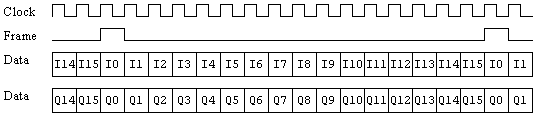
IQ2IQ
|
With this choice, samples are transmitted as
16 bits of ’I’ followed by 16 bits of ’Q’; a complete sample is 32 bits
or 4 bytes. At the device interface, the 16 ’I’
bits of a sample appear as a serial stream on the I0
line. The 16 ’Q’ bits of a sample appear on the
I1 line. Accompanying
these two data lines are separate lines for clock and frame signals. The
frame signal goes high for one clock cycle during I0
and Q0; for
the rest of the sample, the frame is low.
|
|
|
|
|
IQ2SIIQ
|
With this choice, samples are transmitted as 16 bits of ’I’ followed
by 16 bits of ’Q’; a complete sample is 32 bits or 4 bytes. At the device
interface, the 16 'I’ bits as well as the 16 ’Q’ bits of a sample appear
as a single serial stream on the I0
line. The ’I’ bits of a given sample precede the
associated 16 ’Q’ bits. The frame signal goes high for one clock cycle
during the first ’I’ bit of a sample; for the rest of the sample, the
frame signal is low.
|
|

|
|
|
IQ2BIIQ
|
With this choice, samples are transmitted as 16 bits of ’I’ followed
by 16 bits of ’Q’; a complete sample is 32 bits or 4 bytes. At the device
interface, the 16 ’I’ bits as well as the 16 ’Q’ bits of a sample appear
as a single serial stream on the I0
line, with each 'I’ bit preceding the associated ’Q’ bit. The frame signal
goes high for one clock cycle during the first ’I’ bit of a sample; during
the rest of the sample, the frame signal is low.
|
|

|
|