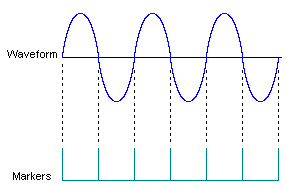
These commands allow you to change or adjust the marker settings applied to the waveform output which may be necessary after summing, fading, or impairments have been added. These output marker commands will override any markers as previously set by input I/O or baseband marker commands.
Numerical Choices:
IO[1]|2|3|4|5|6|7|8 – Refer to the block diagram for your system configuration to determine the output block that you want to configure.
MARKer[1]2|3|4 – The numerical choices correspond to the marker that you want to assign to the selected output parameter. Marker 2 is reserved for internal use. When connected to a DSIM at the output, marker 4 is turned off.
:CONTrol:IO[1]|2|3|4|5|6|7|8:OUTPut:MARKer[1]2|3|4:DELay <val>
:CONTrol:IO[1]|2|3|4|5|6|7|8:OUTPut:MARKer[1]2|3|4:DELay?
This command sets the delay for the individual marker determined by the sample rate.
The maximum delay is the time required to play 1,024 samples, as calculated using the following equation:
The variable <val> is expressed in seconds.
Range: 0
to time required to play 1.024 samples (varies depending on sample rate)
:CONTrol:IO[1]|2|3|4|5|6|7|8:OUTPut:MARKer[1]2|3|4:ENABle ON|OFF|1|0
:CONTrol:IO[1]|2|3|4|5|6|7|8:OUTPut:MARKer[1]2|3|4:ENABle?
This command turns the marker state on or off. (Marker 4 is always off (cannot be enabled) when connecting to a DSIM. Marker 2 is reserved.) This command is required when executing any marker commands.
:CONTrol:IO[1]|2|3|4|5|6|7|8:OUTPut:MARKer[1]2|3|4:POLarity POSitive|NEGative
:CONTrol:IO[1]|2|3|4|5|6|7|8:OUTPut:MARKer[1]2|3|4:POLarity?
This command sets the active polarity for the selected markers.
|
POSitive |
This choice sets the marker signal to be high on a value of 1. |
|
NEGative |
This choice sets the marker signal to be high on a value of 0. |
:CONTrol:IO[1]|2|3|4|5|6|7|8|5|6|7|8:OUTPut:MARKer[1]2|3|4:SOURce DYNamic|MCHannel
:CONTrol:IO[1]|2|3|4|5|6|7|8|5|6|7|8:OUTPut:MARKer[1]2|3|4:SOURce?
This command sets the marker source to be used for individual output marker settings.
|
DYNamic |
This choice selects a dynamically set marker instead of using the marker as set in the master channel selection. The type of marker is selected using the Marker Type command and related parameters. |
|
MCHannel |
This choice selects the marker as specified in the master channel. |
:CONTrol:IO[1]|2|3|4|5|6|7|8:OUTPut:MARKer[1]|2|3:TYPE ZDETect|RDETect|PERiodic
:CONTrol:IO[1]|2|3|4|5|6|7|8:OUTPut:MARKer[1]|2|3:TYPE?
This command allows you to dynamically control the events that will turn a marker on or off when the marker source is Dynamic.
|
ZDETect |
This choice sets the marker to active when I and Q are both detected
as zero; otherwise, marker is not active. It is mainly intended to detect
when a bursted signal is on or off. (It is equivalent to using Range and
Power equal to 0). |
|
RDETect |
This choice specifies the marker signal to be active when the waveform signal detects the specific range criteria that you define. To be effective, this command requires that the Range Relationship (Equal, Less, Greater, and Range), Range Data, and Range Units commands are executed. |
|
PERiodic |
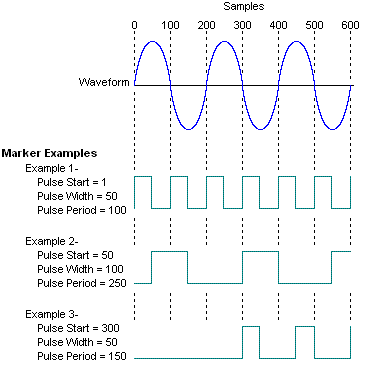
This choice selects the sample and duration where the marker will be
active. To be effective, this command requires that the Pulse Start (the
number of samples to wait until the first marker pulse is started), Pulse
Width (the number of samples that the marker pulse is turned on), and
Pulse Period (the number of samples for one complete cycle of the marker
pulse, which is number of samples of the pulse period plus the number
of samples of off time between two pulses) commands are executed. |
:CONTrol:IO[1]|2|3|4|5|6|7|8:OUTPut:MARKer[1]2|3|4:TYPE:PERiodic:PPERiod <val>
:CONTrol:IO[1]|2|3|4|5|6|7|8:OUTPut:MARKer[1]2|3|4:TYPE:PERiodic:PPERiod?
This command sets the total number of samples in the marker cycle (on plus off time). The pulse period is set as an even-numbered integer, greater than or equal to 4, representing the number of samples.
The variable <val> is number of samples.
This command is only valid when the Marker Source is Dynamic and the Marker Type is Periodic.
Range: 4 to 1099511627775
(240-1) samples
:CONTrol:IO[1]|2|3|4|5|6|7|8:OUTPut:MARKer[1]2|3|4:TYPE:PERiodic:PSTart <val>
:CONTrol:IO[1]|2|3|4|5|6|7|8:OUTPut:MARKer[1]2|3|4:TYPE:PERiodic:PSTart?
This command sets the sample on which the marker becomes active (on) when the Marker Type is Periodic. This command is only valid when the Marker Source is Dynamic and the Marker Type is Periodic.
The variable <val> is number of samples.
Range: 1
to 1099511627775
(240-1)
samples
:CONTrol:IO[1]|2|3|4|5|6|7|8:OUTPut:MARKer[1]2|3|4:TYPE:PERiodic:PWIDth <val>
:CONTrol:IO[1]|2|3|4|5|6|7|8:OUTPut:MARKer[1]2|3|4:TYPE:PERiodic:PWIDth?
This command sets the width of the active markers in the samples when the Marker Type is Periodic. The variable <val> is number of samples.
This command is only valid when the Marker Source is Dynamic and the Marker Type is Periodic.
Range: 1
to 4294967295 (232-1) samples
:CONTrol:IO:[1]2|3|4|5|6|7|8:OUTPut:MARKer[1]2|3|4:TYPE:RRELation EQUal|GREater|LESS|RANGe
:CONTrol:IO:[1]2|3|4|5|6|7|8:OUTPut:MARKer[1]2|3|4:TYPE:RRELation?
This command sets the relationship for the range limit that the marker must meet. The limiting values for the range relationship are set in separate commands depending on the relationship selected.
This command is only valid when the Marker Source is Dynamic and the Marker Type is Range Detect.
|
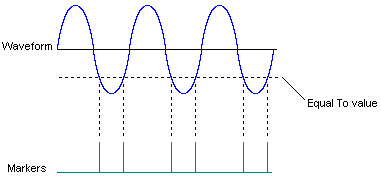
EQUal |
This choice selects the range value equal to a specified limit. |
|
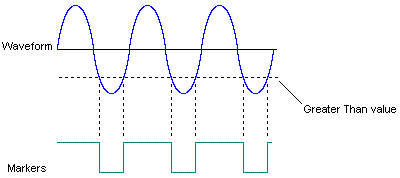
GREater |
This choice selects the range value to be greater than the limit and
less than the maximum allowed value. |
|
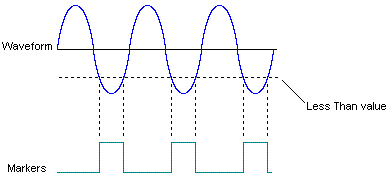
LESS |
This choice selects the range value to be less than the limit and greater
than the minimum allowed value. |
|
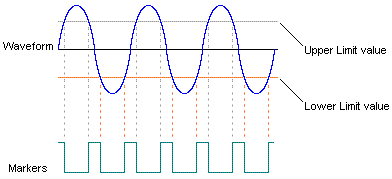
RANGe |
This choice selects the range value to be set using a user designated
upper and lower limit. |
:CONTrol:IO[1]|2|3|4|5|6|7|8:OUTPut:MARKer[1]2|3|4:TYPE:RRELation:EQUal <val>
:CONTrol:IO[1]|2|3|4|5|6|7|8:OUTPut:MARKer[1]2|3|4:TYPE:RRELation:EQUal?
This command sets the value for the marker when the desired range limit is equal to a specified value. This command is valid only if the Marker Source is Dynamic, and the Marker Type is Range Detect.
Range: Depends on marker units selected
–32768
to 32767 (Range unit is integer)
0 to –6 dB (Unit is
dB, Data is I or Q)
–Infinity to 3 dB (Unit
is dB, Data is Power)
0 to 46340 (Unit is integer; Data is Power)
0 to 100 (Range unit is %)
:CONTrol:IO[1]|2|3|4|5|6|7|8:OUTPut:MARKer[1]2|3|4:TYPE:RRELation:GREater <val>
:CONTrol:IO[1]|2|3|4|5|6|7|8:OUTPut:MARKer[1]2|3|4:TYPE:RRELation:GREater?
This command sets the value for the range detect markers when the desired range limit is to be greater than a specified value. This command is only valid if the Marker Source is Dynamic, and the Marker Type is Range Detect.
Range: Depends on marker units selected
–32768
to 32768 (Range unit is integer)
0 to –6 dB (Unit is
dB, Data is I or Q)
–Infinity to 3 dB (Unit
is dB, Data is Power)
0 to 46340 (Unit is integer; Data is Power)
0 to 100 (Range unit is %)
:CONTrol:IO[1]|2|3|4|5|6|7|8:OUTPut:MARKer[1]2|3|4:TYPE:RRELation::LESS <val>
:CONTrol:IO[1]|2|3|4|5|6|7|8:OUTPut:MARKer[1]2|3|4:TYPE:RRELation:LESS?
This command sets the value for the range detect markers when the desired range limit is to be less than a specified value. This command is only valid if the Marker Source is Dynamic, and the Marker Type is Range Detect.
Range: Depends on marker units selected
–32768
to 32767 (Range unit is integer)
0 to –6 dB (Unit is
dB, Data is I or Q)
–Infinity to 3 dB (Unit
is dB, Data is Power)
0 to 46340 (Unit is integer; Data is Power)
0 to 100 (Range unit is %)
:CONTrol:IO[1]|2|3|4|5|6|7|8:OUTPut:MARKer[1]2|3|4:TYPE:RRELation:LLIMit <val>
:CONTrol:IO[1]|2|3|4|5|6|7|8:OUTPut:MARKer[1]2|3|4:TYPE:RRELation:LLIMit?
This command sets the lower limit when the range relationship is selected as Range. This command is only valid when the Marker Type is Range Detect and the Range Relationship is Range.
Range: Depends on marker units selected
–32768
to 32767 (Range unit is integer)
0 to – 6 dB (Unit is
dB, Data is I or Q)
–Infinity to 3 dB (Unit
is dB, Data is Power)
0 to 46340 (Unit is integer; Data is Power)
0 to 100 (Range unit is %)
:CONTrol:IO[1]|2|3|4|5|6|7|8:OUTPut:MARKer[1]2|3|4:TYPE:RRELation:RDATa I|Q|POWer
:CONTrol:IO[1]|2|3|4|5|6|7|8:OUTPut:MARKer[1]2|3|4:TYPE:RRELation:RDATa?
This command sets the source of data used to apply the range limit choices as selected when Marker Type is Range Detect and the Range Relation is Range.
|
I |
This choice dynamically generates the marker based on the I channel data using all 16 bits of data. |
|
Q |
This choice dynamically generates the marker based on the Q channel data using all 16 bits of data. |
|
POWer |
This choice dynamically generates the marker as a function of the waveform's power. |
:CONTrol:IO[1]|2|3|4|5|6|7|8:OUTPut:MARKer[1]2|3|4:TYPE:RRELation:ULIMit <val>
:CONTrol:IO[1]|2|3|4|5|6|7|8:OUTPut:MARKer[1]2|3|4:TYPE:RRELation:ULIMit?
This command sets the upper limit when the range limit relationship is selected as Range. This command is only valid when the Marker Type is Range Detect, and the Range Relationship is Range.
Range: Depends on marker units selected
–32768
to 327687 (Range unit is integer)
0 to – 6 dB (Unit is
dB, Data is I or Q)
–Infinity to 3 dB (Unit
is dB, Data is Power)
0 to 46340 (Unit is integer; Data is Power)
0 to 100 (Range unit is %)
:CONTrol:IO[1]|2|3|4|5|6|7|8:OUTPut:MARKer[1]2|3|4:TYPE:RRELation:UNIT INT|DB|PCT
:CONTrol:IO[1]|2|3|4|5|6|7|8:OUTPut:MARKer[1]2|3|4:TYPE:RRELation:UNIT?
This command selects the units to use for the range relationship parameters: Greater, Less, Equal, Range.
|
INT |
This choice selects integer values to express the range relationship. |
|
DB |
This choice selects decibels to express the range relationship. |
|
PCT |
This choice selects percentage to express the range relationship. |
 Example…