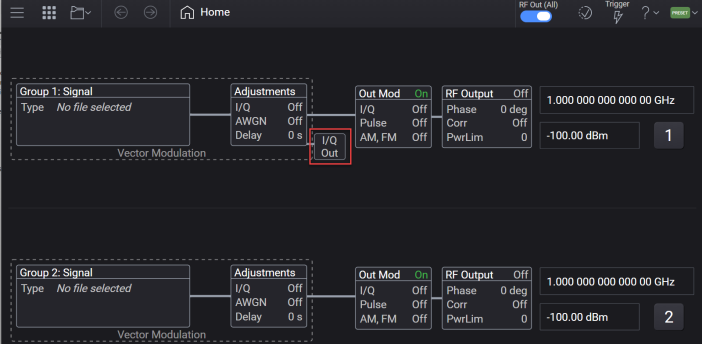
Applies to N5186A only.
Requires Option DIQ
This topic describes the settings accessed from the I/Q Out block. These settings allow you to configure the I/Q outputs of the instrument.
The following connectors are available on the rear panel of N5186A to provide the I/Q baseband outputs. To know more, see N5186A Connectors > Rear Panel.
I OUT - In-phase signal (analog baseband output)
Q OUT - Quadrature signal (analog baseband output)
I Out - Inverted I signal (for differential use)
Q Out - Inverted Q signal (for differential use)
When you click the I/Q Out block, the following screen is displayed to allow you to configure the I/Q Outputs.
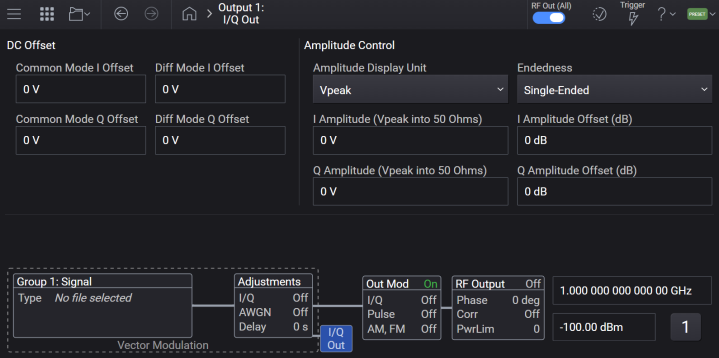
The GUI/SCPI descriptions for IQ Out settings are provided below.
This option is used to specify the common mode offset voltage routed to the external I+/I- output ports. The Common Mode Offset Voltage raises or lowers the voltage of the signal applied to the I+/I- output ports by the same value. A positive Common Mode Offset Voltage raises the voltage of the signal applied to external I+/I- output port above the baseline values, while a negative Common Mode Offset Voltage lowers the voltage of the signal applied to external I+/I- output port below the baseline values. For example, if the Common Mode Offset Voltage is +0.03 V, the baseline of both the external I+/I- outputs is shifted upward by 0.03 V. When no signal is applied (baseline condition), both outputs will measure +0.03 V.
The actual output voltage of an individual instrument may clip prior to achieving the minimum or maximum limit value. Verify your instrument is able to achieve your expected output prior to establishing your measurement procedure.
|
GUI Location |
I/Q Out > Common Mode I Offset |
|
SCPI Command |
[:SOURce]:IQOut<channel>:IQADjustment:EXTernal:IOFFset <voltage> [:SOURce]:IQOut<channel>:IQADjustment:EXTernal:IOFFset? |
|
SCPI Example |
IQO:IQAD:EXT:IOFF 5 mV IQO:IQAD:EXT:IOFF? |
| Notes |
For N5186A without Option DIQ:
|
|
Preset |
0 V |
|
State Saved |
Yes |
|
Min |
-1.5 V |
|
Max |
1.5 V |
|
Resolution |
0.5 mV |
| Backwards Compatibility SCPI |
N51xxB: [:SOURce]:DM:IQADjustment:EXTernal:IOFFset |
| Backwards Compatibility Notes |
For N51xxB: Alias [:SOURce]:DM:IQADjustment:EXTernal:IOFFset to [:SOURce]:IQOut1:IQADjustment:EXTernal:IOFFset |
This option is used to specify the common mode offset voltage signal routed to the external Q+/Q- output ports. The Common Mode Offset Voltage raises or lowers the voltage of a signal applied to the Q+/Q- output ports by the same value. A positive Common Mode Offset Voltage raises the voltage of the signal applied to external Q+/Q- output port above the baseline values, while a negative Common Mode Offset Voltage lowers the voltage of the signal applied to external Q+/Q- output port below the baseline values. For example, if the Common Mode Offset Voltage is 0.03 V, the voltage of the signal at both the external Q+/Q- outputs is increased by 0.03 V relative to the baseline.
The actual output voltage of an individual instrument may clip prior to achieving the minimum or maximum limit value. Verify your instrument is able to achieve your expected output prior to establishing your measurement procedure.
|
GUI Location |
I/Q Out > Common Mode Q Offset |
|
SCPI Command |
[:SOURce]:IQOut<channel>:IQADjustment:EXTernal:QOFFset <voltage> [:SOURce]:IQOut<channel>:IQADjustment:EXTernal:QOFFset? |
|
SCPI Example |
IQO:IQAD:EXT:QOFF 5 mV IQO:IQAD:EXT:QOFF? |
| Notes |
For N5186A without Option DIQ:
|
|
Preset |
0 V |
|
State Saved |
Yes |
|
Min |
-1.5 V |
|
Max |
1.5 V |
|
Resolution |
0.5 mV |
| Backwards Compatibility SCPI |
N51xxB: [:SOURce]:DM:IQADjustment:EXTernal:QOFFset |
| Backwards Compatibility Notes |
For N51xxB: Alias [:SOURce]:DM:IQADjustment:EXTernal:QOFFset to [:SOURce]:IQOut1:IQADjustment:EXTernal:QOFFset |
Specifies a differential offset voltage for an in-phase (I) signal routed to the I+/I- output ports.
This option is used to specify the total differential offset voltage routed to the external I output port. The Offset Voltage offsets the signal routed to the external I output port by the value of this voltage. This is accomplished by adding half of the Offset Voltage to the signal applied to the external I+ output port and subtracting half of the Offset Voltage from the signal applied to the external I- output port. For example, if the desired I Offset Voltage is 0.05 volts, then 0.025 volts is added to the signal applied to the external I+ output port while 0.025 volts is subtracted from the signal applied to the external I- output port.
|
GUI Location |
I/Q Out > Diff Mode I Offset |
|
SCPI Command |
[:SOURce]:IQOut<channel>:IQADjustment:EXTernal:DIOFfset <voltage> [:SOURce]:IQOut<channel>:IQADjustment:EXTernal:DIOFfset? |
|
SCPI Example |
IQO:IQAD:EXT:DIOF 5 mV IQO:IQAD:EXT:DIOF? |
|
Notes |
For N5186A without Option DIQ
|
|
Preset |
0 V |
|
State Saved |
Yes |
|
Min |
-3 V |
|
Max |
3 V |
|
Resolution |
0.5 mV |
| Backwards Compatibility SCPI |
N51xxB: [:SOURce]:DM:IQADjustment:EXTernal:DIOFfset |
| Backwards Compatibility Notes |
For N51xxB: Alias [:SOURce]:DM:IQADjustment:EXTernal:DIOFfset to [:SOURce]:IQOut1:IQADjustment:EXTernal:DIOFfset |
Specifies a differential offset voltage for a quadrature-phase (Q) signal routed to the Q+/Q- output ports.
This option is used to specify the total differential offset voltage routed to the external Q output port. The Offset Voltage offsets the signal routed to the external Q output port by the value of this voltage. This is accomplished by adding half of the Offset Voltage to the signal applied to the external Q+ output port and subtracting half of the Offset Voltage from the signal applied to the external Q- output port. For example, if the desired Q Offset Voltage is 0.05 volts, then 0.025 volts is added to the signal applied to the external Q+ output port and 0.025 volts is subtracted from the signal applied to the external Q- output port.
|
GUI Location |
I/Q Out > Diff Mode Q Offset |
|
SCPI Command |
[:SOURce]:IQOut<channel>:IQADjustment:EXTernal:DQOFfset <voltage> [:SOURce]:IQOut<channel>:IQADjustment:EXTernal:DQOFfset? |
|
SCPI Example |
IQO:IQAD:EXT:DQOF 5 mV IQO:IQAD:EXT:DQOF? |
|
Notes |
For N5186A without Option DIQ
|
|
Preset |
0 V |
|
State Saved |
Yes |
|
Min |
-3 V |
|
Max |
3 V |
|
Resolution |
0.5 mV |
| Backwards Compatibility SCPI |
N51xxB: [:SOURce]:DM:IQADjustment:EXTernal:DQOFfset |
| Backwards Compatibility Notes |
For N51xxB:
|
The I+/I− and Q+/Q− output voltages can be adjusted while continuing to provide modulated RF output.
Remote command only.
Provided to allow programmatic compatibility with other Keysight Technologies signal generators. On this signal generator, Amplitude Control State is always enabled and cannot be disabled. This setting allows adjustment of I+/I- and Q+/Q- output voltages using the I Amplitude and Q Amplitude settings. These adjustments affect only the I/Q outputs and do not modify the RF output signal.
|
SCPI Command |
[:SOURce]:IQOut<channel>:IQADjustment:EXTernal:AMPLitude[:STATe] ON|OFF|1|0 [:SOURce]:IQOut<channel>:IQADjustment:EXTernal:AMPLitude[:STATe]? |
|
SCPI Example |
IQO:IQAD:EXT:AMPL ON IQO:IQAD:EXT:AMPL? |
|
Notes |
State is ON and not changeable, attempting to set to OFF raises error "703, Feature not supported; Amplitude Control State is always on for this instrument." |
|
Preset |
ON |
|
State Saved |
Yes |
Selects the display unit used for I and Q Output Amplitude.
VPEak: Displays amplitude in volts peak.
VRMS: Displays amplitude in volts RMS.
DBM: Displays amplitude in dBm.
The units are related as follows:


where k = 1 for Single-Ended endedness and k = 2 for Differential endedness. This yields +3.01 dB when switching from Single-Ended to Differential for the same underlying signal amplitude.
|
GUI Location |
I/Q Out > Amplitude Display Unit |
|
SCPI Command |
[:SOURce]:IQOut<channel>:IQADjustment:EXTernal:AMPLitude:UNIT VPEak|VRMS|DBM [:SOURce]:IQOut<channel>:IQADjustment:EXTernal:AMPLitude:UNIT? |
|
SCPI Example |
IQO:IQAD:EXT:AMPL:UNIT VPE IQO:IQAD:EXT:AMPL:UNIT? |
| Notes |
This setting affects only the displayed amplitude values and does not alter the IQ output signal. |
|
Preset |
VPEak |
| Choices | Vpeak| Vrms | dBm |
|
State Saved |
Yes |
Sets the maximum voltage on I+ and I-. Maximum voltage occurs when waveform I data is 16-bit integer maximum (+32767), with minimum voltage occurring when I data is -32768. The voltage is for I into a 50 Ohm load.
|
GUI Location |
I/Q Out > I Amplitude |
|
SCPI Command |
[:SOURce]:IQOut<channel>:IQADjustment:EXTernal:AMPLitude:I <voltage> [:SOURce]:IQOut<channel>:IQADjustment:EXTernal:AMPLitude:I? |
|
SCPI Example |
IQO:IQAD:EXT:AMPL:I 1V IQO:IQAD:EXT:AMPL:I? |
| Notes |
For N5186A without Option DIQ
|
| Couplings |
This value, I Amplitude (RMS), and I Amplitude (dBm), all represent the same underlying I amplitude; setting any one recalculates the others. See deriving equation in Amplitude Display Unit. The displayed value is also affected by Endedness and I Amplitude Offset (dB). |
|
Preset |
0 |
|
State Saved |
Yes |
|
Min |
0 V |
|
Max |
- When Endedness is SINGle: 0.95 V - When Endedness is DIFFerential: 1.9 V |
|
Resolution |
0.001 |
Sets the maximum voltage on Q+ and Q-. Maximum voltage occurs when waveform Q data is 16-bit integer maximum (+32767), with minimum voltage occurring when Q data is -32768. The voltage is for Q into a 50 Ohm load.
|
GUI Location |
I/Q Out > Q Amplitude |
|
SCPI Command |
[:SOURce]:IQOut<channel>:IQADjustment:EXTernal:AMPLitude:Q <voltage> [:SOURce]:IQOut<channel>:IQADjustment:EXTernal:AMPLitude:Q? |
|
SCPI Example |
IQO:IQAD:EXT:AMPL:Q 1V IQO:IQAD:EXT:AMPL:Q? |
| Notes |
For N5186A without Option DIQ
|
| Couplings |
This value, Q Amplitude (RMS), and Q Amplitude (dBm), all represent the same underlying Q amplitude; setting any one recalculates the others. See deriving equation in Amplitude Display Unit. The displayed value is also affected by Endedness and Q Amplitude Offset (dB). |
|
Preset |
0 |
|
State Saved |
Yes |
|
Min |
0 |
|
Max |
- When Endedness is SINGle: 0.95 V - When Endedness is DIFFerential: 1.9 V |
|
Resolution |
0.001 |
Sets the I output amplitude in Vrms. The value accounts for the endedness and I Amplitude Offset. See Endedness and I Amplitude Offset (dB).
|
GUI Location |
I/Q Out > I Amplitude (RMS) |
|
SCPI Command |
[:SOURce]:IQOut<channel>:IQADjustment:EXTernal:AMPLitude:I:RMS <voltage> [:SOURce]:IQOut<channel>:IQADjustment:EXTernal:AMPLitude:I:RMS? |
|
SCPI Example |
IQO:IQAD:EXT:AMPL:I:RMS 0.5 IQO:IQAD:EXT:AMPL:I:RMS? |
| Notes |
For N5186A without Option DIQ
|
| Couplings |
This value, I Amplitude, and I Amplitude (dBm), all represent the same underlying I amplitude; setting any one recalculates the others. See deriving equation in Amplitude Display Unit. The displayed value is also affected by Endedness and I Amplitude Offset (dB). |
|
Preset |
0 |
|
State Saved |
No |
|
Min |
0 V |
|
Max |
When Endedness is SINGle: 0.671 V When Endedness is DIFFerential: 1.343 V |
|
Resolution |
0.001 |
Sets the Q output amplitude in Vrms. The value accounts for the endedness and I Amplitude Offset. See Endedness and Q Amplitude Offset (dB).
|
GUI Location |
I/Q Out > Q Amplitude (RMS) |
|
SCPI Command |
[:SOURce]:IQOut<channel>:IQADjustment:EXTernal:AMPLitude:Q:RMS <voltage> [:SOURce]:IQOut<channel>:IQADjustment:EXTernal:AMPLitude:Q:RMS? |
|
SCPI Example |
IQO:IQAD:EXT:AMPL:Q:RMS 0.5 IQO:IQAD:EXT:AMPL:Q:RMS? |
| Notes |
For N5186A without Option DIQ
|
| Couplings |
This value, Q Amplitude, and Q Amplitude (dBm), all represent the same underlying Q amplitude; setting any one recalculates the others. See deriving equation in Amplitude Display Unit. The displayed value is also affected by Endedness and Q Amplitude Offset (dB). |
|
Preset |
0 |
|
State Saved |
No |
|
Min |
0 V |
|
Max |
- When Endedness is SINGle: 0.671 V - When Endedness is DIFFerential: 1.343 V |
|
Resolution |
0.001 |
Sets the I output amplitude in dBm, referenced to a 50 Ω load. The value accounts for the endedness and I Amplitude Offset. See Endedness and I Amplitude Offset (dB).
|
GUI Location |
I/Q Out > I Amplitude (dBm) |
|
SCPI Command |
[:SOURce]:IQOut<channel>:IQADjustment:EXTernal:AMPLitude:I:DBM <ampl> [:SOURce]:IQOut<channel>:IQADjustment:EXTernal:AMPLitude:I:DBM? |
|
SCPI Example |
IQO:IQAD:EXT:AMPL:I:DBM -10 IQO:IQAD:EXT:AMPL:I:DBM? |
| Notes |
For N5186A without Option DIQ
|
| Couplings |
This value, I Amplitude, and I Amplitude (RMS), all represent the same underlying I amplitude; setting any one recalculates the others. See deriving equation in Amplitude Display Unit. The displayed value is also affected by Endedness and I Amplitude Offset (dB). |
|
Preset |
-200 dBm |
|
State Saved |
No |
|
Min |
-200 dBm |
|
Max |
When Endedness is SINGle: 9.55 dBm When Endedness is DIFFerential: 12.56 dBm |
|
Resolution |
0.001 |
Sets the Q output amplitude in dBm, referenced to a 50 Ω load. The value accounts for the endedness and Q Amplitude Offset. See Endedness and Q Amplitude Offset (dB).
|
GUI Location |
I/Q Out > Q Amplitude (dBm) |
|
SCPI Command |
[:SOURce]:IQOut<channel>:IQADjustment:EXTernal:AMPLitude:Q:DBM <ampl> [:SOURce]:IQOut<channel>:IQADjustment:EXTernal:AMPLitude:Q:DBM? |
|
SCPI Example |
IQO:IQAD:EXT:AMPL:Q:DBM -10 IQO:IQAD:EXT:AMPL:Q:DBM? |
| Notes |
For N5186A without Option DIQ
|
| Couplings |
This value, Q Amplitude, and Q Amplitude (RMS), all represent the same underlying Q amplitude; setting any one recalculates the others. See deriving equation in Amplitude Display Unit. The displayed value is also affected by Endedness and Q Amplitude Offset (dB). |
|
Preset |
-200 dBm |
|
State Saved |
No |
|
Min |
-200 dBm |
|
Max |
When Endedness is SINGle: 9.55 dBm When Endedness is DIFFerential: 12.56 dBm |
|
Resolution |
0.001 |
Selects how the I/Q output amplitude voltage is displayed.
Single-Ended (SINGle): Single-ended output configuration.
DIFFerential: Differential output configuration. Displayed amplitude values represent the total differential voltage, which is twice the single-ended voltage.
|
GUI Location |
I/Q Out > Endedness |
|
SCPI Command |
[:SOURce]:IQOut<channel>:IQADjustment:EXTernal:AMPLitude:ENDedness SINGle|DIFFerential [:SOURce]:IQOut<channel>:IQADjustment:EXTernal:AMPLitude:ENDedness? |
|
SCPI Example |
IQO:IQAD:EXT:AMPL:END DIFF IQO:IQAD:EXT:AMPL:END? |
| Notes |
This setting only affects the displayed amplitude values and does not alter the IQ output signal. |
|
Preset |
SINGle |
| Range | Single-Ended|Differential |
|
State Saved |
Yes |
Provides a power offset value as a dB offset to the actual I output amplitude. This simulates a power level at a test point beyond the I+ and I- connectors without changing the actual output power. The offset value only affects the displayed amplitude setting. The offset is reflected in all I amplitude views (Vpeak, RMS, and dBm). See I Amplitude, I Amplitude (RMS), I Amplitude (dBm).
|
GUI Location |
I/Q Out > I Amplitude Offset (dB) |
|
SCPI Command |
[:SOURce]:IQOut<channel>:IQADjustment:EXTernal:AMPLitude:OFFSet:I <rel_ampl> [:SOURce]:IQOut<channel>:IQADjustment:EXTernal:AMPLitude:OFFSet:I? |
|
SCPI Example |
IQO:IQAD:EXT:AMPL:OFFS:I 3 IQO:IQAD:EXT:AMPL:OFFS:I? |
| Notes |
For N5186A without Option DIQ,
|
|
Preset |
0 dB |
|
State Saved |
Yes |
|
Min |
-20 dB |
|
Max |
20 dB |
| Resolution | 0.01 dB |
Provides a power offset value as a dB offset to the actual Q output amplitude. This simulates a power level at a test point beyond the Q+ and Q- connectors without changing the actual output power. The offset value only affects the displayed amplitude setting. The offset is reflected in all Q amplitude views (Vpeak, RMS, and dBm). See Q Amplitude, Q Amplitude (RMS), Q Amplitude (dBm).
|
GUI Location |
I/Q Out > Q Amplitude Offset (dB) |
|
SCPI Command |
[:SOURce]:IQOut<channel>:IQADjustment:EXTernal:AMPLitude:OFFSet:Q <rel_ampl> [:SOURce]:IQOut<channel>:IQADjustment:EXTernal:AMPLitude:OFFSet:Q? |
|
SCPI Example |
IQO:IQAD:EXT:AMPL:OFFS:Q 3 IQO:IQAD:EXT:AMPL:OFFS:Q? |
| Notes |
For N5186A without Option DIQ
|
|
Preset |
0 dB |
|
State Saved |
Yes |
|
Min |
-20 dB |
|
Max |
20 dB |
| Resolution | 0.01 dB |