 Setup
SetupThe Reference tab lets you configure the frequency reference for the instrument.
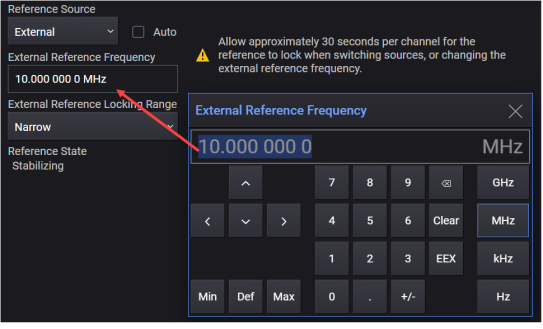
For Option 1ER, the user interface appears and behaves differently as shown in the sample screens below.
|
GUI Location |
System Menu (triple bar icon) > Settings (gear icon) > Reference |
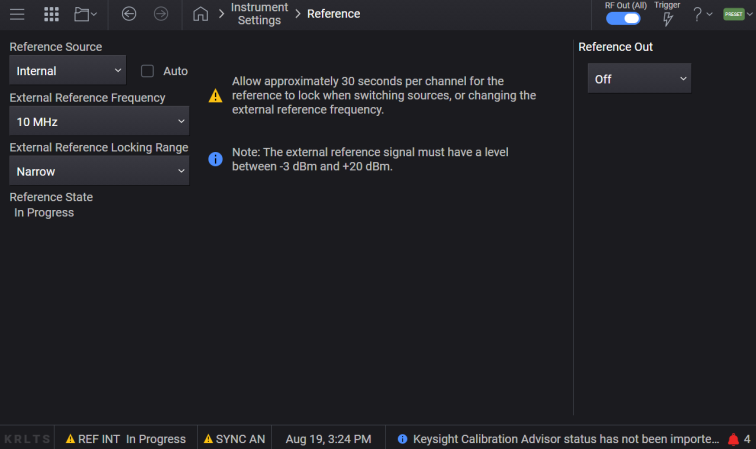
Standard User Interface for Reference
Option 1ER User Interface for Reference
Sets the source for the frequency reference. Choices include the following:
INTernal: Internal reference oscillator
EXTernal: External reference oscillator. Requires a signal present at the REF IN connector
The reference indicator field in the notifications bar at the bottom of the GUI displays the currently selected Reference Source and its current state.
When set to External, the frequency of the external signal can be specified with the External Reference Frequency setting.
If the external reference becomes unlocked or fails, after you correct the issue, toggle the Frequency Reference Source to Internal and back to External to update the Reference State status.
|
GUI Location |
System Menu (triple bar icon) > Settings (gear icon) > Reference >Reference Source |
|
SCPI Command |
[:SOURce]:ROSCillator:SOURce INTernal|EXTernal [:SOURce]:ROSCillator:SOURce? |
| SCPI Example |
:ROSC:SOUR EXT :ROSC:SOUR? |
|
Notes |
Changing the reference may take up to 30 seconds to regain frequency lock. For remote control operation, ensure your VISA timeout is set to 30 seconds (or more) when executing this command. |
| Range |
Internal | External |
| Preset | This is unaffected by a Preset but is set to INTernal on a "Restore System Settings to Default Values." |
| State Saved | Persistent, survives preset and power cycle but not saved in the instrument state. |
| Backwards Compatibility SCPI |
E82X7D, E8663D, N51xxB: [:SOURce]:ROSCillator:SOURce |
| Backwards Compatibility Notes |
For N51xxB: SCPI query reports the setting’s stored value, not what is actively being applied to the hardware. This command differs from this prior behavior. To query what source is actively applied to hardware, see Current Reference Source setting. |
Remote command only.
Returns the current reference source being applied to the instrument. Possible sources are:
INTernal
EXTernal - External will only be applied when a signal is actively present at the REF IN connector.
See the Reference Source setting for more information.
|
SCPI Command |
[:SOURce]:ROSCillator:SOURce:CURRent? |
| SCPI Example |
:ROSC:SOUR:CURR? |
| For SG6420A: - An external 2.4 GHz reference source cannot be detected automatically. The reference source auto setting should be turned off when using a 2.4 GHz external reference to prevent unitentionally locking to the wrong signal. The external reference frequency and external reference locking range settings have no effect when the source is set to external 2.4 GHz. | |
| Range | Internal|External| |
Enables or disables the ability of the signal generator to automatically switch between the Internal and External reference oscillator.
ON - If Auto is enabled, a valid reference signal present at the REF IN connector triggers the reference source to automatically switch from Internal to External. When the valid reference signal is absent, the instrument automatically switches from External to Internal.
OFF - If Auto is disabled, the value that you set for the Reference Source setting is used as the frequency reference source.
|
GUI Location |
System Menu (triple bar icon) > Settings (gear icon) > Reference > Auto |
|
SCPI Command |
[:SOURce]:ROSCillator:SOURce:AUTO ON|OFF|1|0 [:SOURce]:ROSCillator:SOURce:AUTO? |
| SCPI Example |
:ROSC:SOUR:AUTO ON :ROSC:SOUR:AUTO? |
| Notes | Changing the reference may take up to 30 seconds to regain frequency lock. For remote control operation, ensure your VISA timeout is set to 30 seconds (or more) when executing this command. |
| Preset | This is unaffected by a Preset but is set to OFF on a "Restore System Settings to Default Values." |
| State Saved | Persistent, survives preset and power cycle but not saved in the instrument state. |
Sets the external reference frequency.
|
GUI Location |
System Menu (triple bar icon) > Settings (gear icon) > Reference > External Reference Frequency |
|
SCPI Command |
[:SOURce]:ROSCillator:FREQuency:EXTernal <freq> [:SOURce]:ROSCillator:FREQuency:EXTernal? |
|
SCPI Example |
:ROSC:FREQ:EXT 100 MHZ |
|
Preset |
This is unaffected by a Preset but is set to 10 MHz on a "Restore System Settings to Default Values." |
|
State Saved |
Persistent, survives preset and power cycle but not saved in the instrument state. |
|
Notes |
Changing the reference frequency may take up to 30 seconds to regain frequency lock. For remote control operation, ensure your VISA timeout is set to 30 seconds (or more) when executing this command. For
For
|
|
Min |
Without Option 1ER: 10 MHz With Option 1ER: 1 MHz |
|
Max |
For N5185A, N5186A
|
|
Resolution |
With option 1ER: 0.1 Hz Without option 1ER: Not applicable |
The instrument provides two locking ranges for an externally supplied reference signal. Locking range set to Wide allows your reference signal to be further away in frequency from the selected value in External Reference Frequency, with a slight compromise in the phase noise performance of the instrument. Locking range set to Narrow provides the best phase noise on the instrument. See table below.
|
Locking Range |
External Reference Requirements |
Benefits |
|---|---|---|
|
Wide |
Within approximately +/- 1.0 ppm of the selected external reference frequency |
Easier to lock to external reference |
|
Narrow |
Within approximately +/- 1.0 ppm of the selected external reference frequency |
Better phase noise |
|
GUI Location |
System Menu (triple bar icon) > Settings (gear icon) > Reference > External Reference Locking Range |
|
SCPI Command |
[:SOURce]:ROSCillator:FREQuency:EXTernal:LRANge NARRow|WIDE [:SOURce]:ROSCillator:FREQuency:EXTernal:LRANge? |
|
SCPI Example |
:ROSC:FREQ:EXT:LRAN WIDE :ROSC:FREQ:EXT:LRAN? |
|
Preset |
This is unaffected by a Preset but is set to WIDE on a "Restore System Settings to Default Values." |
|
State Saved |
Persistent, survives preset and power cycle but not saved in the instrument state. |
| Backwards Compatibility SCPI |
N51xxB: [:SOURce]:ROSCillator:BANDwidth|BWIDth:EXTernal |
| Backwards Compatibility Notes |
For N51xxB:
|
Displays the current state of the frequency reference. The displayed state can help you understand whether the frequency reference is locked or if a failure occurred.
See Notifications Area for more information on various Reference states.
If the external reference becomes unlocked or fails, after you correct the issue, toggle the Frequency Reference Source to Internal and back to External to update the Reference State status.
The instrument, depending on model number, may contain several connectors that can be used for frequency references used by external test equipment or devices. Some of the connectors may be fixed outputs of frequency while others are switchable, or have selectable frequencies.
The Ref Out connector is controllable. The connector is normally on, providing a 10 MHz frequency reference by default. The connector can be switched off.
For
|
GUI Location |
System Menu (triple bar icon) > Settings (gear icon) > Reference > Reference Out |
|
SCPI Command |
:ROUTe[:CONNectors]:REFerence:ROUTput OFF|F10|F100 :ROUTe[:CONNectors]:REFerence:ROUTput? |
|
SCPI Example |
ROUT:REF:ROUT OFF |
|
Preset |
This is unaffected by a Preset but is set to 10 MHz on a "Restore System Settings to Default Values." |
| Range | OFF | 10 MHz |
|
State Saved |
Persistent, survives preset and power cycle but not saved in the instrument state. |
Remote command only
Provided to allow programmatic compatibility with other Keysight Technologies signal generators. Command is accepted but does nothing.
|
SCPI Command |
:ROUTe[:CONNectors]:REFerence:LFOutput:STATe ON|OFF|1|0 :ROUTe[:CONNectors]:REFerence:LFOutput:STATe? |
| Notes | Value is OFF and not changeable. Sending the SCPI command does not generate an error. |
|
Preset |
OFF |
Remote command only
Provided to allow programmatic compatibility with other Keysight Technologies signal generators. Command is accepted but does nothing.
|
SCPI Command |
:ROUTe[:CONNectors]:REFerence:HFOutput:STATe ON|OFF|1|0 :ROUTe[:CONNectors]:REFerence:HFOutput:STATe? |
| Notes | Value is OFF and not changeable. Sending the SCPI command does not generate an error. |
|
Preset |
OFF |