RACH
The Reverse Access Channel (RACH) is used by the mobile station to initiate communication with the base station and to respond to Paging Channel messages.
|
1. General |
2. Frame |
|---|---|
|
|
|
|
|
|
|
|
|
|
|
RACH Configuration Summary Table
This section defines the Settings Current and Apply Needed buttons. Only one button is available at any time. These buttons are available in all of the CDMA2000's tree nodes.
|
|
This button sets all channels to equal power, and the total power to 0 dB. |
|
|
This button scales all of the current channel powers so that the total power equals 0 dB, keeping the previous power ratios between the individual channels. |


1. General
State
Choice: On | Off
Set operating state of the channel.
[:SOURce]:RADio:CDMA2000[:BBG]:REVerse:RC12:ACCess:RACH[:STATe] ON|OFF|1|0
[:SOURce]:RADio:CDMA2000[:BBG]:REVerse:RC12:ACCess:RACH[:STATe]?
Power
Range: -40 to 0 dB
Set the power of the channel in dB.
[:SOURce]:RADio:CDMA2000[:BBG]:REVerse:RC12:ACCess:RACH:POWer <val>
[:SOURce]:RADio:CDMA2000[:BBG]:REVerse:RC12:ACCess:RACH:POWer?
Radio Configuration
Choice: 1 | 2
Set the Radio Configuration of the channel.
[:SOURce]:RADio:CDMA2000[:BBG]:REVerse:RC12:ACCess:RACH:RCONfig 1|2
[:SOURce]:RADio:CDMA2000[:BBG]:REVerse:RC12:ACCess:RACH:RCONfig?
Data
Choice: PN9 | PN15 | Pattern | UserFile
Default: PN9
Edit the data pattern for the Reverse Fundamental Traffic Channel (RFCH) by clicking on the cell. Then click on the dialog box icon  to launch the
  selection dialog box.
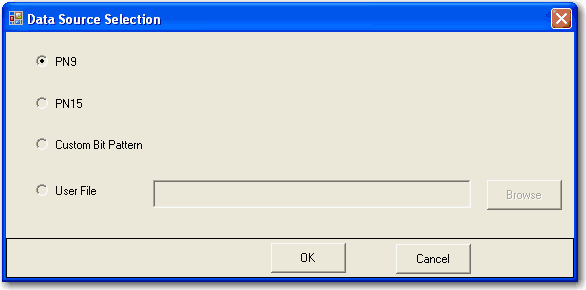
Set the data of the channel. In the User File case, 0,1 txt file or binary file can be selected as the data source
[:SOURce]:RADio:CDMA2000[:BBG]:REVerse:RC12:ACCess:RACH:DATA PN9|PN15|FIX4|"<file name>"
[:SOURce]:RADio:CDMA2000[:BBG]:REVerse:RC12:ACCess:RACH:DATA?
[:SOURce]:RADio:CDMA2000[:BBG]:REVerse:RC12:ACCess:RACH:DATA:FIX4 <val>
[:SOURce]:RADio:CDMA2000[:BBG]:REVerse:RC12:ACCess:RACH:DATA:FIX4?
Bit Rate (bps)
Display the bit rate of the channel.
[:SOURce]:RADio:CDMA2000[:BBG]:REVerse:RC12:ACCess:RACH:RATE?
Channel Coding
Choice: All On | All Off
Set the channel code state of the channel.
If the coding state is off, the channel will be no channel coding and interleaver.
[:SOURce]:RADio:CDMA2000[:BBG]:REVerse:RC12:ACCess:RACH: CCODing 0|1|ON|OFF
[:SOURce]:RADio:CDMA2000[:BBG]:REVerse:RC12:ACCess:RACH: CCODing ?
BER Insertion
Range: 0.00% to 50%
Set the bit error rate of the channel.
[:SOURce]:RADio:CDMA2000[:BBG]:REVerse:RC12:ACCess:RACH:BER <val>
[:SOURce]:RADio:CDMA2000[:BBG]:REVerse:RC12:ACCess:RACH:BER?
2.Frame
Frame Length (ms)
[:SOURce]:RADio:CDMA2000[:BBG]:REVerse:RC12:ACCess:RACH:FLENgth?
Frame Offset (ms)
[:SOURce]:RADio:CDMA2000[:BBG]:REVerse:RC12:ACCess:RACH:FOFFset <val>
[:SOURce]:RADio:CDMA2000[:BBG]:REVerse:RC12:ACCess:RACH:FOFFset?
EbNo
Range:
Min: -30 + 10log10(ChipRate/BitRate) + NormalizedPower dB
Max: 30 + 10log10(ChipRate/BitRate) + NormalizedPower dB
Sets the Eb/No of the channel.
[:SOURce]:RADio:CDMA2000[:BBG]:REVerse:RC12:ACCess:RACH:EBNO <val>
[:SOURce]:RADio:CDMA2000[:BBG]:REVerse:RC12:ACCess:RACH:EBNO?