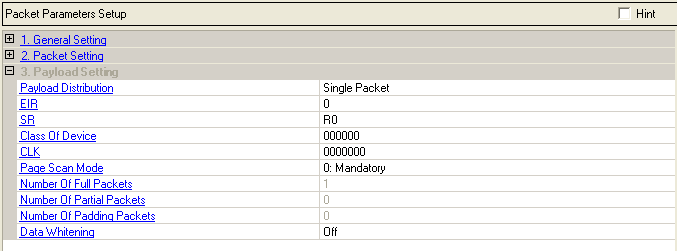
Choice: Single Packet | Multiple Packet
Default: Single Packet
Double-click or use the drop down menu to select the distribution type of packet payload.
When Single Packet is selected, the software creates a waveform that consists of one Bluetooth packet. When downloaded to the signal source, the waveform is repeatedly played back resulting in a packet sequence comprised of identical packets. When Multi Packet is selected, the software creates a waveform that consists of a multiple packet sequence. A data pattern is distributed into the payload portion of each packet in the sequence. Once downloaded to the instrument, the signal generator repeatedly plays back the entire packet sequence. The net result is the ability to configure longer data sequences for analysis.
Range: 0 to 1
Default: 0
Set the extended inquiry response packet following indication bit in the FHS packet.
Choice: R0, R1, R2, Reserved
Default: R0
Set the scan repetition mode in the FHS packet. This 2-bit field is the scan repetition filed and indicates the interval between two consecutive page scan windows.
Range: 0x000000 to 0xFFFFFF
Default: 0x000000
Set the class of Bluetooth device. This 24-bit field shall contain the class of device of the device that sends the FHS packet. This field is defined in Bluetooth Assigned Number.
Range: 0x0000000 to 0x3FFFFFF
Default: 0x0000000
Set the native clock of the Bluetooth device. This 26-bit field shall contain the value of the native clock of the device that sends the FHS packet, sampled at the beginning of the transmission of the access code of this FHS packet. This clock value has a resolution of 1.25ms (two-slot interval). For each new transmission, this field is updated so that it accurately reflects the real-time clock value.
Choice: Mandatory, Reserved
Default: Mandatory
Set the page scan mode in the FHS packet. This 3-bit field shall indicate which scan mode is used by default by the sender of the FHS packet.
Display the number of full packet occupied by the packet payload.
Display the number of partial packet occupied by the packet payload. Because the payload portion of each packet is filled to capacity if possible, the number of partial packets appended to the end of a packet sequence will always be 0 or 1.
Choice: 0 | 1
Default: 0
Sets the number of padding packets occupied by the packet payload.
When the software creates a multiple packet sequence, the sequence bit in the header field is toggled after each packet transmission in the sequence. This indicates to the Bluetooth device that the incoming packet is not a re-transmitted packet. To maintain an alternating sequence bit when the waveform is repeatedly played back, an even number of packets must be generated. If the data pattern length is set such that an odd number of packets are required to send the data, then a pad packet is appended to the end of the packet sequence. The pad packet has no payload and is only generated in this circumstance to accommodate the alternating sequence bit.
Choice: On | Off
Default: Off
Double-Click or use the drop-down menu to set the data whitening state of the packet payload.
Before transmission, both the header and the payload shall be scrambled with a data whitening word in order to randomize the data from highly redundant patterns and to minimize DC bias in the packet. The scrambling shall be performed prior to the FEC encoding.
At the receiver, the received data shall be descrambled using the same whitening word generated in the recipient. The descrambling shall be performed after FEC decoding.