Range: 1 to 100us
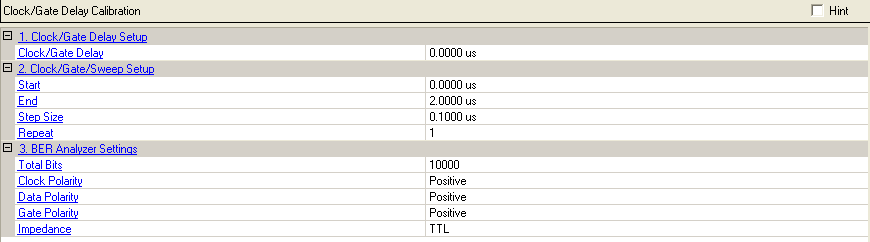
Enter this value to set the Clock/Gate Delay manually if the propagation delay characteristics for the device under test are known. Pressing the Set Delay button can also change this value.
If the delay parameter is unknown, the Clock/Gate Sweep Setup menu is used to configure the calibration utility, Once configured, the calibration utility generates a plot of BER versus clock/gate delay. From the plot, the correct clock gate delay setting to realign the signals at the input of the BER analyzer can be determined.
Range: 1 to 100us
Default: 0.000us
Enter this value to set the start of the delay for the Clock/Gate calibration.
Range: 1 to 100us
Default: 2.000us
Enter this value to set the end of the delay for the Clock/Gate calibration.
Range: 0.01 to 0.5us
Default: 0.1000us
Enter this value to set the incremental step of the delay for the Clock/Gate calibration.
Range: 1 to 9
Default: 1
Enter this value to set the repeat times for the Clock/Gate calibration. When this field is set to two or greater, the BER results are plotted on the graph for each iteration of the measurement. By increasing the number of BER test repetitions, it can easily be determined if repeatable results are achievable.
The signal source internal BER analyzer settings required to perform
the clock/gate delay calibration also can be configured remotely using
the Signal Studio software. Once configured, initiate the BER test sequence
by pressing the  button. A plot of BER vs. clock/gate delay
will be incrementally filled in as each BER test in the sweep is completed.
With no impairments added to the signal, a delay that results in 0 % BER
should be achievable.
button. A plot of BER vs. clock/gate delay
will be incrementally filled in as each BER test in the sweep is completed.
With no impairments added to the signal, a delay that results in 0 % BER
should be achievable.
Range: 100 to 4294967295
Default: 10000
Enter the value to set the total number of data bits to be analyzed at each delay increment.
Choice: Positive | Negative
Default: Positive
Select the Clock Polarity
Choice: Positive | Negative
Default: Positive
Select the Data Polarity
Choice: Positive | Negative
Default: Positive
Select the Gate Polarity
Choice: TTL | 75ohm
Default: TTL
Select the impedance