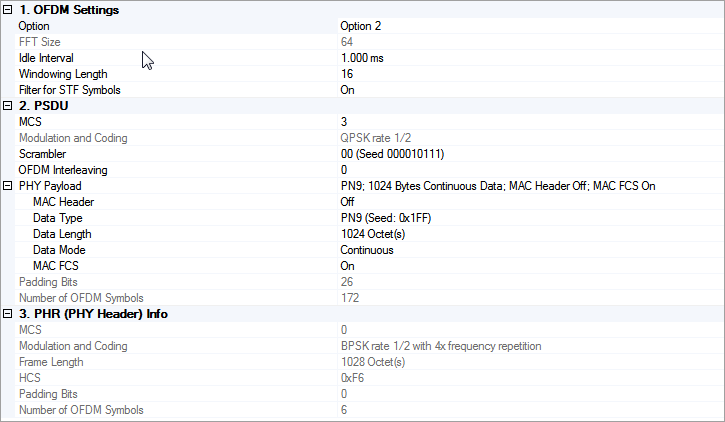
Click in the tree view to display the 802.15.4g MR-OFDM setup.
Choices: Option 1 | Option 2 | Option 3 | Option 4
Default: Option 2
Select the OFDM option of the waveform. See Data Rates for 802.15.4g MR-OFDM for details.
Display the FFT size of selected OFDM option. You cannot edit this cell.
FFT Sizeis automatically updated when Option is changed.
Range: 0–200 ms
Default: 1.0 ms
Enter the idle interval in-between frames in seconds. When idle interval is set to zero, a continuous waveform will be generated. See FSK Packet/Frame Structure for details.
Range: 0–FFT Size * Oversampling Ratio * 0.5
Default: 16
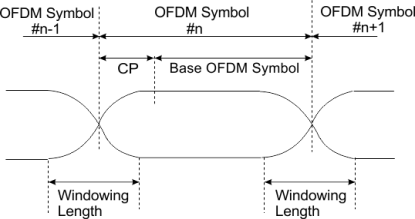
Enter the windowing length in even number of samples that are added to smooth OFDM symbol transition. Max windowing length is clipped to avoid exceeding the cyclic prefix (CP) part based on the option of OFDM signal.
For more details, see Windowing.
You need to set appropriate windowing length to balance ACP and EVM test results. When you increase windowing length to improve the ACP result, the EVM result may get worse.
Choices: On | Off
Default: On
A raised cosine window is added in-between OFDM symbols to smooth the symbol transition.
The figure below illustrates how the window is added to OFDM symbols.
Enable or disable an ideal low pass filter that is applied to STF symbols. This filter will help eliminate the out-of-band spurs that are caused by the negated half of the 4th STF symbol.
|
Range: |
0–3 for Option 1 |
|
0–5 for Option 2 |
|
|
1–6 for Option 3 |
|
|
2–6 for Option 4 |
|
|
Default: |
3 |
Enter the MCS level for PSDU. See Data Rates for 802.15.4g MR-OFDM for details.
Display the modulation and coding scheme under selected MCS level. You cannot edit this cell. See Data Rates for 802.15.4g MR-OFDM for details.
Modulation and Codingis automatically updated when MCS is changed.
Choices: 00 (Seed 000010111) | 01 (Seed 101110111) | 10 (Seed 000011100) | 11 (Seed 101111100)
Default: 00 (Seed 000010111)
Select the seed for scrambling PN sequence generation. This value corresponds to bit 19 and 20 of PHR.
Choices: 0 | 1
Default: 0
Enter the OFDM interleaving attribute. It corresponds to the PIB attribute phyOFDMInterleaving defined in IEEE Std 802.15.4g-2012.
Display the summary of PHY payload configuration.
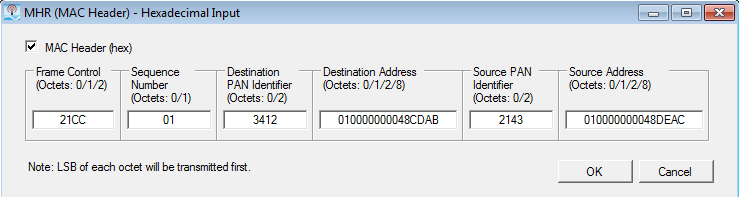
Click the  button on the right of this cell to open an editor to configure the MAC Header
(see the dialog below).
button on the right of this cell to open an editor to configure the MAC Header
(see the dialog below).
You can check the check box to enables pre-pending the MAC header to the data payload. You can set the desired data in each of the individual fields.
You can also disable these fields if the data is no longer desired by clearing the Mac Header (hex) check box.
Click the button on the right to open an editor (see the dialog below) that allows you to select payload data type from the following available choices:
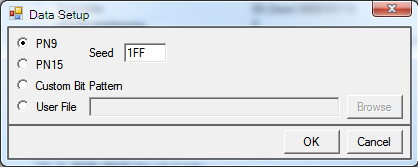
When you select the Custom Bit Pattern, the editor provides you the following data patterns for easily use.
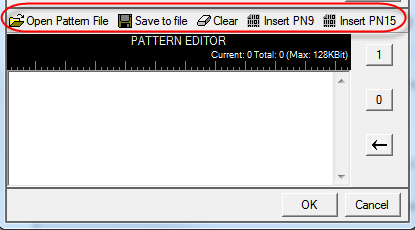
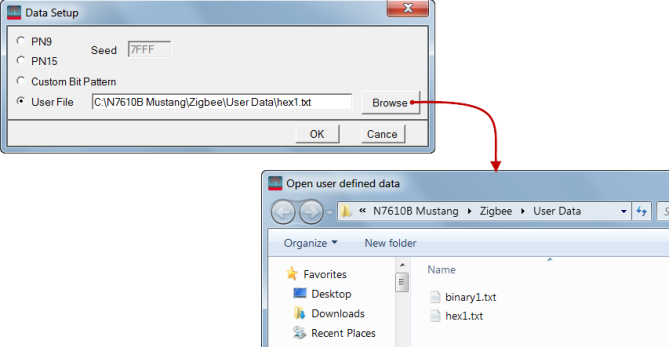
There is also a User File selection. When selected, the Browse button becomes active. When clicked, the button launches the Open user defined data window that is used to navigate to and select the user data file. After selecting a file, the file path and name shows in the User File field.
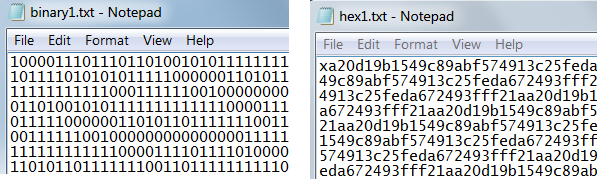
The software accepts two forms of user data: binary and hex. The following figure shows an example of each data type. As shown in the figure, the hex data begins with an 'x' to indicate hex data. The 'x' can be either upper or lower case.
Range: 0–2047 Octet(s)
Default: 1024
Enter the length of MAC payload in octets.
When you turn off MAC FCS, the Data Length is the same as Frame Length. When you turn on MAC FCS, the Data Length equals the Frame Length minus 4 octets.
Choices: Continuous | Truncated
Default: Continuous
Select the data mode applied to MAC payload for a multi-frame waveform. Continuous mode will have data bits continuously distributed across multi-frame. Truncated mode will have the same payload data bits for all the frames, with the data size truncated for one frame.
Choices: On | Off
Default: On
Enable or disable MAC FCS in the PSDU. When turned off, it can be used to simulate an invalid FCS case, since FCS part is actually filled with user data bits.
Display the number of padding bits appended to the tail bits in PSDU. You cannot edit this cell.
Padding Bitsis automatically updated with Option, MCS, Frame Length and OFDM Interleaving.
Display the number of OFDM symbols of PSDU. You cannot edit this cell.
Number of OFDM Symbolsis automatically updated with Option, MCS, OFDM Interleaving and PSDU settings.
Display the MCS level for PHR. You cannot edit this cell. This value is always the lowest supported MCS level for each option.
Display the modulation and coding scheme under selected MCS level. You cannot edit this cell. See Data Rates for 802.15.4g MR-OFDM for details.
Modulation and Codingis automatically updated when MCS is changed.
Display the total number of octets contained in the PSDU. You cannot edit this cell.
When you turn off MAC FCS, the Frame Length is the same as Data Length. When you turn on MAC FCS, the Frame Length equals the Data Length plus 4 octets.
Frame Lengthis automatically updated when MAC Header, MAC FCS or Data Length is changed.
Display the HCS field of PHR in HEX. You cannot edit this cell.
HCSis automatically re-calculated when any of the PHR filed settings is changed.
Display the number of padding bits appended to the tail bits in PHR. You cannot edit this cell.
Padding Bitsis automatically updated with Option, MCS, Frame Length and OFDM Interleaving.
Display the number of OFDM symbols of PHR.You cannot edit this cell.
Number of OFDM Symbolsis automatically updated with Option, MCS, and OFDM Interleaving.