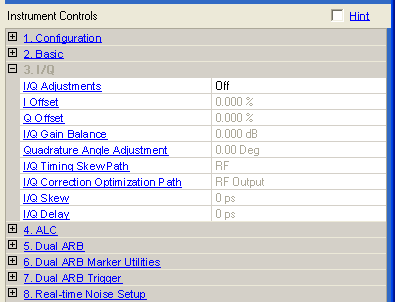
Choice: On | Off
Default: Off
Double-click or use the drop-down menu to turn the I/Q adjustments on or off.
On − the values entered for I and Q parameters are applied to the I and Q signals.
Off − I/Q adjustment values are not applied to the I and Q signals.
Range: N5162A/N5182A: -20% to 20%
All other models: -50% to 50%
Default: 0.00%
Set to to enable this parameter.
Enter a DC offset value to apply to the I signal before the I/Q modulator. Use this offset to remove imperfections in the in-phase signal or to introduce calibrated impairments.
For more information, refer to the User Guide or Key Reference for the signal generator you are using.
Range: N5162A/N5182A: -20% to 20%
All other models: -50% to 50%
Default: 0.00%
Set to to enable this parameter.
Enter a DC offset value to apply to the Q signal before the I/Q modulator. Use this offset to remove imperfections in the quadrature-phase signal or to introduce calibrated impairments.
For more information, refer to the User Guide or Key Reference for the signal generator you are using.
Range: N5162A/N5182A: −1 dB to 1 dB, in 0.001 dB steps
All other models: −4 dB to 4 dB, in 0.01 dB steps
Default: 0.00 dB
Set to to enable this parameter.
Enter a gain ratio, by which I gain exceeds Q gain.
For example, if you enter a value of 1 dB, the I signal will have 1 dB more amplitude than the Q signal. Use the gain balance to remove imperfections in I and Q or introduce calibrated impairments.
Range: −10 to 10 degrees
Default: 0.00 degrees
Set to to enable this parameter.
Enter a value to adjust the Q phase angle. When the quadrature skew is zero, the phase angle between the I and Q vectors is 90 degrees. Positive skew increases the angle from 90 degrees while negative skew decreases the angle from 90 degrees.
Choice: RF | Baseband (BB)
Default: RF
Set to to enable this parameter.
Double-click or use the drop-down menu to select whether the path is RF or Baseband (BB).
This parameter is not available with all instrument model numbers and may be grayed out.
Choice:
N5172B/N5182B: RF Output | External I/Q Output | Dig Bus Output
Other Models: RF Output | External I/Q Output
Default: RF Output
Set to to enable this parameter.
Double-click or use the drop-down menu to select the I/Q Correction optimization path.
This parameter is not available with all instrument model numbers and may be grayed out.
Range:N5162A/N5182A: −800 to 800 ns, in 1 ps steps
All other models: −2.0 to 2.0 seconds, in 1 ps steps, the limits are affected by the sample rate of the current format
Default: 0.0 seconds
Set to to enable this parameter.
This cell inputs skew changes to the I and Q paths, in picoseconds. A positive value delays the I signal relative to the Q signal, and a negative value delays the Q signal relative to the I signal.
Range: N5162A/N5182A: −400 to 400 ns, in 1 ps steps
All other models: −1.0 to 1.0 seconds, in 1 ps steps, the limits are affected by the sample rate of the current format
Default: 0.0 seconds
Set to to enable this feature.
This cell sets the I/Q delay from triggers and markers, in picoseconds.