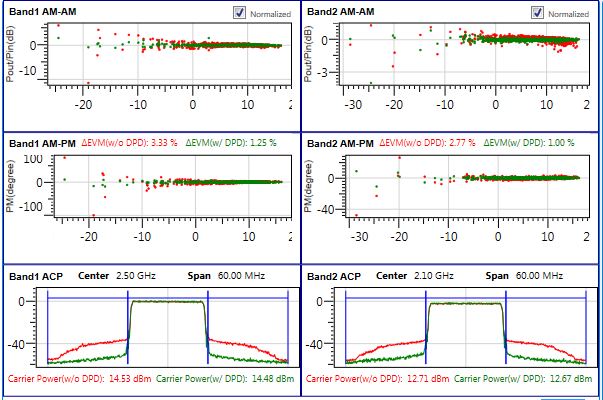
Measurement View shows the measurement results of the Dual Band DPD test. Six result windows are provided: Band 1 AM-AM, Band 1 AM-PM, Band 1 ACP, Band 2 AM-AM, Band 2 AM-PM, and Band 2 ACP. When Measurement Enable is set to Off, none of these measurements will be run and shown.
You can double click on each result window to enlarge it to see more detailed information and then double click again to be back to the default layout (3x2).
AM-AM, AM-PM and ACP results will be shown for every “Run”. If DPD is enabled (Digital Predistortion is set to On), there will be two sets of results, one without DPD and the other with DPD. You can select which Traces will be displayed on the screen.

Click this button to export all the measurement results into combined and separate trace files using using the .csv file format. You will get a Warning message in the Log when there is no measurement result to be exported.
This button does not support MATLAB script and PXI instruments.
|
1. General |
2. Band 1 3. Band 2 |
|---|---|
Choice: On | Off
Default: On
Choose whether to make measurement during the running process. If this parameter is set to Off, measurement will NOT be perform during the running process, and no results will be shown in the measurement view.
Choice: Show w/o DPD | Show with DPD | Show Both
Default: Show Both
Choose the display of the traces, with DPD, without DPD, or both.
Range: 1 to 6
Default: 1
Set the number of adjacent channels for ACP measurement.
Range: 10 Hz to 200 MHz
Default: 5 MHz
Coupling: This parameter is coupled with the Bandwidth setting in Waveform block.
Set the integration bandwidth for the adjacent channel.
Range: 10 Hz to 200 MHz
Default: 5 MHz
Coupling: This parameter is coupled with the Bandwidth setting in Waveform block.
Set the in-channel bandwidth.
Range: 0 to 200 MHz
Default: 5 MHz
Coupling: This parameter is coupled with the Bandwidth setting in Waveform block.
Set the frequency offset between the main channel and the adjacent channel.