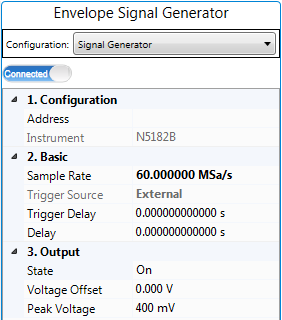
This parameter displays the model number and serial number of the instrument if the status of  Instrument Connection button is Connected.
Instrument Connection button is Connected. | 1. Configuration | 2. Basic | 3. Output |
|---|---|---|
Enter the instrument address.
Instrument Connection button is Connected. Range: 1 Hz to Maximum sample rate supported by the instrument
Default:
PA Test: 15 MSa/s
Dual-band PA Test: 60 MSa/s
Set the sample rate of the Envelope Signal Generator. By default, this value is set to three times of the product of the Sample Rate value and Resampling Ratio value in Waveform block and the OSR for Envelope value in Envelope Tracking block.You can set it to a larger value if you like.
Choice: External | Bus
Default:
PA Test: Bus
Dual-band PA Test: External
Set the type of trigger source of the Envelope Signal Generator.
Range: 1 ns to 1ks
Default: 0 s
Coupling: If Envelope Tracking block is set to On and the Trigger Master in Envelope Tracking block is set to RF Signal Generator, this setting and the I/Q Delay setting in RF Signal Generator block will be determined by the Delay value in the Envelope Tracking block.
Set the trigger delay of the Envelope Signal Generator. This parameter is available for Dual-band PA Test only.
Range: -250 ns to 250 ns
Default: 0
Set the IQ delay of the Envelope Signal Generator.
Choice: On | Off
Default: On
Set the IQ state of the MXG/EXG as Envelope Signal Generator.
Range: -5.0 v to 5.0 v
Default: 0
Set the voltage offset of the Envelope Signal Generator.
Range: 0.1 to 1.1 v
Default: 0.4
Coupling:
If the Envelope Source setting in the Envelope Tracking block is set to From Predistorted Signal or From Non-predistorted Signal, this value will be calculated and filled automatically when you run the measurement.
If the Envelope Source setting in the Envelope Tracking block is set to User Defined, you need to provide the value for this setting.
Set the peak voltage of the envelope signal generator. Refer to Voltage Mapping in Envelope Tracking Measurement for more details about peak voltage.