Waveform
This block is to load the original IQ waveform file with some basic processing, then pass it along to do further CFR/DPD/ET processing.
1. Basic
Waveform Type
Choice: Preloaded | Signal Studio | User-defined | MATLAB Variable
Default: Signal Studio
Specify the type of waveform. It has three different choices, Preloaded, Signal Studio and User-defined.
-
Preloaded – N7614B Signal Studio for Power Amplifier Test provides about eight waveforms that do not require waveform licenses to use. They are WLAN and LTE waveforms with different settings.
-
Signal Studio – Select this option to use the waveform generated with another Keysight Signal Studio. Refer to Creating and Exporting Waveforms for details about exporting a waveform file.
To use the waveform generated by another signal studio, the RF Signal Generator needs to have the corresponding license. For this example, if you plan to use the LTE waveform exported by N7624B signal studio, you need to have the N7624B license.
-
User-defined – Select this option to use a waveform in a certain format generated by the user.
-
MATLAB Variable – Select this option to use a waveform from the MATLAB workspace. See also IQ Variable Name.
Waveform Location
Choice: PC | RF Signal Generator
Default: PC
Coupling: This cell is grayed out if the waveform type is set to Preloaded or User-defined or when the RF Signal Generator Configuration is set to AWG + Signal Generator.
Select the waveform location for a signal studio waveform.
I/Q Variable Name
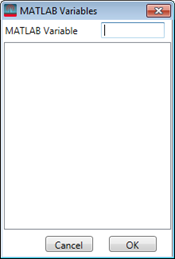
When MATLAB Variable is selected as the Waveform Type, clicking this parameter opens a  window where you can choose an I/Q variable name from the MATLAB workspace. The I/Q variable should be a 1-d complex array. If you have a valid license, you can launch MATLAB from the Signal Studio software's System menu and then use this window to browse or directly input a variable.
File Name
Click the  in the right side of the cell to browse the computer and select the waveform file.
File Type
Choice: CSV/Text | Big Endian 16 bits | MATLAB
Default: CSV/Text
Coupling: Available when the Waveform Type is set to User-defined.
Specify the format of the source file when the Waveform Type is set to User-defined.
-
CSV / Text
.txt or .csv file format. The I/Q data is interleaved and delimited with comma.
1.235, -3.123
1.72, -2.15
-0.5, -1.2
…, …
-
Big Endian 16bits
In this type of file, the DAC bit values of the IQ data are included with the leftmost bit is MSB. The I and Q data are interleaved. Unencrypted X-Series signal generator/ESG waveforms are stored in this format.
-
Matlab
Matlab .mat waveforms. The .mat file may contain several complex arrays, but only the first array will be imported as the waveform.
Sample Rate
Range: 1 MHz to 8 GHz
Default: 5 MHz
Coupling: This cell is read-only when the Waveform Type is set to Predefined or Signal Studio.
It indicates the sample rate used by the waveform when Waveform Type is set to Predefined or Signal Studio. Sample rate is extracted from the header file of the waveform. You need to specify the sample rate manually when the Waveform Type is set to User-defined.
Waveform Length
Waveform Length is read-only and it indicates the sample number in the waveform.
Bandwidth
Range: 1 to 200 MHz
Default: 5 MHz
Specify the bandwidth of the waveform.
2.Processing
Resampling Ratio
Range: 0.1 to 20
Default: 1
Coupling: The resultant sampling rate will not be greater than 200 MHz if the configuration is set to RF Signal Generator (MXG-B). The resampling ratio is displayed as a fraction after rational approximation. You should set a proper resampling ratio to make the resampled waveform cyclic, that is, the waveform length should be able to be divided by the decimator. The software doesn’t do extra coupling to make sure the waveform is cyclic, instead, it reports an error after you click Run when the waveform length cannot be divided by the decimator.
Specifies the resampling ratio (RSR) that up-samples the waveform. This is not the RSR used by the imported waveform. Rather, it is the RSR that the software uses to resample the waveform.
It is expected that the signal employed to extract a DPD model should have a resampling rate no less than 3. If the selected waveform's up-sampling ratio is less, it can be up-sampled here with a resampling ratio greater than 3. If the user-defined or chosen waveform file already has a high over-sampling ratio beyond the capability of the selected signal generator, then the created waveform must be be resampled with a ratio less than 1.
Resampled Waveform Length
Range: 1 to Int32.Max
Default: 10000
Coupling: It equals the product of Waveform Length and Resampling Ratio.
It indicates the sample number of the waveform after resampling.
Filter
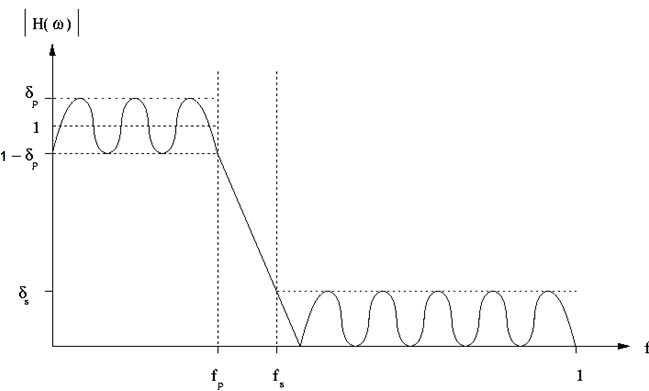
Set the parameters to design a Parks-McClellan low pass filter in the menu below. The Parks-McClellan design method uses the Remez exchange algorithm to design linear phase FIR filters such that a filter has minimum weighted Chebyshev error in approximating a desired ideal frequency response. For more details, refer to Chapter 7.4.3 in "The Parks-McClellan Algorithm in Discrete-Time Signal Processing, 2nd ed".
The filter can be depicted as below, in which
fp is the pass frequency,
fs is the stop frequency,
δp is the pass ripple,
δs is the stop ripple.
Sate
Choice: On | Off
Default: Off
Double-click or use the drop-down menu to enable or disable the application of the filter.
Maximum Order
Range: 1 to 2048
Default: 300
Set the maximum filter length. The filter’s length is clipped to the Maximum Order if the minimum filter length required to satisfy its specification exceeds the Maximum Order.
Pass Frequency
Range: 1 Hz to (Stop Frequency - 0.0015*Sample Rate*Resampling Ratio in Waveform block/2)
Default: 1.25 MHz
Set the pass frequency of the filter.
Stop Frequency
Range: 2 Hz to (0.5*Sample Rate*Resampling Ratio)
Default: 1.5625 MHz
Set the stop frequency of the filter.
Pass Ripple
Range: 0.0001 to 5.0
Default: 0.01
Set the maximum ripple in the pass band.
Stop Ripple
Range: 6.0 to 200.0
Default: 50.0
Set the maximum ripple in the stop band.
3. Burst Formation and Mask
Burst Shape & Mask
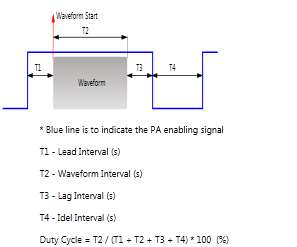
In real-time configuration mode, the Burst Shape & Mask function is not supported. It is grayed out and set to Off by default.
4. Marker
Marker 1 Source
Configure the marker points for Marker 1 using the
Marker Source
Selection dialog box.
The signal generator outputs the Marker 1 signal
from the rear-panel EVENT 1 output. For more information, see the signal
generator's User Guide.
Marker 2 Source
Configure the marker points for Marker 2 using the
Marker Source
Selection dialog box.
The signal generator outputs the Marker 2 signal
from the rear-panel EVENT 2 output. For more information, see the signal
generator's User Guide.
Marker 3 Source
This parameter is read-only and it indicates Marker 3 is used to control ALC hold.
The signal generator outputs the Marker 3 signal
from the rear-panel EVENT 3 output. For more information, see the signal
generator's User Guide.
Marker 4 Source
This parameter is read-only and it indicates Marker 4 is used to control Pulse/RF Blank.
The signal generator outputs the Marker 4 signal
from the rear-panel EVENT 4 output. For more information, see the signal
generator's User Guide.