Range: 0 to 69
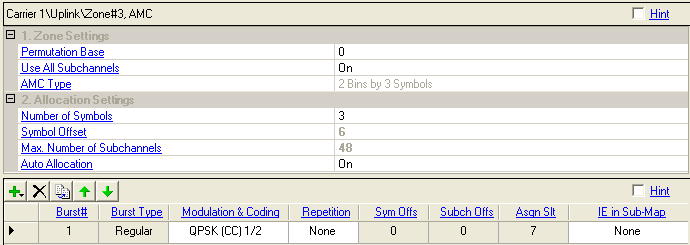
Select the permutation base used in this uplink zone.
Default: Off
Double-click or use the drop-down menu to turn Use All Subchannels On or Off.
On - all subchannels will be used for this zone.
Off - subchannels are assigned according to AMC Physical Bands Bitmap setup when it is enabled; otherwise all subchannels will be used.
According to P802.16Rev2/D6, this field in STC_DL_Zone_IE and UL_Zone_Switch_IE is ignored for AMC zones.
Range: 1 Bins by 6 Symbols, 2 Bins by 3 Symbols, 3 Bins by 2 Symbols
Set the AMC type of the AMC Zone.
Specify the number of occupied symbols in this zone.
The value must be a multiple of three because the uplink zone is divided into slots of 3 symbols x 1 subchannel (section 8.3.3.1 in P802.16Rev2/D6).
Displays how much the zone is offset from the start of the uplink frame. (Read-only)
Displays the maximum number of subchannels per symbol for the zone.
Double-click or use the drop-down menu to turn on or off.
On - Automatically configure all bursts' allocation according to IEEE P802.16-2004/Cor1/D3.
Off - Manually configure the Symbol Offset, Subchannel Offset, and Assigned Slots.
Use the button  to add a new burst. When a burst is added, the software displays the burst
in the tree view and adds it to the frame plot view.
to add a new burst. When a burst is added, the software displays the burst
in the tree view and adds it to the frame plot view.
Use the button  to delete the selected burst. The burst to be deleted is indicated by
the
to delete the selected burst. The burst to be deleted is indicated by
the  in the first column.
Use the button  to add a new burst that has the same configuration as the currently selected
one (indicated by the in the first column).
to add a new burst that has the same configuration as the currently selected
one (indicated by the in the first column).
Use the and
arrows  to reposition the currently selected burst (indicated by the
in the first column).
to reposition the currently selected burst (indicated by the
in the first column).
Range: 1 to 16
Displays the burst index number.
Displays the type of the burst.
Regular bust- none - HARQ scheme enabled burst.
HARQ burst (Hybrid ARQ) - HARQ scheme enabled burst.
Chase Combining
IR CTC HARQ
IR CC HARQ
Use the drop-down menu to select a modulation and coding type. See also Modulation and Coding.
Choices: None, 2, 4, 6
Use the drop-down menu to select the number of times the data is repeated. See also Repetition Coding.
Displays the symbol offset of the burst. See also Symbol Offset.
Displays the subchannel offset for the burst. See also Subchannel Offset.
Displays the total available slots in the burst. If Auto Allocation is off, you can edit this cell.
Choices: None, SUB-DL-UL-MAP #1, SUB-DL-UL-MAP #2, SUB-DL-UL-MAP #3
Use the drop-down menu to select the MAP message where the IE for this burst is located.
'None' means that the burst IE goes into normal or compressed MAP message. UL-MAP-IEs defined in one SUB-DL-UL-MAP must be consecutive ones by allocation order in a given uplink zone.