CCDF Plot
The software has two locations that access the CCDF
plot: the Waveform Setup view and the Carrier Setup view. In the Waveform
Setup view, the CCDF graph shows the composite plot
and peak-to-average values for all carriers. In the Carrier Setup view,
the CCDF graph shows the plot and peak-to-average values
for the current carrier. This topic describes the CCDF
functionality using the graph in the Waveform Setup view.
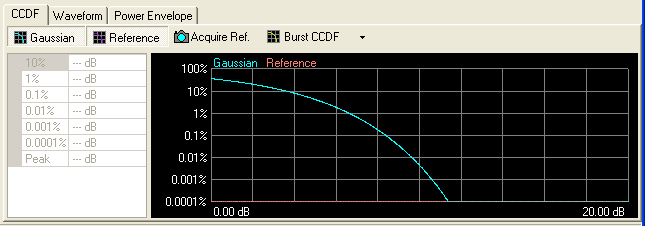
The CCDF graph displays the probability (in percentage)
of the generated waveform's calculated peak-to-average power ratio (measured
in dB) meeting or exceeding a certain level. The table to the left of
the CCDF plot displays the calculated peak-to-average
values for the current waveform. For additional information, see .
Click  or
or  from the main tool bar to generate an I/Q waveform
and plot the CCDF graph using the current channel configuration.
Any changes to the channel configuration setup do not appear on the graph
until you generate the waveform. The status bar at the bottom of the screen
shows waveform generation progress.
from the main tool bar to generate an I/Q waveform
and plot the CCDF graph using the current channel configuration.
Any changes to the channel configuration setup do not appear on the graph
until you generate the waveform. The status bar at the bottom of the screen
shows waveform generation progress.
The CCDF, Waveform, and Power Envelope graphs
are minimized in the Waveform Setup node's initial view. To view the graphs,
click and drag above the CCDF, Waveform, and Power Envelope tabs.
Each time you adjust parameters and generate a waveform, a plot is added
to the  graph.
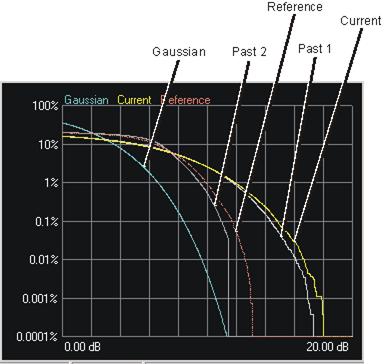
The graph retains your three most recent plots (in shades of gray), allowing
you to make comparisons of waveform characteristics.
graph.
The graph retains your three most recent plots (in shades of gray), allowing
you to make comparisons of waveform characteristics.
Use the buttons shown below to plot the Gaussian data, reference data
and generated waveform data to the CCDF graph. The graph's initial state
shows only the Gaussian curve (blue) until you generate a waveform.

Click the
button to toggle the view of the band-limited Gaussian noise curve (blue).

Click the
button to toggle the view of the reference curve (red). The reference
appears as a flat line until you generate a waveform and click the button.

Click the button to make the current waveform curve (yellow) the reference
curve (red). Click the
button to view the reference curve.

Click the or button,
or use the pull-down menu,
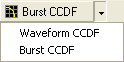
to toggle between the calculation types. Waveform CCDF calculates CCDF
and peak-to-average ratio using the entire waveform, including portions
where the data is zero (no signal). Burst CCDF calculates them using only
the actual signal instead of the whole waveform.