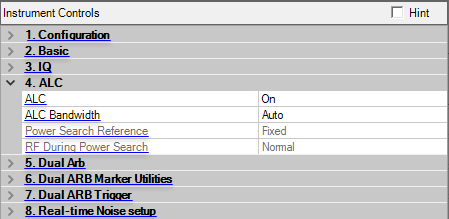
When an M9381A/M9383A is connected, you will see the display as below:
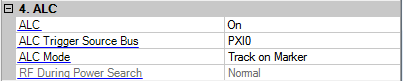
When an M9383B/M9384B/M9484C is connected, you will see the display as below:
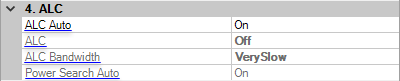
(M9383B/M9384B/M9484C only)
Choice: On | Off
Default: On
Enables or disables ALC On and ALC Bandwidth couplings.
For IQ modulation, ALC Auto and Power Search Auto should be On.
Choice: On | Off
Default: On
Double-click or use the drop-down menu to enable or disable the automatic level control.
On − the ALC circuit constantly monitors and controls the output power level.
Off − no automatic leveling occurs.
This parameter is not available with all instrument model numbers and may be grayed out.
Select the ALC loop bandwidth from the drop-down list. The available choices are different for the various signal generators. Choose Auto to let the signal generator automatically select the optimized bandwidth for the current signal setup.
For waveforms with varying amplitudes, a high crest factor, or both, set the ALC loop bandwidth to 100 Hz, which is the default bandwidth set when an ARB format is turned on. Limiting the loop bandwidth of the ALC circuit prevents the ALC from sampling the fast rising edges of high-crest pulsed waveforms.
Choice: Modulation | Fixed
Default: Modulation
Set to to enable this parameter.
Double-click or use the drop-down menu to select a fixed or modulation reference signal when doing a power search.
Fixed − power search uses a fixed 0.5 V reference.
Modulation − power search uses the RMS value of the current I/Q modulation as the reference.
Choice: Normal | Minimum
Default: Normal
Set to to enable this parameter.
Double-click or use the drop-down menu to select the level of the output power control during a power search routine.
Normal − performs power searches without setting the internal step attenuator to its maximum setting. Glitches and power changes may be present during the search.
Minimum − sets the signal generator's step attenuator to its maximum setting during power search to protect sensitive circuits.
(M9381A/M9383A only)
Choice: AUTO | PXI0 | .. | PXI7
Default: None
Double-click or use the drop-down menu to select a bus for ALC hold signal path on PXI backplane. This parameter is only available when connected to the M9381A/M9383A.
(M9381A/M9383A only)
Choice: : Off | HOLD | TRACK
Default: Off
Double-click or use the drop-down menu to select ALC mode. This parameter is only available when connected to the M9381A/M9383A.
(M9383B/M9384B/M9484C only)
Choice: On | Off
Default: On
Toggles Power Search Mode between On or Off.
When enabled, power search calibration routine is executed whenever an instrument setting is modified. This includes changes to frequency, amplitude and modulation.
For IQ modulation, ALC Auto and Power Search Auto should be On.
For M9383B/M9384B/M9484C, this parameter is grayed out and set to Very Slow when ALC Auto is On.