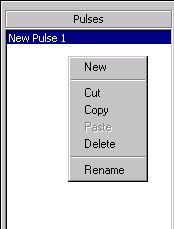

The Pulse Building GUI has several shortcut menus in addition to the menus and toolbar icons previously described. Two are shown below.
The Pulse Library shortcut menus include the two menus shown in the following figures.
Place the mouse pointer in the Pulses section or in a text box or table in the Pulse Details section of the form.
Click the right mouse button
Menu item functions, such as and , have been described in previous sections. Some menu items may be disabled depending on whether or not the function can be performed.
The Pattern Library shortcut menus include the two menus shown in the following figures.
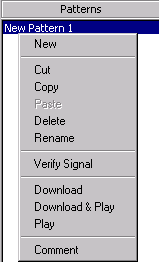

Place the mouse pointer in the Patterns section or in the Pattern Details section.
Click the right mouse button.
Menu item functions, such as and , have been described in previous sections. Some menu items may be disabled depending on whether or not the function can be performed.
The Comment menu item allows you to enter information on the signal, enter data and so forth, into a simple text editor form. The text editor comments are saved with the .pbp project.
The and menu items are available in the Pattern Details section of the Pattern Library form. The menu item increments the index number and adds a pattern item to the pattern items table at that index number. The menu item inserts a pattern item into the pattern items table at the index position selected (the pattern item will be highlighted). The original pattern item at the highlighted position and all pattern items following are shifted down. See the section on pattern items for more detail.
The menu item cascades to a list of items that control the list of column titles appearing on the Pattern Details table. See Customize pattern item table for information about the preset column choices.