 in the Transport
Channel node and select UL-SCH or select an existing UL-SCH channel
in the Transport channel node and click the UL-SCH Configuration button
in the Transport
Channel node and select UL-SCH or select an existing UL-SCH channel
in the Transport channel node and click the UL-SCH Configuration button
 to open the Configure UL-SCH window.
 Before adding a transport channel as described below, delete any existing transport channel, physical channel, or resource block collection that occupies the resource blocks that your new transport channel will occupy. If you add a new transport channel without first deleting a conflicting channel or resource block collection, a "code conflicted" error occurs when you generate the waveform.
Click the Add Channel button in the Transport
Channel node and select UL-SCH or select an existing UL-SCH channel
in the Transport channel node and click the UL-SCH Configuration button
to open the Configure UL-SCH window.
The yellow area with diagonal lines shows the resource blocks occupied by the currently configured UL-SCH. The number of available resource blocks is determined by the System Bandwidth selection in the UE Setup node.
Figure 1 shows an UL-SCH with a Transmission Bandwidth setting of 10 MHz (50RB). Figure 2 and Figure 3 show configurations with different offset and subframe settings. Figure 4 shows an example of clustered resource block groups when the Resource Allocation is Type 1.
Links to parameter descriptions are listed in the tables below.
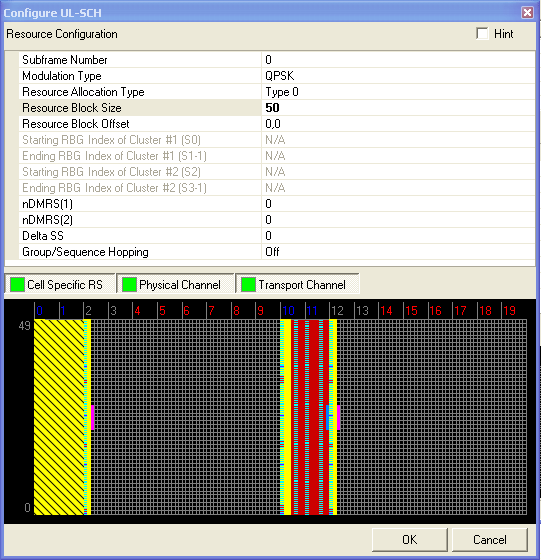
Figure 1. UL-SCH with 50 Resource Blocks and 0 Offset
|
|
Enter the number(s) of the subframe(s) that the UL-SCH will occupy. You can enter the number of a single subframe, two or more subframes separated by commas, or a range of subframes (for example, 1-3)
Double-click or use the drop-down menu to select a modulation type for the UL-SCH.
Range: Type 0 | Type 1
Double-click or use the drop-down menu to select the uplink resource allocation type.
Type 0 : A set of resource blocks continuously allocated by a starting resource block (Resource Block Offset) and length Resource Block Size).
Type 1 : Two sets of resource blocks with each set including one or more consecutive resource block groups of size P where P is the RBG size associated with the system bandwidth. See 3GPP TS 36.213.)
Dependency: Resource Allocation Type = Type 0
Enter a value for the number of resource blocks the UL-SCH channel will occupy. The System Bandwidth defined in the UE Setup node determines the range of values for this parameter.
Dependency: Resource Allocation Type = Type 0
Enter an integer offset value for each occupied slot occupied by the UL-SCH, separated by commas. These offsets are applied in order from lowest numbered occupied slot to highest numbered occupied slot.
Range: 1 to 7 (1.4MHz) | 1 to 9 (3MHz ) | 1 to 14 (5MHz) | 1 to 18 (10MHz) | 1 to 20 (15MHz) | 1 to 26 (20MHz)
Default: 1
Dependency: Resource Allocation Type = Type 1
Enter a value for the Starting RBG Index of Cluster #1 (s0) for each subframe respectively, separated by commas (for example, 0,1,0,1...,0,1).The input limitation is s0 < s1 < s2 < s3. See 3GPP TS 36.213.
Range: 1 to 6 (1.4MHz) | 1 to 8 (3MHz ) | 1 to 13 (5MHz) | 1 to 17 (10MHz) | 1 to 19 (15MHz) | 1 to 25 (20MHz)
Default: 1
Dependency: Resource Allocation Type = Type 1
Enter a value for the Starting RBG Index of Cluster #1 (s0) for each subframe respectively, separated by commas (for example, 0,1,0,1...,0,1).The input limitation is s0 < s1 < s2 < s3.See 3GPP TS 36.213.
Range: 1 to 7 (1.4MHz) | 1 to 9 (3MHz ) | 1 to 14 (5MHz) | 1 to 18 (10MHz) | 1 to 20 (15MHz) | 1 to 26 (20MHz)
Default: 1
Dependency: Resource Allocation Type = Type 1
Enter a value for the Starting RBG Index of Cluster #1 (s0) for each subframe respectively, separated by commas (for example, 0,1,0,1...,0,1).The input limitation is s0 < s1 < s2 < s3. See 3GPP TS 36.213.
Range: 1 to 6 (1.4MHz) | 1 to 8 (3MHz ) | 1 to 13 (5MHz) | 1 to 17 (10MHz) | 1 to 19 (15MHz) | 1 to 25 (20MHz)
Default: 1
Dependency: Resource Allocation Type = Type 1
Enter a value for the Starting RBG Index of Cluster #2 (s0) for each subframe respectively, separated by commas (for example, 0,1,0,1...,0,1).The input limitation is s0 < s1 < s2 < s3. See 3GPP TS 36.213.
Range: 0 to Int32
Default: 0
For PUSCH channels, enter a value which is used to calculate the cyclic shift value for the demodulation reference signal (DMRS) for PUSCH. (See 3GPP TS 36.211.)
Choice: 0, 2, 3, 4, 6, 8, 9, 10
Default: 0
For PUSCH channels, select a value which is used to calculate the cyclic shift value for the demodulation reference signal (DMRS) for PUSCH. (See 3GPP TS 36.211.)
Range: 0 to 11
Default: 0
Enter a value for the DMRS Cyclic Shift for each slot, separated by commas.
Choice: Off | Group Hopping | Sequence Hopping
Default: Off
Double-click or use the drop-down menu to select the hopping type for PUCCH. (See 3GPP TS 36.211.)
Figure 2 shows a UL-SCH in which the Resource Block Size is set to 12 and the Resource Block Offset is set to 7 in slot 0 and slot 1.

Figure 2. UL-SCH with 12 Resource Blocks and an Offset of 7
Figure 3 shows the UL-SCH from Figure 2 with Subframe 2 added using the Subframe Number cell. An offset of 0 resource blocks is applied to the third occupied slot (slot 4) and an offset of 2 resource blocks is applied to the fourth occupied slot (slot 5) using the Resource Block Offset cell.
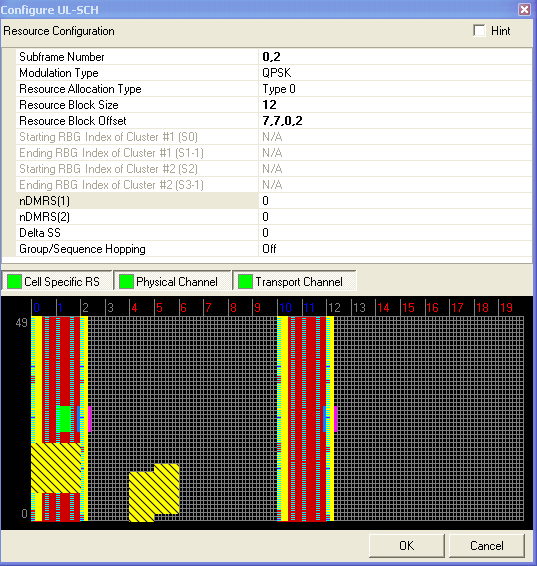
Figure 3. UL-SCH with 12 Resource Blocks in 2 Subframes with different Offsets
Figure 4 shows an UL-SCH in which the Resource Allocation selected is Type 1. This allows you to configure the starting and ending index for two clusters of resource block groups.
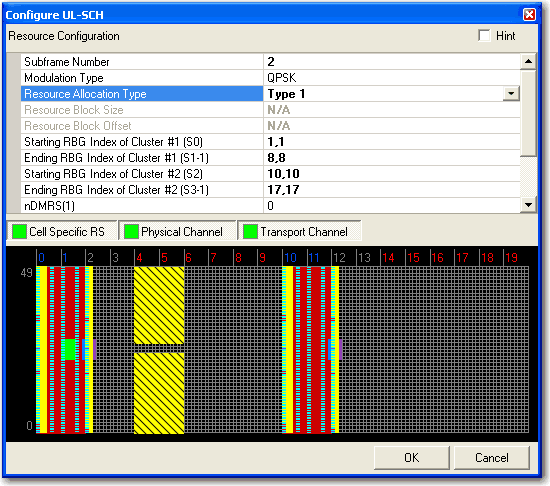
Figure 4. UL-SCH with Type 1 Resource Allocation with starting and ending clusters