Workflow
Keysight MCP Server for Instrument Control translates a natural language request into validated SCPI commands and executes them on a connected instrument, all under engineer control. The sequence below describes exactly how a measurement request flows through the system, from the engineer's words to a plain-language result.
The workflow involves five participants: the Engineer, the AI Client, the MCP Server, the IDF / Context store, and the Instrument.
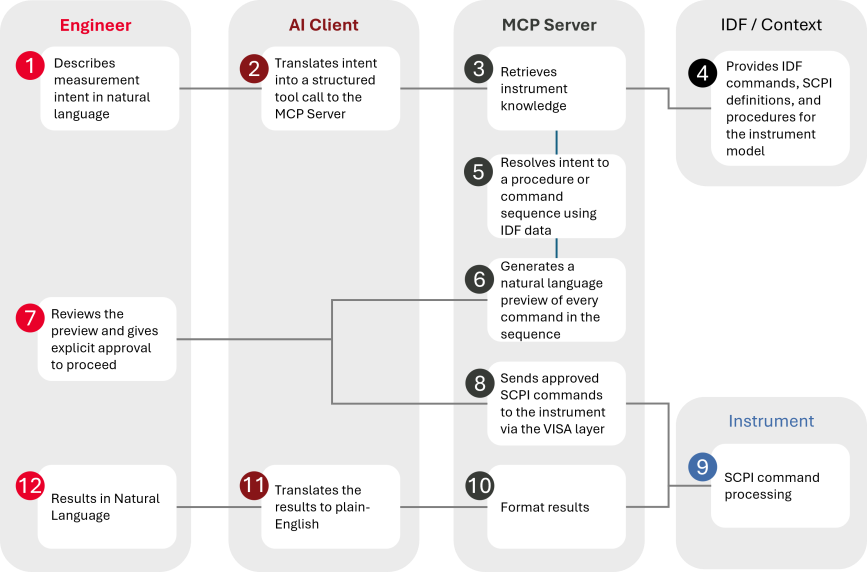
Interaction Flow
Before You Begin. When the session opens, the AI Client calls discover_instruments once. This scans all connected VISA buses and returns the model, resource string, and class of every detected instrument. The result is retained for the entire session and instrument discovery does not repeat on follow-up requests unless the engineer explicitly asks for it. At the same time, the server checks whether a newer version of Keysight MCP Server for Instrument Control is available and includes a brief notice in the response if one is found. For non-Keysight Technologies instruments (or legacy Agilent/HP), the server flags each one individually and adds one summary warning: command-set support may be unavailable for that instrument.
Step 1: Engineer Describes Intent
The engineer describes the measurement in natural language, for example, "Sweep from 1 GHz to 6 GHz and show me S21" or "Set the power supply to 3.3 V with a 500 mA limit." No SCPI knowledge is required. The engineer communicates only in terms of what they want to measure or configure.
Step 2: AI Client Sends a Structured Tool Call
The AI Client receives the natural language request and translates it into a structured tool call directed at the Keysight MCP Server. The tool call encodes the engineer's intent, the operation, the target subsystem, any parameters supplied, and the connected instrument into a format the MCP Server can process. The AI Client has no direct access to instruments; all hardware interaction is routed through the server.
Validating or Translating Existing SCPI
If the engineer already has a SCPI sequence instead of a plain-language request, the AI Client recognizes this at Step 2 and the server can skip intent resolution entirely, as shown by the fork in the diagram above:
- Validate SCPI for the current instrument: If the sequence targets the instrument already selected in this session, the server skips straight to Step 6 (preview) and checks each command against that instrument's IDF.
- Translate SCPI to a different instrument: If the engineer wants to run that sequence on a different model, the server first calls
describe_commandson the original model to find out what each command actually does. It then callsresolve_commandson the new model to find the matching commands, and moves to Step 6 (preview). This way, the server never assumes a command means the same thing, or even exists, on a different instrument.
If no existing SCPI is supplied, the normal flow continues with Step 3.
Step 3: MCP Server Retrieves Instrument Knowledge
The MCP Server queries the IDF / Context store for the instrument knowledge required to fulfil the request. The context store returns IDFs and procedures stored on the user's machine, matched to the instrument's model and identification. This supports fully offline operation.
Step 4: IDF / Context Provides Command Definitions
The context store returns the instrument-specific IDF data for the matched model: SCPI command definitions, parameter ranges, default values, and any applicable procedures. This data is the sole source of commands. No SCPI is invented or derived from general knowledge.
Working with Instruments That Have No IDF
This is a secondary path, not shown in the diagram above, which depicts only the primary sequence with an IDF present.
Some instruments have no matching IDF at all — most commonly a non-Keysight Technologies instrument, or a Keysight virtual/emulated instrument without a published IDF. Previously, this hard-failed the tool call and dead-ended the workflow. Now, the server degrades gracefully: it returns a warning instead of an error, and the AI Client is directed to the existing bring-your-own-SCPI path rather than attempting to resolve commands from general knowledge.
In this path, the engineer supplies the exact SCPI command(s) directly, and the server validates them with preview_commands before requesting approval — the same human-in-the-loop gate used everywhere else. No SCPI is ever invented, even when no IDF is available.
search_instrument_capabilities still returns matching procedures in this case, since the built-in procedure library isn't tied to any one instrument's IDF; only the command-search portion is skipped.
Step 5: MCP Server Resolves Intent to a Command Sequence
Using the returned IDF data, the MCP Server resolves the engineer's intent to a concrete command sequence. Depending on the request, one of two resolution paths is taken:
 Single Command Resolution
For requests that map to a single SCPI command, the server runs a deterministic scoring pipeline against the IDF and returns a confidence level:
| Confidence | When | Outcome |
|---|---|---|
| High | A single clear winner is found | The server proceeds directly to the preview step. |
| Medium | Two or three close candidates exist | The candidates are presented in a ranked list with descriptions and match scores. The engineer selects or approves the recommendation before the server proceeds. |
| Low | No strong match found | A broader keyword search is performed. If no match is found, the operation is reported as not supported for that instrument model. The server does not attempt to construct a command from general knowledge. |
Procedure Resolution
For requests that require a sequence of steps, such as a full S-parameter sweep or a SOLT calibration, the server matches the intent to a predefined procedure and expands it into an ordered command array. For a full description of procedure step types and the built-in procedure library, see Procedures.
All commands resolved from the procedure are collected into a single command array before the preview step.
Step 6: MCP Server Generates a Plain-Language Preview
Before any command is sent to an instrument, the MCP Server generates a complete plain-language preview of every command in the sequence. Each entry in the preview describes what the command does, what value it sets or queries, and on which instrument.
The preview is forwarded to the AI Client, which presents it to the engineer for review.
Step 7: Engineer Reviews and Approves
The engineer reads the preview and makes an explicit decision to proceed or reject. This is the human-in-the-loop gate. Nothing executes without it.
- If the engineer approves, the approval is confirmed back to the MCP Server and execution begins.
- If the engineer rejects, the server discards the command sequence and the AI Client returns to resolving a revised sequence based on updated instructions.
No command reaches an instrument without explicit engineer approval of the preview.
Step 8: MCP Server Sends Commands to the Instrument
After approval is confirmed, the MCP Server sends the approved SCPI commands to the instrument in sequence via the VISA layer. The VISA provider (Keysight IO Libraries Suite, NI-VISA, Rohde & Schwarz VISA, or Mock) handles the low-level connection and byte transfer. The server does not modify commands after approval; what the engineer reviewed is exactly what is sent.
Step 9: Instrument Executes and Returns Results
The instrument processes each SCPI command in order and returns the raw measurement results. The MCP Server collects all responses as the sequence progresses. After the final command, the instrument error queue is automatically queried to surface any hardware-level errors.
Step 10: MCP Server Formats Results
The raw instrument responses are formatted into a structured result set. Units are normalised, values are associated with their corresponding commands, and any instrument errors are translated to plain-language messages with suggested corrective actions. The formatted results are returned to the AI Client.
Step 11: AI Client Translates Results to Plain Language
The AI Client receives the formatted results and renders them in plain language. For example, a numeric S21 trace is converted into a readable summary with the correct frequency range, peak values, and units. The plain-language result is then forwarded to the engineer.
Step 12: Engineer Receives Results
The engineer receives the measurement results in plain language. If further measurements are needed, the engineer describes the next intent in natural language and the flow repeats from Step 2. Instrument discovery does not repeat; the session state is retained.
Non-Negotiable Rules
The following rules apply in every session regardless of instruction:
- No SCPI command is ever invented. Every command is sourced from the instrument's IDF.
- No command is sent to an instrument without an engineer-reviewed preview and explicit approval.
- Instrument discovery runs once per session. The instrument list is retained for the duration of the session.
- If an operation is not found in the IDF, it is reported as unsupported. The system does not attempt to construct commands from general knowledge.
- Approved commands are sent exactly as reviewed. No modification occurs between approval and execution.
- When no IDF exists for an instrument at all (not just an unsupported operation), the engineer is asked to supply SCPI directly, which is still validated by preview before execution. The system never falls back to inventing commands from general knowledge.