. All of the measurement settings and configurations made in the expanded view are remembered.
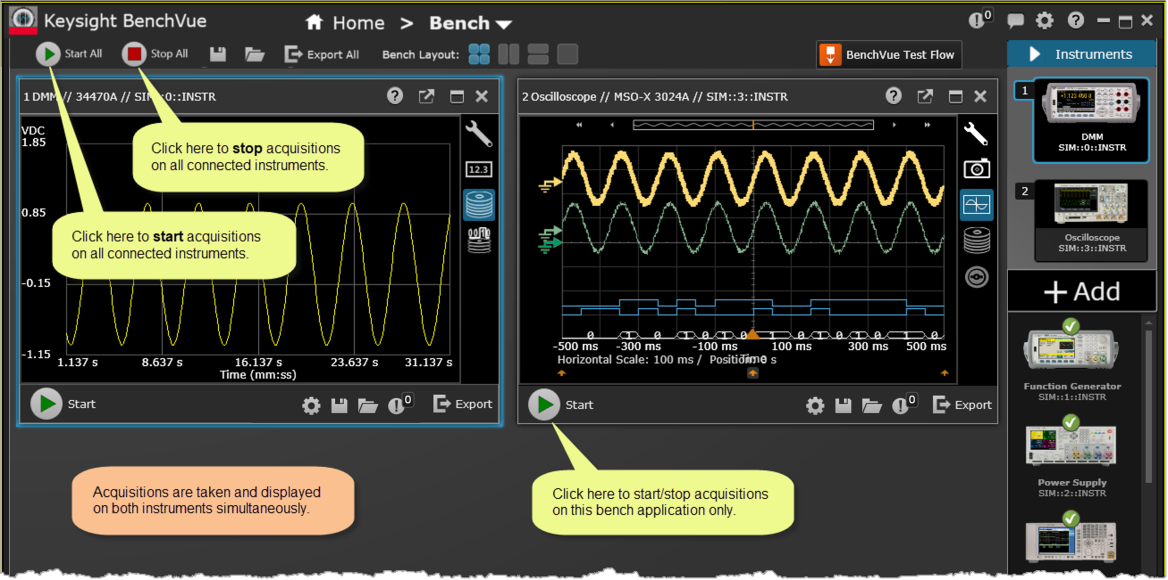
 One of the key features of the BenchVue application is that you can simultaneously control multiple connected instruments. This allows you to create a "virtual" workbench of instruments all running simultaneously within one instance of the BenchVue software.
In this step, begin by restoring (docking) the DMM bench application to the Bench screen by clicking . All of the measurement settings and configurations made in the expanded view are remembered.
The DMM bench application is now returned to the BenchVue desktop. Note that in the example screen below two connected instruments are now running side-by-side on the Bench desktop, each within its own bench application window. You can now start taking acquisitions on both instruments simultaneously.