Arb List
Using the Built-in Arb Waveforms
Select Arb List to configure and generate arbitrary waveform. The default is List.
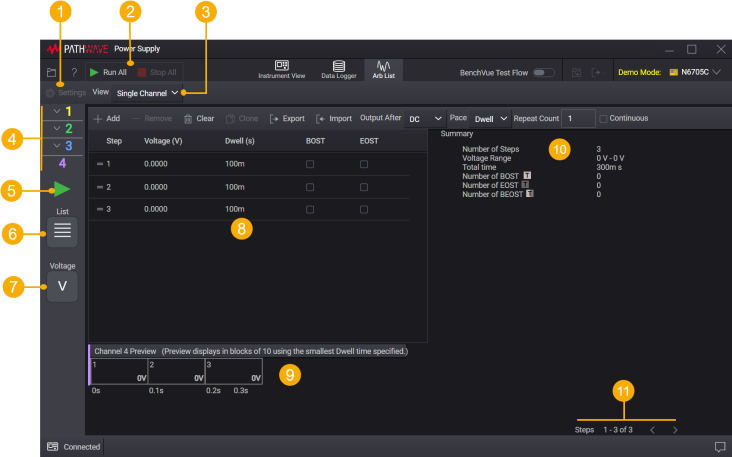
| 1 | Settings – Show or hide the Waveform Settings tab to change settings for built-in Arb waveforms. This is not applicable for List. |
| 2 | Run All, Stop All – Run and stop the Arb for all outputs. |
| 3 | Change the preview trace to Single Channel or All Channels |
| 4 | Output number. Only one output channel can be selected at a time. |
| 5 | Run or Stop the Arb |
| 6 | Arb waveform - Click to select Arb waveform, if applicable. Some model supports List only. |
| 7 | Priority mode - Click to select the output priority mode, if applicable. |
| 8 | List table - Lets you configure the steps, list values, dwell times, and specify output trigger signals associated with the step. (Applicable for List only) |
| 9 | List preview - Display the list in blocks of 10 using the smallest dwell time. |
| 10 | Summary of the list table |
| 11 | Page indicator for list preview |