Using the Built-in Arb Waveforms
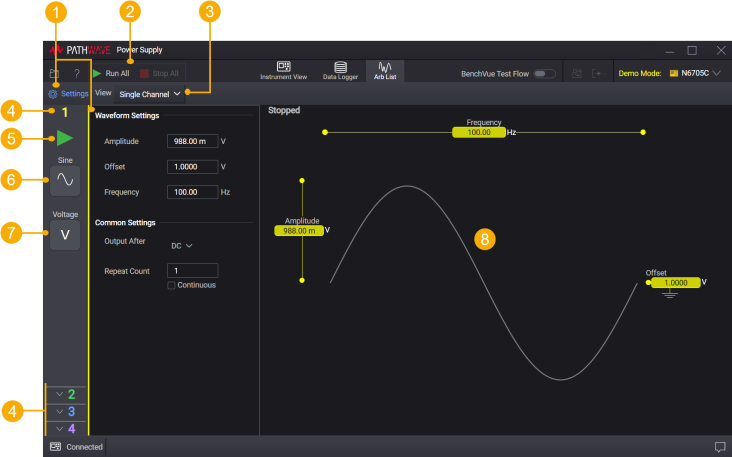
| 1 | Settings – Show or hide the Waveform Settings tab to change settings for built-in Arb waveforms. This is not applicable for List. |
| 2 | Run All, Stop All – Run and stop the Arb for all outputs. |
| 3 | Change the Trace View to Single Channel or All Channels. |
| 4 | Output number. Only one output channel can be selected at a time. |
| 5 | Run or Stop the Arb |
| 6 | Arb waveform - Click to select Arb waveform. |
| 7 | Priority mode - Click to select the output priority mode. |
| 8 | Trace View with settings indicator |
Step 1 – Select the Arb output
| Voltage | Sets the Arb output to voltage |
| Current | Sets the Arb output to current |
| Power | Sets the Arb output to power |
| Resistance | Sets the Arb output to resistance |
Step 2 – Select the Arb waveform
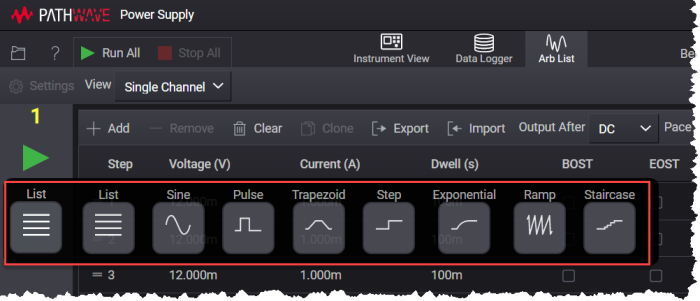
Click  and select the desired Arb waveform.
NOTE: The default Arb is List.
Step 3 – Configure the Arb waveform
Click Settings.The available built-in waveforms and their associates parameters are as follows:
Tip: You may also configure the waveform through the Trace View. Click each parameter to change the setting.
| Sine | Amplitude - the amplitude or peak value Offset - the offset from zero Frequency - the frequency of the sine wave |
| Pulse | Start Setting - the setting before and after the pulse Pulse Setting - the amplitude of the pulse Delay - the delay after the trigger is received but before the pulse starts Pulse Width - the width of the pulse End Time - the time the output remains at the end setting after the pulse completes Frequency - the frequency of the pulse wave |
| Trapezoid | Start Setting - the setting before and after the trapezoid Peak Setting - the peak amplitude of the trapezoid Delay - the delay after the trigger is received but before the trapezoid starts Rise Time - the time that the trapezoid ramps up Peak Width - the width at the peak amplitude Fall Time - the time that the trapezoid ramps down End Time - the time the output remains at the end setting after the trapezoid completes |
| Step | Start Setting - the setting before the step
End Setting - the setting after the step Delay - the delay after the trigger is received but before the step occurs End Time - the time the output remains at the end setting after the step occurs |
| Exponential | Start Setting - the setting before the waveform starts End Setting - the end setting of the waveform Delay - the delay after the trigger is received but before the waveform starts Rise Time - the time for the amplitude to go from the start setting to the end setting Time Constant - the time constant of the exponential curve |
| Ramp | Start Setting - the setting before the ramp
End Setting - the setting after the ramp Delay - the delay after the trigger is received but before the ramp starts Ramp Time - the time that the output ramps up End Time - the time the output remains at the end setting after the ramp completes |
| Stair | Start Setting - the setting before the staircase starts
End Setting - the setting after the final step Delay - the delay after the trigger is received but before the waveform starts Step Time - the time to complete all of the steps End Time - the time the waveform remains at the end of setting after the staircase completes Number of Steps - the total number of staircase steps |
| Square | Start Setting - the setting before the square starts
Peak Setting - the peak amplitude of the square Delay - the delay after the trigger is received but before the waveform starts Peak Width - the width at the peak amplitude End Time - the time the waveform remains at the end of setting after the square completes |
| Triangle | Start Setting - the setting before the triangle starts
Peak Setting - the peak amplitude of the triangle Delay - the delay after the trigger is received but before the waveform starts Rise Time - the time that the triangle ramps up Fall Time - the time that the triangle ramps down End Time - the time the waveform remains at the end of setting after the triangle completes |
Common settings
NOTE: Common settings are applicable for all waveforms except Step waveform.
| Output After | Specifies what happens when the waveform completes. DC - Returns to DC value that was in effect before waveform started. List - Remains at last waveform value. |
| Repeat Count | The number of times that the waveform is executed before it completes. |
Step 3 – Run the Arb waveform
Use the  /
/  buttons for each output to run and stop the Arb individually.
Use Run All / Stop All to run Arb for all outputs.