
 ), until you Add at least one receiver, using the Receivers pane (
 ).
).This topic describes some of the features of IQ Streaming.
Need to edit the middleware.ini file using a text editor (i.e., default UDP port == 6700).
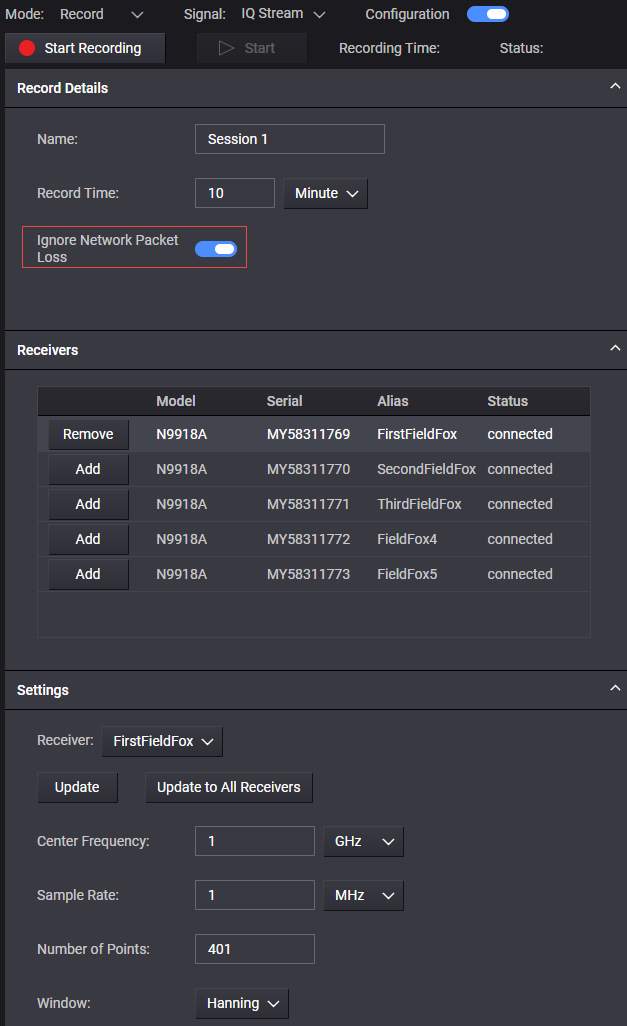
After enabling IQ Streaming, use the Mode: drop-down and click to set Record. You can do the following under Recording Details pane:
Change the Name: (i.e., default == Session 1).
Set the Record Time: (i.e., default == 10 Minute(s))
Ignore Network Packet Loss (i.e., default == enabled). If disabled, and the KSMS software detects packet loss in the signal, the measurement will be stopped.
), until you Add at least one receiver, using the Receivers pane ().Figure. Overview of IQ Streaming settings
Only IQ recordings in .vita49 captured on a FieldFox Handheld Analyzers N9916/17/18/36/37/38/50/51/52/53/60/61/62/63D model are supported.
KSMS supports converting IQ streaming recordings (.vita49) captured on supported FieldFox D models to .bin format and transferring the recordings to a compatible Vector Signal Generator for signal playback. Refer to Share KSMS IQ Streaming Recording to Vector Signal Generator.