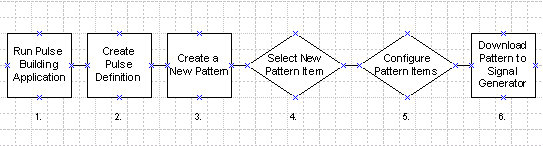
This section gives a brief overview of the steps used to create a signal using the Pulse Building GUI. Detailed instructions are given in the Pulse Building Examples section of this Help document. The following simplified flow diagram shows the process used to create and download a signal using the Pulse Building GUI.
Start the Pulse Building application. A default pulse named New Pulse 1 is automatically created.
Configure pulse parameters in the Pulse Details section.
Go to the Pattern Library (tab
at the bottom of the form) and select New Pattern  from the toolbar.
Select New Pattern Item  from the toolbar.
Set pattern item parameters such as Object Type (a pulse is the default type) and Object Name.
Select Download & Play from the Download menu.