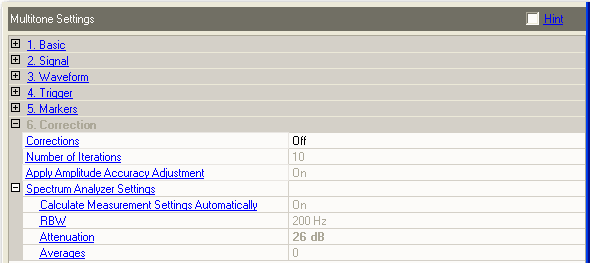
Choices: On | Off
Default: Off
When Corrections are On, the application enables a correction measurement to be made during a download. The measurement is used to suppress the multitone signal distortion products to the higher of the levels entered in the suppression band table or to the levels possible with the current hardware configuration. The spectrum analyzer must be configured as part of the hardware system for the distortion products to be suppressed.
Corrections are very waveform and hardware setup specific. The corrections are embedded in the downloaded waveform. Changing all but a few signal parameters requires a new correction measurement and waveform. Corrections last approximately 8 to 10 hours and the setup is repeatable.
See also Waveform Licensing.
Number of Iterations
Apply Amplitude Accuracy Adjustment
Suppression Bands
Range: 1 to 500
Default: 10
Enter a value to set the maximum number of measurement iterations to use while suppressing the IMD products in the notch. The correction measurement will stop when the desired suppression level is reached or when the specified number of iterations is reached.
Increasing the number of tones will increase the time needed for the software to generate the correction file. You can estimate the time needed by calculating approximately .25 seconds per tone per iteration.
In general, if the desired suppression level has not been reach within 10 iterations, the requested level may exceed the limits for the current signal setup. The maximum suppression level for the current signal can be approximated with the following equation.
90 – 8*log10(Tone Count)
For 10 tones this becomes about 82 dBc
For 100 tones this becomes about 74 dBc.
Choices: On | Off
Default: On
When set to on, this measures the noise bandwidth flatness and corrects it. The flatness correction is applied before the amplitude profile. Multitone mode measures the level of every tone in the signal. Corrections must be set to on for this parameter to function.
It is possible to specify tone power levels other than 0 dB in the tone table. However, the flatness correction measurement is designed for tones at 0 dB. The accuracy of tone power level degrades the further from 0 dB the desired level is.
The following settings are used by the application during the correction measurement. These parameters cannot be used to control the spectrum analyzer directly.
When Calculate Measurement Settings Automatically is set to On, the RBW, Attenuation and Averages are updated after a download to show the actual values used during the correction measurement.
Choices: On | Off
Default: On
On − the application will determine the parameters for the current measurement.
Off − the user can specify the values to use. Be sure to set the Attenuation value high enough or the correction measurement will be correcting IMD products from the spectrum analyzer.
Range: 0.1 Hz to 1 MHz
Default: 200 Hz
Enter a value to set the Resolution Bandwidth used during the correction measurement. Smaller RBWs are usually better but increase the measurement time. The application will automatically reduce the RBW if it appears that the IMD suppression is not improving during the correction.
Range: 0 to 70 dB
Default: 26 dB
Enter a value to set the spectrum analyzer input attenuation used during the correction measurement.
If after the correction measurement there appears to be a number of distortion products visible on the spectrum analyzer try increasing the attenuation 20 dB or more. You may be viewing distortion products from the spectrum analyzer.
Range: 0 to 100
Default: 0
Enter a value to set the number of averages used during the correction measurement. Zero (0) averages means no averaging is used.