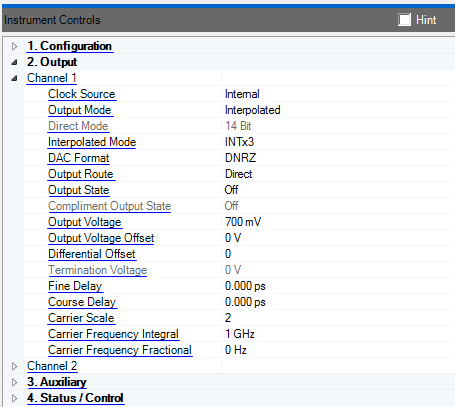
Accesses the properties for this channel. The properties for channel 1 and channel 2 are identical.
Double-click or use the drop-down menu to select the channel clock source.
Internal - Use the internal sample clock.
External - Use the external sample clock provided to the SAMPLE CLK IN connector on the M8190A front panel.
Channel 1 and Channel 2 sample clock sources are coupled when channel coupling is enabled.
The N7621B software sets Channel 1 to Internal and Channel 2 to External when configured in "Arb Only" Mode.
Double-click or use the drop-down menu to select the channel output mode.
Direct - Output a baseband signal. See Direct Mode.
Interpolated - Output a complex modulated signal at the specified IF frequency. See Interpolated Mode. Requires Option DUC.
Channel 1 and Channel 2 output modes are coupled when channel coupling is enabled.
Switching the output mode clears existing waveforms from memory.
Double-click or use the drop-down menu to select the channel direct mode.
12 Bit - Set the DAC resolution to 12 bits with a maximum sample rate of 12 GHz. Requires Option 12G.
14 Bit - Set the DAC resolution to 14 bits with a maximum sample rate of 8 GHz. Requires Option 14B.
Channel 1 and Channel 2 direct modes are coupled when channel coupling is enabled.
Switching the direct mode clears existing waveforms from memory.
Double-click or use the drop-down menu to select the up sampling ratio used in interpolation mode.
INTx3 - Set the ratio to 3.
INTx12 - Set the ratio to 12.
INTx24 - Set the ratio to 24.
INTx48 - Set the ratio to 48.
The I/Q data is automatically up sampled to match the DAC sample rate. Using a larger interpolation reduces the amount of I/Q data needed but also reduces the signal bandwidth.
Channel 1 and Channel 2 interpolated modes are coupled when channel coupling is enabled or when channel 1 and channel 2 share the same clock source.
Double-click or use the drop-down menu to select the DAC format.
RZ - DAC returns to zero between each sample. Provides the flattest amplitude response with a 6 dB loss in maximum output power when compaired to NRZ.
NRZ - The DAC does not return to zero between samples. Provides higher output power.
DNRZ- Optimized for best NRZ signal using two DACs. This is the one to use.
Doublet - The DAC does not return to zero between samples. Provides flatter amplitude response in second Nyquist region. Use this mode when the IF output frequency is greater than 1/2 the DAC sample rate. Dont forget to swap I/Q data to account for spectrum mirroring.
Double-click or use the drop-down menu to select the channel output route.
Direct- Output is directly from DAC. This has the best IMD performance.
DC - Use the amplified DC output.
AC - Use the amplified AC output.
The AC and DC path share common output connectors on the front panel. The direct DAC path uses different connections on the front panel.
Double-click or use the drop-down menu to enable or disable the current output. The current output is determined by the "Output Route" property.
Double-click or use the drop-down menu to enable or disable the current complement output. The current complement output is determined by the "Output Route" property.
Range:
Direct DAC: 200 mV to 1.40 V (peak to peak differential)
DC Output: 300 mV to 2.00 V (peak to peak differential)
AC Output: 200 mV to 2.00 V (peak to peak)
Set the peak to peak output voltage.
The Output Voltage and IQ Gain Balance properties are coupled.
See also: Carrier Scale and Output Route
Range:
Direct DAC: -20 mV to 20 mV
DC Output: -500 mV to 1.0 V
AC Output: Not Applicable
Set the output offset voltage.
The full voltage offset range is coupled to the current Output Voltage and the Output Route values.
Range: -8192 to 8191
Set the differential amplitude offset in DAC values.
Range: -1.0 V to 1.0 V
Set the DC gain termination voltage.
Range: 0 ps to 30 ps
Set the fine channel delay relative to a trigger or event.
The fine delay, I/Q Skew and Trigger Delay are coupled.
Range: 0 ps to 10 ns
Set the course channel delay relative to a trigger or event.
The course delay, I/Q Skew and Trigger Delay are coupled.
Range: 0.0 to 2.83
Set the carrier scale. The carrier scale is used to prevent clipping of the digital data by the DAC. The digital up conversion (DUC) process can generate values that exceed the DAC range. Clipping is prevented by setting the carrier scale to less than the maximum value. The software resets carrier scale to 2.0. This is 70% of the maximum value. Adjusting the carrier scale directly affects the signal output power and dynamic range. Larger values are better until clipping occurs.
Only available when the software is configured in "Arb Only" Mode.
See also: Amplitude
Range: 0 to 12 GHz
Set the integral part of the carrier frequency.
Only available when the software is configured in "Arb Only" Mode.
Range: 0.0000 to 1.0000 Hz
Set the fractional part of the carrier frequency.
Only available when the software is configured in "Arb Only" Mode.