
The 2-port and 4-port Low Frequency Extension (LFE) options add additional hardware to extend the start frequency of the VNA down to 900 Hz.
Note: Source and Receiver frequencies MUST BE EQUAL if both are in the LFE frequency band and LFE is turned on. If they are both in the LFE band and they are not equal, the following error message is displayed and the VNA will go into Hold mode:
In this topic:
The Low Frequency Extension options are available for the following models:
|
PNA Model |
Model Option |
|||||||
|
2-Port |
4-Port |
|||||||
|
N5221B |
√ |
√ |
√ |
√ |
|
|
||
|
N5222B |
√ |
√ |
√ |
√ |
|
|
||
|
N5224B |
√ |
√ |
√ |
√ |
|
|
||
|
N5225B |
√ |
√ |
√ |
√ |
|
|
||
|
N5227B |
√ |
√ |
√ |
√ |
|
|
||
|
N5241B |
√ |
|
|
|
√ |
√ |
||
|
N5242B |
√ |
|
|
|
√ |
√ |
||
|
N5244B |
|
|
|
|
√ |
√ |
||
|
N5245B |
|
|
|
|
√ |
√ |
||
|
N5247B |
|
|
|
|
√ |
√ |
||
|
N5249B |
|
|
|
|
√ |
√ |
||
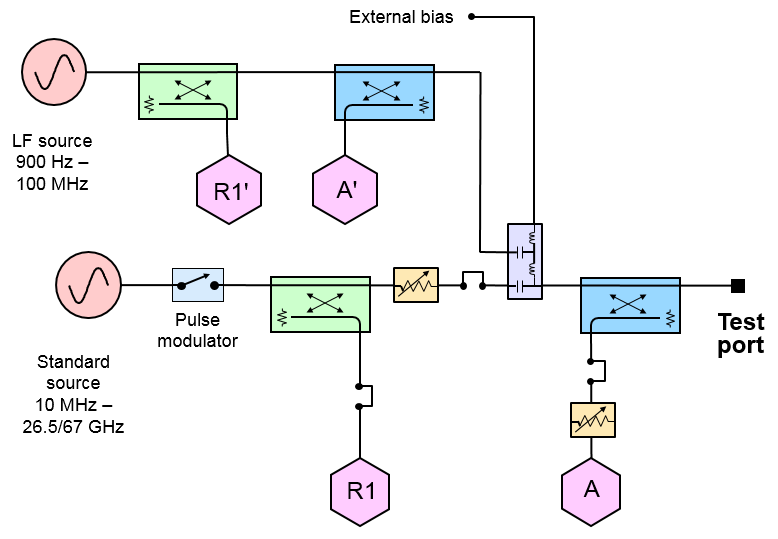
The following LFE block diagram shows how the low-frequency hardware is configured for a single test port. The other ports are configured similarly.
The following table shows which applications are supported or not supported when LF Extension is set to ON. All applications are supported for frequencies ≥10 MHz when LF Extension is set to OFF.
|
Application |
Supported by LFE? |
Option |
|
Gain Compression |
Yes |
|
|
Gain Compression Converters |
Yes |
|
|
Scalar Mixer/Converter (magnitude only) |
Yes |
|
|
Frequency Offset Mode |
Yes |
|
|
Time Domain |
Yes |
|
|
Dynamic Uncertainty Analysis |
Yes |
|
|
Fast CW |
Yes |
|
|
Auto Fixture Removal |
Yes |
|
|
Scalar Mixer/Converter + Phase |
No |
|
|
Vector Mixer/Converter |
No |
|
|
Embedded LO |
No |
|
|
Swept IMD |
No |
|
|
Swept IMD Converters |
No |
|
|
IM Spectrum |
No |
|
|
IM Spectrum Converters |
No |
|
|
True-Mode Stimulus Application (TMSA) |
No |
|
|
Source Phase Control |
No |
|
|
Multiport |
No |
|
|
Differential IQ |
Yes |
|
|
Spectrum Analyzer |
No |
|
|
Basic Pulsed RF |
No |
|
|
Advanced Pulsed RF |
No |
|
|
Noise Figure |
No |
|
|
Noise Figure Converters |
No |
|